

A smaller, better-qualified prospect list can give your sales team a lot more to work with than a sprawling export, so choosing LinkedIn contact extraction tools for B2B sales starts with the people you actually want to reach…not the biggest list a platform can crank out. Scraping can gather profile and search details, but that’s just the raw material; the list gets useful when you know who belongs on it and what makes them a fit.
Automation can lift repetitive data collection off your plate, but a profile’s only the opening page, so human engagement brings in the context, timing, and reason to start a conversation. Get that balance right, and prospecting feels more like a thoughtful introduction than another message tossed into someone’s inbox.
So here’s what we’ll cover…what LinkedIn scraping can collect, how to pair automated research with human engagement, and how prospecting tools compare. We’ll look at extraction tools, broader sales platforms, and LinkedIn’s own prospecting features, so you can choose an approach that supports useful, real conversations.
Key Takeaways
- Start with the contact details your sales process actually needs, so the tool fits the job and your data drawer stays useful.
- Learn how extraction works, then pace account activity with care…a steady workflow is easier to manage, like keeping a good rhythm.
- Let automation handle repeatable research, then bring your own judgment to the conversations that matter most.
- Compare tools by how they fit your workflow and budget, so the feature list serves the work you actually need to do.
- Give prospecting a clear destination: a relevant offer and a sales process that flows like a natural conversation.
What kind of data can you pull from LinkedIn?
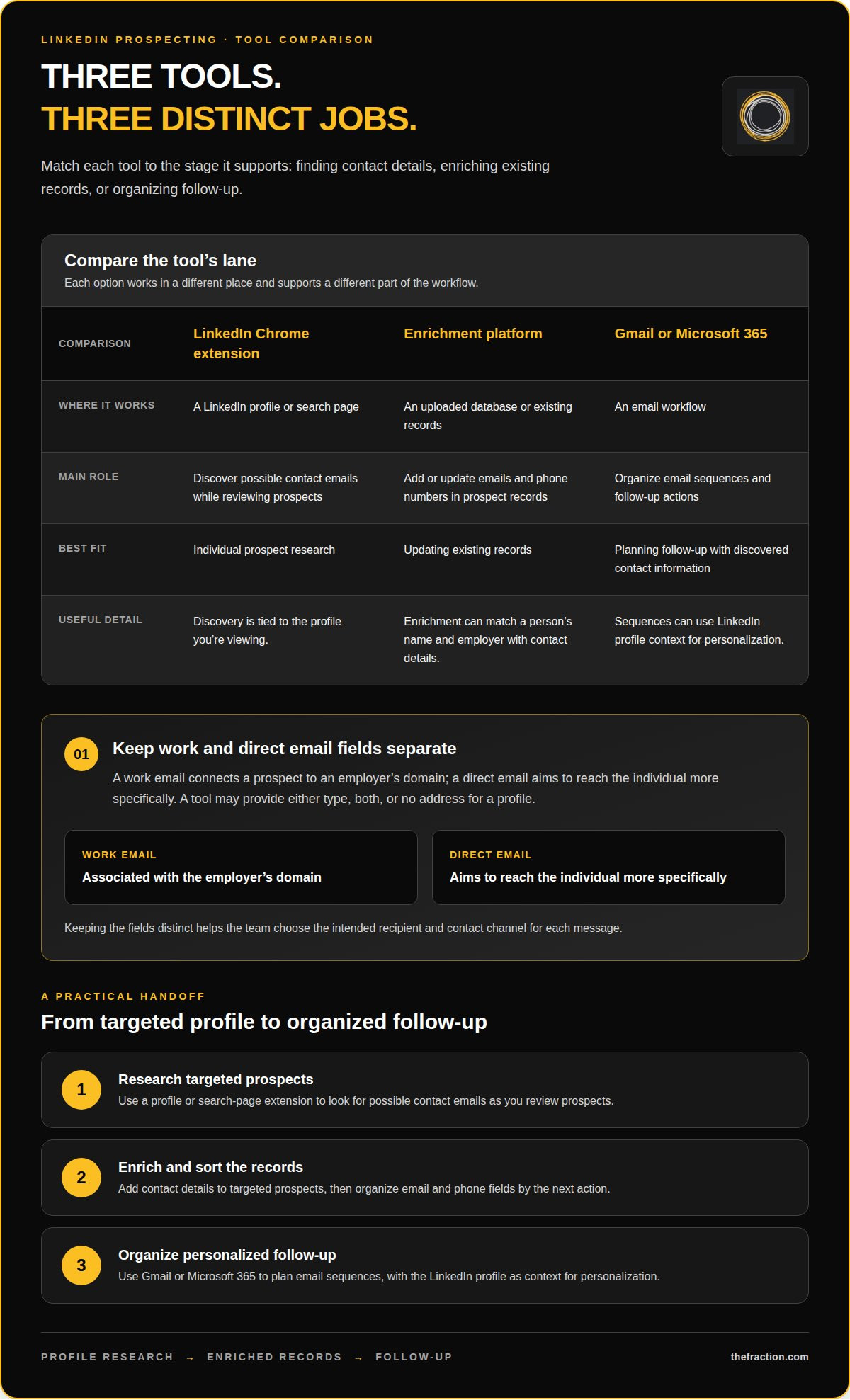
A LinkedIn profile gives you a name, job title, employer, and other details for a targeted prospect list…then email tools can add contact information, while Gmail or Microsoft 365 can help you line up follow-up sequences.
Contact Email Discovery Extensions
A LinkedIn Chrome extension works alongside a profile or search page, so you can look for possible contact emails as you review prospects. A standalone database sits on its own, but an extension ties discovery to the profile you’re already viewing…open a target’s profile, use the extension, and save available details to a prospect list. It’s a bit like keeping your research right beside the source.
Email and Phone Enrichment
Enrichment tools match details such as a person’s name and employer with email addresses or phone numbers. Profile-focused extensions work from the page you’re viewing, while enrichment tools can add contact information to records already in a database. A practical workflow is to export targeted prospects, enrich those records, then sort email and phone fields by the next action…so the handoff from research to outreach feels more like a clear path than a pile of loose notes.
Work and Direct Email Addresses
Work emails connect a prospect to an employer’s domain, while direct email addresses aim to reach the individual more specifically. A tool may provide either type, both, or no address for a profile, so keep work and direct email fields separate in prospect records…that way, your team can choose the right address for each message and keep contact details clear.
Email discovery identifies a possible address, while enrichment adds or updates contact details around a prospect record. For example, a LinkedIn profile may provide a name and company, then a database may add a work email and phone number. Keep each field distinct and organize records by role, company, and intended contact channel…then the sales team gets a more usable view of each prospect, all in one place.
Email sequences from Gmail or Microsoft 365 can organize follow-up using discovered contact information. For example, a team can plan an initial email and later follow-ups, while using the LinkedIn profile as context for personalization. Before a sequence begins, separate work and direct addresses, select the intended recipient, and shape the message around that person’s role and company…like choosing the right map before setting off.
| Option | Where it works | Typical data role | Best fit |
|---|---|---|---|
| LinkedIn Chrome extension | Profile or search page | Discover emails | Individual prospect research |
| Enrichment platform | Uploaded database | Add emails and phone numbers | Updating existing records |
| Gmail or Microsoft 365 | Email workflow | Send sequences | Organizing follow-up actions |
So, choose an extension for profile-level discovery, enrichment for existing records, and Gmail or Microsoft 365 for follow-up sequences…each tool has its own lane.
What is LinkedIn scraping?
LinkedIn scraping collects profile or search-result details into a prospecting record. For B2B lead generation, use Sales Navigator to define a focused audience, then extract data with a tool that follows LinkedIn’s terms. How do you extract B2B leads from LinkedIn Sales Navigator safely and efficiently? Narrow the search, collect only relevant prospects, and keep extraction activity measured.
Account Limits and Detection Signals
LinkedIn account limits and detection signals reflect activity patterns, not just the export file. Opening 500 profiles in five seconds is an example of unusually rapid behavior that may lead to account restrictions. Profile-view guidance can vary by account type, so treat suggested thresholds as cautious operating guidance rather than official allowances. These are practical operating suggestions, rather than published LinkedIn allowances.
Other signals include sudden increases in profile views, repeated actions at identical intervals, and high-volume connection requests. A measured workflow can keep activity steady, while tools that comply with LinkedIn’s terms of service help keep prospecting aligned with platform rules. For example, divide a targeted list into smaller research batches instead of opening every profile at once.
Safe and Efficient Lead Extraction
Sales Navigator extraction starts with search filters, such as job title, company, or geography, then moves to a relevant prospect set. LinkedIn Premium search results are limited to up to 1,000 results per search, so narrow broad queries before exporting. That makes the export more manageable and gives sales teams a clearer lead-generation focus.
Use Sales Navigator extractors that comply with LinkedIn’s terms, then review exported records before moving them into a CRM such as HubSpot. Separate extraction from messaging: first organize relevant profile data, then personalize outreach. That keeps automation focused on research while human attention shapes the conversation.
Sales Navigator’s search-result ceiling and an extractor’s export behavior are different considerations. LinkedIn rarely shows more than 1,000 results for a query, while an export tool may handle the visible results in different ways. Check the output fields and retain only the prospect details your workflow needs, so a large export supports the sales strategy rather than standing in for one.
Consider Expandi usage limits separately from LinkedIn account activity. A tool’s campaign or extraction settings sit alongside the platform’s account limits, so treat a dashboard allowance as a tool setting, while pacing profile views and messaging with care. Keep the prospect list focused, and use profile activity as a signal to pace the workflow.
For example, a team targeting a specific role can filter in Sales Navigator, export a focused set, review records in HubSpot, and then write a relevant message. That sequence is more useful than collecting broad results and sending identical outreach. If your lead-generation process needs a more deliberate system, explore automated lead generation systems as a way to connect targeting with a coherent sales approach.
Balancing automation with manual engagement
Automation can gather and organize prospect details, while manual engagement brings the personal context that makes outreach feel relevant...so the right balance comes down to lead value, search filters, and how much time you’ve got for follow-up.
Automated LinkedIn Extraction
Automated extraction uses software to gather profile details from a selected LinkedIn search, and with filters for job title and company, a sales team can build a focused list without opening each profile one by one. Tools such as Phantombuster fit this category, but the workflow still needs clear limits, a human review, and a relevant reason to contact each prospect.
Automation works well for repeatable research, like collecting profiles for a defined buyer role...it can organize the first pass, but a salesperson still needs to check whether someone’s current priorities line up with the offer. Keep the extracted fields useful, then review each prospect’s fit before outreach, so the list has some real thought behind it.
Scraping Tools and Browser Automation
Scraping tools and browser automation interact with LinkedIn pages to gather information or repeat browser actions, and while they can take on repetitive steps at scale, rapid or excessive activity can put an account at risk. For example, a team using Phantombuster should keep activity measured and aligned with LinkedIn’s terms.
Set limits around the task itself, rather than focusing only on the number of profiles. A job-title search can surface people who fit the role but have no clear business need, so review a sample of results, refine the filters, and stop collecting when the list starts losing relevance. That keeps automation pointed at a real prospecting purpose, instead of letting the process run on autopilot.
Alternatives to Automated Scraping
Manual LinkedIn extraction can work well when you’re identifying 10 specific high-value leads, because a salesperson can review each profile, note a relevant business detail, and shape the first message around that context. It takes more individual attention than automated collection, but it gives the team direct control over who makes the list and how the outreach feels.
Another approach is to automate data collection, then engage manually with high-value prospects. For example, a team could use filters to create a targeted list, then prioritize the people whose profiles clearly connect to its offer...so it doesn’t mistake a bigger pile of names for a better prospecting result, treating 10,000 contacts as inherently more valuable than 100 well-matched prospects.
Think of automation as the mapmaker and personal outreach as the guide: one lays out the route, while the other responds to the person right in front of them. A sound workflow can follow these steps:
- Set LinkedIn filters around a defined job title, company, or audience.
- Collect only the profile information needed for prospecting.
- Review fit and remove records that don’t match the intended audience.
- Personalize the message for high-value prospects before sending outreach.
- Track responses and refine the filters or manual review process.
The right balance comes from measuring relevance alongside volume, because a broad list with little useful context is like a map with every road marked and no destination in sight. If automated scraping produces that kind of list, shift more effort to selection and personal engagement; if manual research takes too long on repetitive collection, automate that step and save human attention for the conversations most likely to matter.
Comparisons of prospecting and data extraction tools
Tools with CRM integration or file export can move LinkedIn contact records into Salesforce or HubSpot, but available fields and transfer methods depend on the tool, so compare the actual workflow…not just its feature labels.
A prospecting platform combines search, contact records, and campaign workflows, while an extraction tool focuses on collecting profile data, so think of the first as a full workshop and the second as a specialized tool. A browser extension can make discovery convenient during profile research, and an enrichment platform can add contact fields to existing records…these differences shape how each option fits your sales process.
| Option | Interface | Data workflow | CRM path | Best use |
|---|---|---|---|---|
| LinkedIn Sales Navigator | LinkedIn search interface | Find and organize prospects | Depends on connected software | Targeted prospecting |
| Contact discovery extension | Browser extension | Find contact details from profiles | Export or connection depends on tool | Profile-by-profile research |
| Enrichment platform | Separate software platform | Add details to existing records | Export or integration depends on tool | Updating contact databases |
| CRM prospecting platform | Salesforce or HubSpot interface | Manage records and campaigns | CRM-native workflow | Coordinating prospecting activity |
Sales Navigator is useful for building a focused search before records enter another system, so think of it as the front gate. An extension may shorten the path from a LinkedIn profile to contact discovery, but its CRM transfer options vary, while enrichment software works further downstream, adding details to records already collected. Salesforce and HubSpot help manage contacts, but a CRM alone doesn’t mean LinkedIn data can be imported directly.
Recruiters and sales teams may value different fields, so a recruiter’s campaign could prioritize role and employer details, while a B2B sales campaign may need company context and usable contact information. For either use, the interface should make it clear which fields came from LinkedIn and which came from enrichment software.
Compare tools through a sample workflow…start with a targeted LinkedIn search, review the profile fields the extraction option captures, then see how those records reach Salesforce or HubSpot. Confirm whether the transfer uses a file or connected workflow, and whether destination fields stay separate and easy to understand.
Also assess how each platform supports the next action, because a tool that gathers records may leave campaign planning to another system, while a broader prospecting platform may bring search and follow-up into one interface. Neither approach suits every team…the right choice depends on where your existing records live and how your sales team manages outreach.
Choose a tool that fits the full path from LinkedIn search to CRM record and campaign, like a well-marked route from first stop to destination. For example, teams already working in Salesforce may prefer a workflow that places organized contacts there, while teams researching individual profiles may favor an extension paired with their existing database.
What are the prices and free plans for LinkedIn lead extraction tools?
Pricing depends on the tool’s model and the work it handles, so a browser extension may come at a different price from a prospecting platform or contact-enrichment service. Free plans, where offered, can help you test a workflow, though features and usage allowances vary…think of them as a first test drive, and compare each plan with how your team finds, organizes, and contacts prospects.
Start by separating the cost categories, because each tool can play a different role in the process. One may focus on profile-based contact discovery, while another combines prospecting, enrichment, and campaign management, and a third may charge for database access or CRM connectivity. For example, a small team researching individual LinkedIn profiles may value an extension, while a team maintaining a shared prospect database may need broader functionality.
Free plans work best as practical trials of a specific task, so test whether the interface captures the fields you need, whether results can be exported, and whether the workflow fits your existing CRM. A free tier focused on profile discovery, with your team’s needed export route outside the plan, can add manual steps rather than save time…so note each limitation before comparing paid options.
Review the plan details side by side, including:
- Included functions: distinguish profile search, email discovery, enrichment, and CRM transfer.
- Usage rules: note how each plan describes access, activity, or record allowances.
- Billing structure: identify whether the tool charges by user, usage, or selected features.
- Workflow fit: map how LinkedIn results reach Salesforce, HubSpot, or another database.
- Upgrade triggers: identify which missing feature would call for a different plan.
Estimate the full workflow instead of comparing subscription labels alone, because the whole process is the recipe, not just one ingredient. If one tool finds contact details and another handles enrichment, account for both steps. If a direct export removes repeated manual entry, weigh the time saved against the added plan cost…that way, your comparison ties spending to a defined prospecting task, rather than a vague promise of more leads.
For example, test a free plan with a small, targeted prospect set, review the exported fields, and trace those records into your CRM. Then compare that process with a broader platform that combines discovery and record management. The decision comes down to data quality, useful functions, and how smoothly the tool supports your existing sales process.
Keep the evaluation focused: choose the simplest option that covers the needed steps, then revisit it when your process changes. A tool built for individual research may suit one workflow, while a shared prospecting operation may call for centralized records and CRM transfer…so the right plan supports relevant outreach from discovery through follow-up.
Costs may be based on users, usage, or selected features, and vary across extensions, prospecting platforms, and enrichment services. Some tools offer free plans with different features and usage limits, so use them to test whether the workflow captures and exports the fields your team needs and fits its CRM process.
The Fraction: A sales process that doesn’t feel like selling
The Fraction helps connect prospecting with a sales process that feels natural, so useful LinkedIn contacts have a clear path into a relevant conversation. If you’ve chosen extraction tools but need a stronger system for turning targeted leads into client opportunities, The Fraction’s automated and AI-driven lead generation systems can support the whole process. And the work goes beyond finding people…you’ll develop a compelling offer and service that gives your outreach a real reason to start and helps you win clients quickly.
Think of the tool as your route planner and the offer as the destination…both need to work together, or prospecting can feel like driving in circles. So if you’re ready to connect the two and build a sales process that feels natural, contact The Fraction.
Turn your prospecting workflow into a growth system
So here's the next step…connect the tools you choose to a clear commercial purpose, so each prospecting action helps create the conversations your business wants. The right LinkedIn contact extraction tools for B2B sales can help organize that work, but the bigger opportunity is building a sales system where your audience, message, and offer move together, like parts of the same engine.
That alignment gives your team a stronger foundation for decisions as your approach develops, from refining who you reach to shaping a reason for them to respond. Treat your sales process like an operating system, not a pile of disconnected tools, and build it with more intention as you go.
Keep developing a prospecting approach that reflects the value you bring, and let each thoughtful improvement give the next one a little more momentum.
Frequently Asked Questions
Step 2: The Browser Extension or API?
So, choose a browser extension when you’re doing hands-on research from LinkedIn profiles, and an API when your workflow needs software-to-software data transfer. For example, a small sales team reviewing prospects one by one may prefer an extension, while a team connecting records to an internal CRM workflow may need API access. Before deciding, compare setup requirements, available fields, and how records make their way to your database.
What are the best LinkedIn contact extraction tools for B2B sales?
The best fit depends on the task at hand: Sales Navigator supports targeted prospect searches, extraction tools collect profile records, and enrichment platforms add contact details. A team researching a small set of strategic accounts may value profile-level discovery, while a larger operation may prioritize exports and CRM workflows. Look at the steps your team needs to complete, then choose a tool that fits those steps rather than chasing the broadest feature list.
How do LinkedIn contact extraction tools compare on features and data accuracy?
Tools vary in the fields they collect, how they enrich records, and where they send exported data, so think of the output as a map you’ll want to check before you set off. Accuracy also depends on whether a detail is current and matches the right person. For example, a contact’s employer may have changed since their profile was last updated. Compare the output against a small set of known records, and track missing, outdated, or mismatched fields separately.
How do LinkedIn lead extraction tools find and verify business email addresses and phone numbers?
Many tools match profile details, such as a person’s name and employer, against contact databases to suggest business emails or phone numbers. Verification may test whether an email appears deliverable, but that doesn’t establish that it belongs to the intended person. Before adding a contact to an outreach sequence, check the name, company domain, and role together, like matching the pieces of a puzzle.
What are LinkedIn's rules on scraping, automation, and data extraction?
LinkedIn’s terms govern access to its platform and profile data, so use extraction methods that comply with those terms. A tool’s ability to automate browser actions doesn’t itself establish permission to use it. Before a campaign, review how the tool operates, the applicable platform terms, and how your team will use, store, and remove collected contact information.
Can using LinkedIn scraping tools get an account restricted or banned?
Yes, activity LinkedIn detects as unusual or inconsistent with its terms may lead to account restrictions. Rapidly opening many profiles or repeating automated actions can signal high-volume use, so think of the way you use a tool as part of the workflow too. For example, a sudden burst of profile views differs from a measured research workflow. Choose compliant tools, keep activity measured, and remember that a tool’s settings can’t guarantee account safety.
What privacy laws apply to collecting LinkedIn contact data for sales outreach in the United States?
Applicable privacy and marketing requirements depend on the data, the people contacted, where they live, and how outreach occurs, so treat each audience and channel as its own set of considerations. Treat contact details as personal information, document their source and business purpose, and provide a clear way to opt out. For example, outreach involving California residents requires attention to opt-out handling. Build data-use controls into your workflow and assess requirements for each audience and channel.
Which LinkedIn contact extraction tools support bulk exports, filters, and enrichment?
These capabilities are often split across categories: Sales Navigator provides search filters, extraction software handles profile collection and exports, and enrichment platforms append contact details. Some workflows combine several tools rather than relying on one platform, a bit like passing records along a relay. For example, a team could filter prospects, export selected records, then enrich them before importing them into its CRM. Confirm that required fields stay organized through each transfer.


