

A follow-up sequence can quietly become the weak link in an otherwise solid outreach system. If you’re wondering why your automated outreach isn’t getting replies, treat the silence as a signal to check the whole system…like tracing a leak through a pipe, rather than sending the same message again and hoping for a different result. Look at each part of the process to find where prospects stop engaging.
It’s natural to suspect the copy first when a campaign’s active but the inbox is quiet. But contact data, delivery, audience fit, and timing can all affect results, so the message is only one piece of the puzzle. A reply can also get missed while the sequence keeps running…which makes follow-up logic just as important as the opening message.
Assess the whole system, separate activity from meaningful engagement, and decide whether each follow-up has a clear purpose or the sequence should stop. The details you gather will make the diagnosis more useful, so your next decision rests on evidence rather than guesswork.
Key Takeaways
- Give every follow-up a clear purpose and stopping point, so the sequence has a destination…then pause it as soon as someone replies.
- Check contact accuracy and prospect fit before you change the message, because weak data can sink even thoughtful outreach.
- Separate automated opens and clicks from real human engagement, so you’re judging campaign performance on signals that actually mean something.
- Check that emails were delivered and LinkedIn messages were sent, then read the platform status signals with care.
- Look at reply rate alongside response quality and the campaign’s goal, so you can decide what to refine next.
How a professional manages follow-up timing and stops sequences after replies
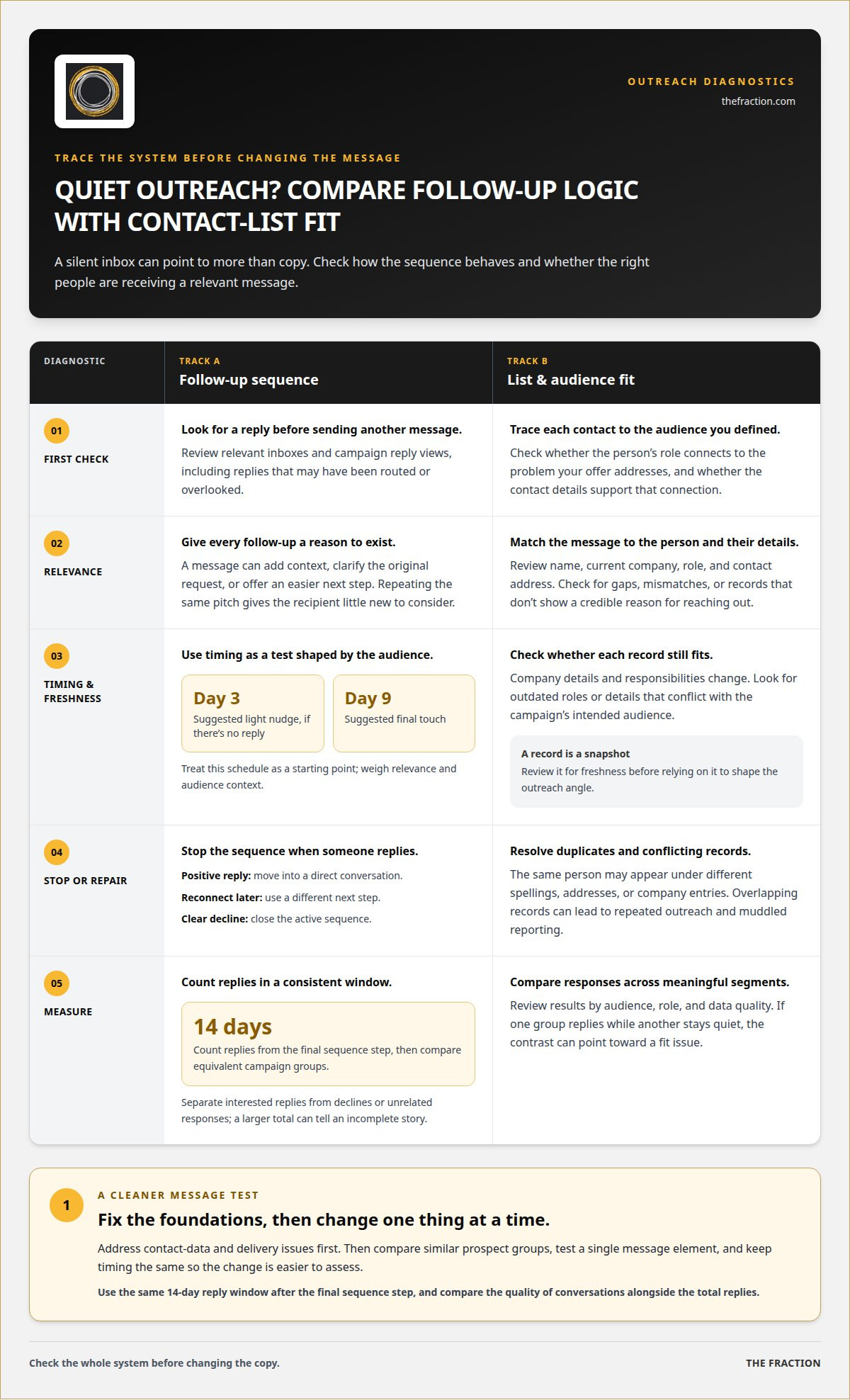
A professional A/B tests one message element at a time, after contact data and delivery issues have been addressed. They compare similar prospect groups, then count replies within 14 days of the final sequence step, so the test has a consistent window and the results have a fair chance to tell a useful story.
- Search for replies before scheduling another message. Review relevant inboxes and campaign reply views, including messages that may have been routed or overlooked. If a prospect has already replied directly, another automated nudge can feel careless. A quick review protects conversations already underway and gives your next step a human starting point.
- Give each follow-up a reason and a stopping point. A second message can add context, clarify the original request, or offer an easier next step. Repeating the same pitch gives the recipient little new to consider. Define when the sequence ends, so each message has a purpose and the automation stops when it has done its useful work.
- Use timing as a test shaped by the audience. One suggested schedule sends a light nudge on day 3 without a reply, then a final touch on day 9. A professional can use that pattern as a starting point, then weigh the message’s relevance and the audience’s context. A polite, timely follow-up can double or triple an outreach response rate.
- Stop the sequence as soon as someone replies. A positive response may start a direct conversation, while a request to reconnect later calls for a different next step. A clear decline should close the active sequence, too. Build stopping rules around these outcomes so follow-ups reflect what each recipient actually said.
- Test one suspected cause at a time. Once contact and delivery checks are complete, compare versions of a single element, such as the follow-up reason or call to action. Keep timing the same for both groups to isolate the message change. This makes it easier to investigate why my automated outreach is not getting replies than changing the audience, wording, and schedule all at once.
- Measure replies against a consistent window. The professional counts replies within 14 days of the last sequence step, then compares equivalent campaign groups. They separate interested replies from declines or unrelated responses, because a larger total can tell an incomplete story. If one version earns more useful conversations, it gives the next test a clearer starting point and helps explain why my automated outreach is not getting replies.
List verification and contact data quality
- Trace each contact to a defined audience. Start with the buyer and work outward…because if your offer addresses a company’s sales process, the recipient’s role should connect to that issue. Think of your list like a map: a big map still gets you lost if it points to the wrong place, and a large list can miss the mark when its contacts don’t match the problem your message addresses.
- Review the fields that support relevance. Check each record for a usable name, current company, role, and contact address, then look for gaps or mismatches…like one person listed with two different companies, which is a little warning light that something’s off. Clear up those inconsistencies, and you may see why a message feels generic, even when its opening is polished.
- Check whether the recipient owns the problem. Before rewriting an opener, make sure its recipient has a connection to the issue, because sharper wording can’t carry a message to someone outside the decision. A note about hiring priorities, for example, may land with someone who doesn’t own that call…so match the problem to the person first, and your outreach has a more credible starting point.
- Assess freshness at the record level. Company details and responsibilities change, so look for signs that a record is outdated…like a current role that conflicts with the campaign’s intended audience. Think of each record as a snapshot that can go stale; reviewing it helps you separate contacts that need attention from those that still support your outreach angle.
- Identify duplicates and conflicting records. Look for the same person under different spellings, addresses, or company entries…because a shortened first name in one record and a full name in another can hide a duplicate in plain sight. Those overlapping records can lead to repeated outreach, muddled reporting, and a patchy view of a prospect’s message history.
- Connect prospect details to a specific outreach angle. Role and company information should make it clear why this person and this message belong together, like the two pieces of a puzzle. Use those details to shape a relevant reason for contact, then make the request easy to answer…so if the record gives you no credible connection, the prospect may fit better in another segment.
- Compare results across meaningful segments. Review responses by audience, role, and data quality, so one campaign-wide total doesn’t blur the useful differences. If one group replies while another stays quiet, that contrast can point toward a fit issue…a bit like hearing one instrument drop out of an orchestra. It also helps connect prospect fit with the offer itself, an important part of a clearer executive growth strategy.
Separating automated opens and clicks from human engagement
Use response quality as your clearest signal, then compare channel activity and message context. Treat opens and clicks as clues, while actual replies show what prospects chose to communicate.
-
Separate Human Replies from Automated Signals
Review reply content before interpreting an open or click as interest. Email platforms can record activity without showing whether someone read, understood, or valued the message. A clicked link could reflect a security scan, while a written question shows direct engagement. Sort results into replies, clicks, opens, and meaningful next steps, then assess each category separately.
For example, a prospect who asks about fit has shown stronger intent than someone whose email registered an open. A benchmark roundup from Something Inc. estimates about 14% of replies show genuine interest. That figure describes interest among replies, not an overall email reply rate, so keep those measures distinct.
-
Compare Reply Rates Across Channels
Compare email, LinkedIn, and SMS using the same definition of a reply and the same campaign goal. A single channel-wide rate can mislead because audiences, messages, and context differ. Count LinkedIn connection acceptance separately from message replies, and assess SMS responses for relevance to the conversation.
There’s no single comparative rate in the available campaign facts. Evaluate each channel against its own delivered messages, meaningful replies, and resulting conversations instead of naming a winner based on opens or clicks. For U.S. outreach, account for channel-specific requirements and opt-out requests, then suppress opted-out contacts from further messaging.
-
Assess Automated Cold Email Reply Rates
Define a good rate against the campaign’s audience, offer, and objective, rather than borrowing a number from a different list. The professional counts replies within 14 days of the last sequence step, then compares equivalent campaigns. They also track meetings booked per 1,000 delivered emails, keeping the measurement tied to delivery.
Separate interested replies from declines, referrals, and unrelated responses, because each tells a different story. If an email gets opens but no substantive replies, activity alone doesn’t show that the message resonates. Test one suspected cause, such as the relevance of the request, while keeping other campaign elements steady.
A campaign poster said recipients of their distribution-list address had received out-of-office messages from other campaigns. The author says she helped clients reduce unread emails from 100,000 to fewer than 60.
How a professional verifies message delivery and status indicators
Trace delivery from the sending system to the recipient’s inbox, and treat each status as limited evidence. A “sent” label alone doesn’t establish inbox placement or prove that anyone saw the message.
For email, the professional reviews domain reputation and SPF, DKIM, and DMARC authentication results, then checks whether the sending domain aligns. They test deliverability before sending and assess bounce patterns; a bounce rate above 2% is the threshold associated with reduced inbox placement.
Subject lines and opening messages should earn attention through clarity, relevance, and a connection to the recipient’s role. Give a specific reason for reaching out and an easy request, so the reader has a straightforward way to respond.
- Confirm the campaign actually sent. Review the sending platform’s delivery records, message status, and recipient address. A queued email and a sent email represent different stages, so check for failures or delays before treating silence as a message problem. Review bounce notices, too, because an undelivered email can’t generate a reply.
- Test email deliverability before launch. Examine sender-domain reputation, authentication results, and delivery behavior in the campaign setup. SPF, DKIM, and DMARC records help assess whether the sending identity is authenticated and aligned. Check for authentication failures and rising bounces, then address the underlying setup issue before sending another campaign.
- Interpret bounce patterns against the threshold. A rising bounce rate can be a warning sign for inbox placement, so review delivery patterns before continuing a campaign. The professional separates hard failures from temporary delivery problems, then looks for patterns across addresses or domains. That distinction can reveal whether the issue sits with contact accuracy, sending configuration, or a particular recipient environment.
- Verify LinkedIn message status separately. First confirm that the LinkedIn message was sent. Then assess connection acceptance separately from message replies, because an accepted connection doesn’t mean the recipient answered. Interpret LinkedIn status indicators cautiously: a displayed status doesn’t prove that someone read the message.
- Compare delivery evidence with the message itself. If delivery checks look sound, examine whether the subject and opening explain why this recipient should care. Connect the message to a responsibility the recipient holds, then make the request concise and easy to answer. Avoid long pitches that bury the reason for reaching out.
- Change one variable after the checks. Test a revised subject line or opening only after resolving basic delivery issues. Keep the audience and other campaign conditions consistent so the comparison shows whether that single change affects replies. Changing several elements together makes the results harder to interpret.
What is a good reply rate for automated cold email outreach?
Look, a useful benchmark starts with two things: what you’re counting as a reply, and what you want the campaign to do…because a percentage floating around on its own is like a speedometer with no destination. Compare similar audiences, too, so you can see whether your outreach is starting the right conversations.
- Define the reply you’re measuring. First, decide whether a reply means any human response or a relevant one, because a prospect asking about fit sends a very different signal from an automatic reply or a clear decline. Keep those categories separate, so a high total doesn’t blur the picture or hide whether qualified interest is showing up.
- Choose a consistent denominator. Use delivered emails to calculate your reply rate, rather than mixing sent, bounced, and delivered messages together. Someone contacted at an incorrect address never had the chance to respond, so keeping the denominator consistent gives you a much cleaner way to compare campaign versions.
- Compare similar groups. Put campaigns with similar audiences, offers, and goals side by side…because otherwise you’re comparing apples with a whole fruit stand. For example, compare messages to people with the same decision-making role, rather than that group with a broad list of unrelated contacts. Audience fit can shape results just as much as the wording.
- Judge the rate against the intended outcome. A campaign meant to start qualified conversations needs a different yardstick from one meant to secure a meeting, so track replies that move toward the intended next step, then look at the reasons behind declines or questions. That way, “good” means something useful to the business, rather than just looking nice as a number.
- Use your own baseline before outside comparisons. Record each comparable campaign’s audience, message version, and outcome, then use your earlier work as the first point of comparison. If the rate shifts, look at what changed before pinning the difference on subject lines, timing, or the offer…otherwise you’re guessing which knob moved the dial.
- Diagnose low response in sequence. Start with whether the messages reached recipients, then work through audience relevance, offer clarity, and how easy it is to respond. A delivered email to a suitable prospect can still get no reply when the ask feels like too big a commitment, so change one factor at a time and let each result guide the next move.
- Prioritize useful conversations over raw volume. Look at response quality alongside the overall rate, then pick out replies that point toward a plausible next step. Fewer, relevant responses can do more for you than a pile of replies that don’t fit, so use that distinction to tune the next campaign’s audience and message.
The Fraction: Automated & AI lead generation systems
The Fraction helps professionals treat outreach as part of a broader client-acquisition system, where contact strategy, offer clarity, and the next sales conversation work together. Its Automated & AI lead generation systems support that process. A compelling offer and a sales process that doesn’t feel like selling help connect outreach to the service behind it.
Consider this next step if delivery and contact data look sound but your outreach still struggles to create meaningful conversations. Start with the evidence you’ve gathered: who you’re contacting, what your messages say, and which responses or campaign signals you’re seeing.
Turn outreach signals into your next growth decision
Treat each campaign as a decision system: its evidence should show what to refine, what to preserve, and where a human conversation can add context. If you’re still asking why your automated outreach isn’t getting replies, shift from chasing activity to building a clearer path from first contact to a relevant business conversation.
Start by defining the outcome you want. Decide what makes a response commercially meaningful, then use that standard to guide how your outreach and sales process work together. The Fraction can align lead generation with an offer that gives the right prospects a compelling reason to engage, while keeping the sales process grounded and natural.
With a clear diagnosis and deliberate next step, you can build a more focused path from outreach to opportunity.
Frequently Asked Questions
How do email deliverability issues and spam filters reduce outreach replies?
Deliverability problems can reduce replies by keeping messages out of the inbox or preventing delivery, so email providers look at signals such as sender reputation, authentication, bounce patterns, and recipient behavior. A campaign sent to outdated addresses, for example, may generate delivery failures, while repeated unwanted messages can weaken sender reputation. Compare delivery results across recipient domains, and you’ll see whether the issue is broad or concentrated.
How does a professional decide how many follow-ups an automated outreach sequence should include, how far apart they should be, and when to stop?
Set sequence length and spacing according to the audience, the value of each message, and the recipient’s likely decision process, so each follow-up contributes something useful, like a clearer example or an easier way to respond. End the sequence when a recipient replies, declines, or asks you to stop, and if another message would add no useful context, leave it out.
How does a professional target the right prospects and verify contact data for outreach?
Start with the problem your offer solves, then identify the roles and organizations likely to own it. Review records for mismatched job titles, company details, duplicate contacts, and outdated information, so a message about operational decisions reaches someone connected to those decisions. Grouping prospects by role or business context keeps messages relevant and makes campaign results easier to interpret.
What are common mistakes in automated email outreach campaigns?
Common mistakes include sending one message to unrelated audiences, making an unclear or demanding request, and treating automated activity as proof of interest. Asking a busy prospect to review a lengthy pitch creates more work than offering one clear next step, so keep the request simple. Changing several campaign elements at once also makes results difficult to interpret, so test changes deliberately.
What U.S. laws and opt-out rules apply to automated sales outreach?
For U.S. outreach, account for channel-specific requirements and opt-out requests, and make sure opted-out contacts are suppressed from further messaging.


