

Look, the best prospecting tool for a boutique consulting firm may be the one that helps you focus on fewer, better-fit decision-makers, because a giant contact list can feel like a warehouse stacked to the rafters with names…while you’re still searching for the right people to talk with. So if you’re weighing zoominfo alternatives for boutique consulting firms, start with the practical question: does this tool fit your ideal client, your budget, and the way you actually work?
Enterprise-oriented platforms can bring plenty of features and complexity, while more accessible options have their own strengths, so the goal is to match useful records with a workflow you can keep moving. This guide compares Apollo, Lusha, Hunter, SalesIntel, and Cognism by fit, data usefulness, and workflow, then shows you how to build a shortlist and test it against real prospects. Keep the whole picture in view as you compare: targeting, outreach, and a compelling consulting offer work together to turn the right records into meaningful conversations.
Key Takeaways
- Separate contact discovery, account research, outreach, and CRM functions so you can compare tools by the job each needs to do.
- Evaluate zoominfo alternatives for boutique consulting firms against your ideal client profile, target buyer roles, and service boundaries.
- Shortlist Apollo, LinkedIn Sales Navigator, Clay, Crunchbase, or HubSpot according to the workflow gaps you need to address.
- Test a focused sample of records for relevance and completeness before making a commitment.
- Record your selection criteria and test results, then connect the chosen tool to your offer, outreach, and repeatable sales process.
What Counts as a ZoomInfo Alternative for a Boutique Consulting Firm?
Look, an alternative can be one tool or a small set of steps that handles a particular prospecting job, and that’s a useful place to start because boutique firms rarely need every moving part of a large sales operation. Maybe you need to find the right people, learn enough about their organizations to judge fit, keep outreach on track, or organize follow-up. Those are separate jobs, so name the job before choosing the tool. The broader model of providing data on demand is called Data as a Service (DaaS), but data is one ingredient in the process, not the whole recipe.
Think of the work as a relay, where each step hands useful context to the next:
- Contact discovery: Finding people who may match your buyer roles, along with ways to reach them.
- Account research: Learning about an organization so you can judge how it fits your market and offer.
- Outreach: Shaping messages and follow-up that can open a relevant business conversation.
- CRM: Keeping prospect details, conversation history, and next steps organized.
Some platforms combine several of these jobs, while others focus on one, so the right fit comes down to what your process needs and what you can comfortably maintain. A broad feature set may add setup and upkeep; a focused tool can be a cleaner fit when it handles the step that’s slowing you down.
Which ZoomInfo capabilities does a boutique firm actually need?
Start with your ideal client profile (ICP), buyer roles, target sectors, and service offer, then trace where prospecting gets sticky. Are you spending time finding suitable people, understanding their organizations, or keeping follow-up organized? For example, if your offer serves a defined leadership role in a few sectors, relevant account filters and usable contact details may matter more day to day than features built for a larger sales operation. Let your actual workflow set the brief.
Why a contact database and a lead-generation system differ
A contact database gives you information to support targeting and outreach, while offer clarity and thoughtful follow-up determine what you do with it. Picture a kitchen counter covered with good ingredients: useful, sure, but a recipe brings them together into a meal. For a consulting practice, the recipe is the fit between a buyer’s problem, your offer, and a sales process that carries the conversation forward.
A prospect database helps you find and understand potential buyers; a complete acquisition system connects that data to a defined audience, a compelling offer, relevant outreach, and consistent follow-up. So, as you compare zoominfo alternatives for boutique consulting firms, choose the tool that supports the right step, then connect it to the rest of your process so those records can do useful work.
How to Evaluate ZoomInfo Alternatives for Boutique Consulting Firms
Look, the clearest way to evaluate a tool is to start with the buyers you can serve and the work your practice can take on, because a big pile of records only helps when those records fit. Write down the buyer roles, industries, and service boundaries you’re targeting, then see how each option supports those prospects and the sales process you have capacity to run. The Forbes review of ZoomInfo offers a third-party reference point, and your buyer profile gives you the practical yardstick for your own comparison.
How should consultants test prospect data quality?
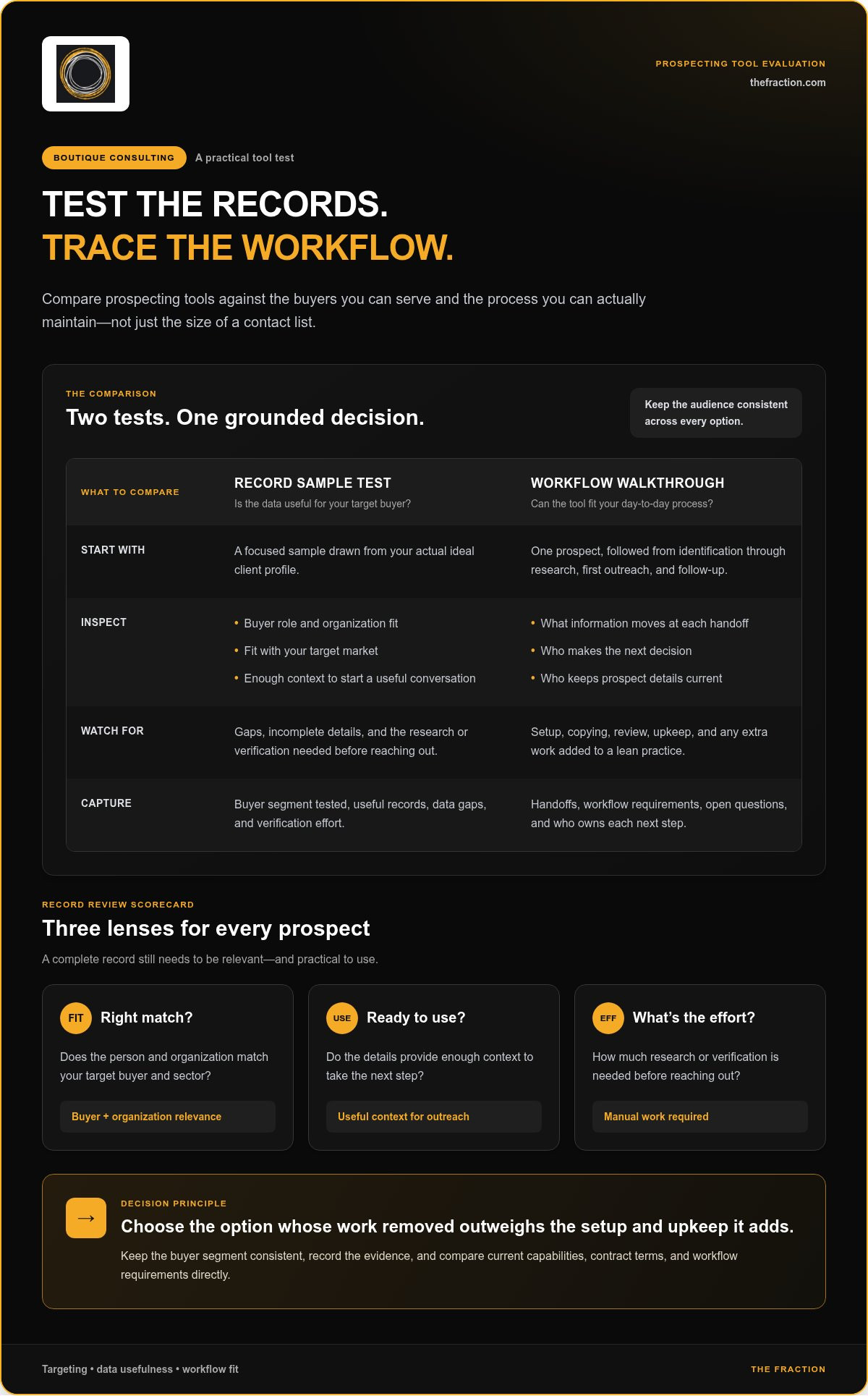
Build a focused sample from your actual ideal client profile before comparing vendors, so you’re reviewing the kind of prospects you’d genuinely want to reach. For each record, check whether the person holds a relevant buyer role, the organization fits your target market, and the details give you enough context to start a useful conversation. Completeness matters, and so does relevance; a full record aimed at the wrong buyer still sends you down the wrong road.
Keep a simple scorecard as you review:
- Fit: Does the contact and organization match your target buyer and sector?
- Usability: Do the details give you enough context to take the next step?
- Effort: How much research or verification will you do before reaching out?
Note gaps and manual work as you go, and keep each sample tied to one defined audience. A test gives you evidence about that segment, and the results become much more useful when you keep the audience consistent across options.
Which workflow and adoption criteria matter most?
Walk one prospect through the full journey, from identification and research to first outreach and follow-up, and note what information moves along at each handoff. Who makes the next decision? Who keeps the details current? In a lean practice, a tool earns its place when the work it takes off your plate outweighs the setup, copying, review, and upkeep it adds.
Compare each vendor’s current capabilities, contract terms, and workflow requirements directly, using current documentation and offer details. Then capture your findings in a short decision record: the buyer segment tested, useful records, gaps, verification effort, handoffs, and open questions. That gives you a grounded way to judge zoominfo alternatives for boutique consulting firms, with your actual process at the center of the decision.
And keep the commercial engine in view: more names can feed prospecting, while a clear offer, relevant outreach, and thoughtful follow-up help create qualified demand. If you’d like support connecting targeting with the broader acquisition process, explore done-with-you consulting practice support.
ZoomInfo Alternatives to Shortlist by Boutique Consulting Use Case
Build your shortlist around the job you need done, then compare each candidate against the buyers you serve and the steps you can maintain. The tools below play different potential roles, so treat them as options to investigate rather than a universal ranking. Verify current features, integrations, and terms directly before you decide.
| Tool | Use case to explore | Buyer-fit support | Workflow role and evaluation question |
|---|---|---|---|
| Apollo | Prospect discovery and outreach in one candidate platform. | Test whether its available records match your named buyer roles and sectors. | Research how its current plans handle prospecting and outreach, then assess whether the workflow fits your capacity. |
| LinkedIn Sales Navigator | Identifying and researching people and accounts. | Its search can draw on fresh, user-provided profile information to help find relevant buyers. | It can support targeting, while direct contact details may require a separate step. Map that handoff. |
| Clay | A candidate to investigate if your process needs a way to work with prospect information across steps. | Test it against your actual ICP sample rather than assuming it improves fit. | Confirm the current capabilities and integrations, then estimate the setup and maintenance your workflow would require. |
| Crunchbase | A candidate for researching a focused list of organizations. | Check whether its current information helps you assess the types of accounts your offer serves. | Determine whether it supports account research alone or addresses another defined gap in your process. |
| HubSpot | A candidate to assess if your firm already organizes sales activity in its ecosystem. | Consider whether the available enrichment and CRM functions suit your buyer records. | Clearbit is no longer sold as a standalone product to new customers; its features have been integrated into HubSpot. Verify current plan details and credit requirements. |
When does a prospecting platform suit a lean consulting practice?
A platform may suit your practice when you need a repeatable way to find and organize potential business buyers, and its workflow fits the time and tools you already have. For a narrow account list, broad discovery may add little; in a defined market where you need to identify more suitable buyers, it may deserve a closer look. Compare the entire path from target selection to the next sales action, not just the search screen.
When can a focused research or relationship tool be enough?
If your buyer universe is already clear, a focused research tool or relationship workflow may be sufficient. LinkedIn Sales Navigator and Crunchbase are candidates to compare for distinct research needs, while Clay or HubSpot belong on the list when a specific data or CRM gap justifies them. Public information can also add context: U.S. Government's Open Data offers datasets to explore, though public data still needs to be matched to your buyers and offer.
That’s the practical lens for zoominfo alternatives for boutique consulting firms: choose the candidate that supports a defined step in your acquisition process, then make sure the whole workflow stays workable for a lean team.
How to Choose and Test a ZoomInfo Alternative Before Committing
Give each candidate the same practical test, and treat your notes like a decision record rather than a collection of product impressions. That way, a polished demo or a long feature list won’t outweigh what matters in your day-to-day consulting workflow: suitable prospects, useful context, manageable upkeep, and a credible next step toward a conversation.
- Define your ICP. Record the industries, organization types, buyer roles, and problems your consulting offer is built to address.
- Shortlist by job. Choose candidates based on whether you need to identify people, research accounts, enrich records, or organize follow-up.
- Test a representative sample. Use prospects from your real target market and review whether the records offer relevant, usable context.
- Map the workflow. Trace each prospect from discovery to research, outreach, and follow-up, noting every handoff and manual task.
- Review the evidence. Compare the findings with your original ICP and workflow needs, then record what fits, what takes effort, and what remains unclear.
Keep the decision record simple: candidate, audience tested, relevant records, missing or hard-to-use details, verification effort, workflow steps, implementation work, and current commercial terms. Review vendor terms directly and compare them on equal footing, including the commitment involved, the work required to get started, and the ongoing tasks your practice would own. Use current vendor information for prices and terms, rather than building your choice around assumptions.
What should a boutique firm include in a representative test?
Draw prospects from the roles and service market your offer can credibly support, then track whether each record helps you understand who the buyer is, why the account may fit, and what could make a relevant opening conversation. Note the effort required to verify details and prepare for outreach, because a record that needs substantial repair can shift the workload back onto you.
How can a consultant decide whether the tool fits?
Compare test findings with your original ICP and the workflow you can sustain. If targeting, outreach, or follow-up relies on handoffs your lean team can’t consistently manage, account for that operational weight before choosing. The right tool should support a coherent client-acquisition process, alongside an offer and a repeatable way to continue conversations, much like pieces in one working system.
For a broader view of how targeting and automation can sit within a consulting acquisition system, explore an AI-driven consulting practice build-out.
Beyond ZoomInfo: Build a Client-Acquisition System Around the Right Tool
A prospecting tool works best as one part of a connected acquisition system, because finding a suitable buyer only opens the door. Your expertise still needs to become an offer a buyer can understand, be aimed at a clear audience, and be supported by outreach and follow-up that move a real conversation forward. Think of the tool as one instrument in an orchestra: the sound comes together when each part follows the same score.
What belongs in a complete consulting lead-generation system?
Start with outcome-based positioning: define the business problem your consulting work helps address, then shape that expertise into a clear, productized offer. From there, segment your ideal client profile into specific buyer roles and organizations, so targeting reflects the work you can credibly deliver. Prospecting identifies potential fits; relevant outreach opens the conversation; a repeatable sales funnel gives each conversation a sensible next step. For the role automation can play in that process, see our guide to professional service sales automation.
How does The Fraction support the system build-out?
The Fraction takes a done-with-you approach to developing the offer, defining the ideal client, and building client-acquisition and sales infrastructure together. Implementation can include configured LinkedIn Sales Navigator targeting and automation, connected to the firm’s broader outreach workflow. This is implementation support for a consulting practice’s acquisition system, bringing targeting and sales infrastructure into the same build-out.
The research process can also include a custom strategy with interviews with 10 industry leaders, using a provided framework before payment. And as the system is built, clients retain their systems, automations, content, and infrastructure permanently, giving the practice assets it can continue to own and use.
That distinction matters as you compare zoominfo alternatives for boutique consulting firms: the strongest choice supports a business-development architecture, rather than becoming another tool to maintain in isolation. If you want targeting, offer development, outreach, and sales infrastructure developed together, explore the executive consulting practice program.
Build a Prospecting Approach That Fits Your Practice
The right zoominfo alternatives for boutique consulting firms are the ones that support your ideal client profile and fit the way your practice works. Test records against real buyer roles, compare the effort each workflow requires, and choose a tool for the specific prospecting job it can handle. Then connect it to a clear consulting offer, relevant outreach, and a sales process that gives promising conversations a next step.
That broader system is where the real architecture comes together. The Fraction’s done-with-you approach brings offer development, targeting, and sales infrastructure into one build-out, with clients retaining their systems, automations, content, and infrastructure permanently. Its custom Proof of Concept includes interviews with 10 industry leaders before payment, helping ground the work in market insight.
You can build a thoughtful, right-sized acquisition system around your expertise, one practical decision at a time.
Frequently Asked Questions
Is ZoomInfo a good fit for a boutique consulting firm?
ZoomInfo can fit a boutique consulting firm when its target-market coverage, prospecting workflow, and data value justify the team capacity required to use it. The practical test is whether records match your actual ideal client profile (ICP) and help you move suitable buyers toward relevant conversations. Compare a focused sample with your criteria, then consider how prospect identification fits your existing sales process. That evidence supports a decision grounded in your own needs.
Which ZoomInfo alternative is best for solo consultants?
The best choice for a solo consultant depends on the job to solve: prospect discovery, account research, outreach support, or CRM organization. A shortlist for zoominfo alternatives for boutique consulting firms could include Apollo, LinkedIn Sales Navigator, Clay, Crunchbase, and HubSpot, but treat them as candidates to investigate, not interchangeable tools. Verify current capabilities, integrations, and terms, then choose the platform that fits your workflow and capacity.
Can LinkedIn Sales Navigator replace ZoomInfo for consulting prospecting?
That depends on the specific jobs you need your prospecting setup to perform. Compare how each option supports finding relevant buyer roles, researching target accounts, and organizing outreach, then verify current capabilities and integrations before deciding. One platform can support part of your process while another tool or step handles a different need. Your choice still rests on a clear ICP, an offer relevant to those buyers, and follow-up you can sustain.
How should boutique consulting firms evaluate prospect data quality?
Test a focused sample drawn from your actual target market before judging a prospect database. Assess whether each record matches a relevant buyer role, provides usable context, and includes enough complete information to support a next step. Track the effort needed to review and act on each record, too. Document your criteria before comparing vendors, so the decision reflects useful prospects and the work involved, rather than list size alone.
How much prospect data does a boutique consulting firm need?
The useful volume depends on your ICP, offer, outreach capacity, and follow-up rhythm. A smaller, relevant group may be easier to research and engage thoughtfully than a large list that exceeds the time your practice can give it. Define a manageable test cohort based on how many prospects you can review and follow up with consistently. That gives you a grounded starting point without imposing a universal number on every firm.
Do boutique consulting firms need a lead database or a complete lead-generation system?
A lead database can support prospect identification, while a complete system connects ICP definition, offer design, outreach, follow-up, and sales conversion. Think of the database as a source feeding a pipeline: the wider process helps move a suitable prospect from first identification toward a qualified conversation. To find your immediate gap, ask whether you need more relevant prospect information or a clearer process for turning your expertise into buyer interest.
Can AI automation replace a prospecting platform for consultants?
AI automation and prospecting platforms can support different jobs within one workflow. Depending on verified capabilities, a platform may assist with discovery or research, while automation can help make repeatable tasks more consistent. Start with a clear ICP and offer, then decide which steps need technology and where human review belongs. Check current platform features before selecting a setup, so the tools support a process your consulting practice can manage.
Ready to connect your offer, targeting, and sales process into a working client-acquisition system? Explore The Fraction’s done-with-you consulting practice build-out.


