

The CRM with the longest feature list can become the heaviest piece of machinery in a solo consulting practice, especially when what you need is a clear view of prospects, conversations, and the next follow-up. That’s why close crm vs hubspot for solo consulting business development comes down to choosing the platform that fits how you build relationships, develop opportunities, and win work.
If leads are scattered across notes, inboxes, and good intentions, you’re right to want one dependable place to keep things moving, but the system needs to make client development easier, not turn it into an administrative job. Close is built around sales execution and direct outreach, while HubSpot offers a broader platform that can support inbound marketing and sales as your practice develops.
Here, we’ll compare the two through the day-to-day realities of a solo consulting business, including follow-up, workflow simplicity, and room to grow, so you can choose a CRM that fits the business-development motion you can sustain. And because software is only one part of the engine, we’ll also look at where a CRM ends and a wider client-acquisition system begins.
Key Takeaways
- Choose a CRM around the client-development motion you can sustain, whether that’s direct outreach or attracting and nurturing inbound leads.
- Compare Close CRM and HubSpot through the workflows you’ll use day to day, including communication, follow-up, visibility, and room to expand.
- Run a realistic prospect scenario in each platform to see which one makes the next step easier to track and act on.
- The close crm vs hubspot for solo consulting business development decision is one piece of the build: clear positioning, a compelling offer, and a repeatable acquisition process give your CRM meaningful work to organize.
- Map your process and must-have workflows before committing, so your CRM supports a repeatable practice without adding unnecessary administration.
Close CRM vs. HubSpot: What Does a Solo Consultant Need From a CRM?
A CRM is your working record of business relationships, bringing prospects, conversations, opportunities, and next actions together so you can see what’s moving and where your attention belongs. Think of it as the cockpit for client development: the instruments keep the journey in view, while you’re still steering the practice. The broader idea of Customer Relationship Management (CRM) covers how businesses manage interactions and use relationship information over time.
Look, the close crm vs hubspot for solo consulting business development choice gets clearer when you start with how you find and develop clients. A solo consultant doing direct outreach may need a different daily rhythm from someone publishing content and nurturing inbound interest, so choose around the business-development motion you can actually maintain. The software supports that motion, while your positioning, offer, and lead generation give prospects a reason to engage.
Which parts of consulting business development should a CRM support?
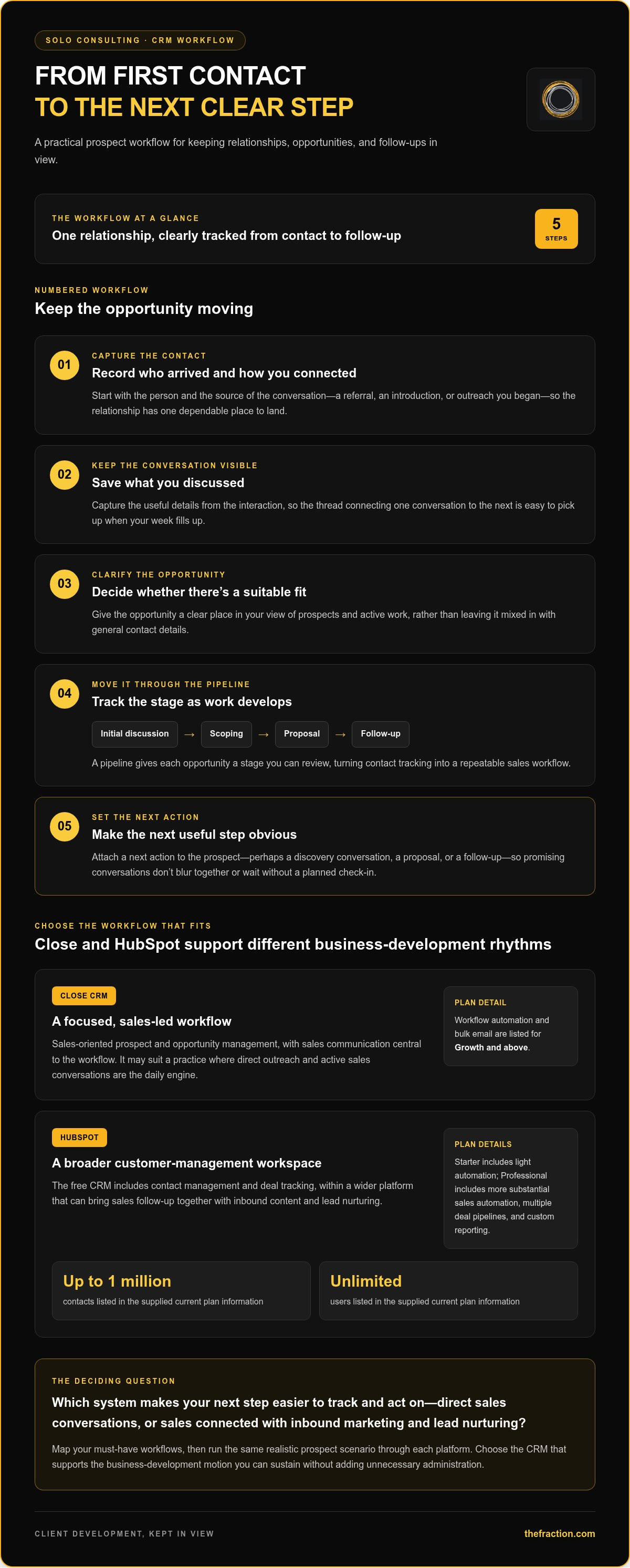
Picture a potential client arriving through a referral, an introduction, or a conversation you started. You’ll want to capture who they are, what you discussed, whether there’s a suitable opportunity, and the next useful step, perhaps a discovery conversation, a proposal, or a follow-up. That history is the thread connecting one interaction to the next, keeping promising conversations visible when your week fills up.
Offer design and market positioning shape the commercial foundations around that thread, while lead generation opens the door to new conversations. The CRM gives those efforts a practical place to land, with one clear view of prospects and next actions. For a solo operator, that shared view can feel like a well-organized desk: important details are close at hand, and each relationship has a sensible next step.
When does a solo consultant need more than a contact list?
A simple list can work while you’re tracking a few names and each relationship has an obvious next move. As opportunities pass through initial discussions, scoping, proposals, and follow-ups, a pipeline adds structure by giving each opportunity a stage you can review. That turns contact tracking into a repeatable sales workflow you can return to and improve.
So pay attention to the points where things get fuzzy: you’re unsure who needs a reply, a proposal is waiting without a planned check-in, or active opportunities start to blur together. Those are signs you need clearer tracking. Choose a CRM that makes the essentials easy to maintain, fits your working style, and leaves room for the operating needs you expect as the practice develops.
Close CRM vs. HubSpot Features: How Do Their Workflows Compare?
Think of a CRM workflow as a track that carries a prospect from first contact to a clear next step. In the close crm vs hubspot for solo consulting business development comparison, the useful question is which track fits how you work: a focused sales rhythm or a broader setup that connects customer and marketing activity. Here’s the quick map, then we’ll put it into a consultant’s day.
Workflow area | Close CRM | HubSpot
Core CRM | Sales-oriented prospect and opportunity management. | Free CRM includes contact management and deal tracking, with a wider platform around it.
Communication | Sales communication is central to its workflow; available capabilities vary by plan. | Sales communication sits within HubSpot’s CRM and Sales Hub environment; check the selected tier for specific tools.
Automation | Workflow automation is available on Growth and above, according to current plan information. | The free tier is basic and Starter includes light automation; more substantial sales automation is available at Professional.
Reporting and expansion | Focused on sales execution, with higher tiers adding advanced capabilities. | A broader ecosystem can support sales alongside marketing and other customer functions, with features depending on the Hub and tier.
How does Close CRM support a sales-led consulting workflow?
Say someone refers a potential client to you. A sales-focused workflow can keep the opportunity moving through an introduction, a discovery conversation, and a proposal follow-up, with the next action attached to the prospect. Close may suit a practice where direct outreach and active sales conversations are the daily engine. Keep one plan detail in view: workflow automation and bulk email are listed for Growth and above, so match the plan to the work you expect the system to do.
How does HubSpot support a broader customer-management workflow?
HubSpot can make sense if your practice brings sales follow-up together with inbound content and lead nurturing, like a wider workspace with more rooms to arrange around your business. Its free CRM includes contact management and deal tracking, and the supplied current plan information lists up to one million contacts and unlimited users. Starter adds light automation, while Professional includes more substantial sales automation, multiple deal pipelines, and custom reporting. That breadth can support several functions in one environment, but each added capability brings setup choices, so give every part a clear job in your solo workflow.
Try a referral lead and a proposal follow-up in each platform, then notice which feels natural to run. Features and plan limits can change, so review Close’s and HubSpot’s current vendor documentation before deciding. If you’re shaping the offer and acquisition process around your CRM too, explore consulting business-development support as part of building those foundations.
Close CRM or HubSpot for a Solo Consultant: Which Trade-Offs Matter Most?
The close crm vs hubspot for solo consulting business development decision often comes down to a practical trade-off: a focused sales workspace or a broader platform with more room to connect business functions. The product distinctions below are separate from workflow fit, which depends on how you prefer to develop relationships and how much system you want to maintain day to day.
| Criterion | Close CRM fit | HubSpot fit | Verification notes |
|---|---|---|---|
| Setup and daily use | May suit a sales-led routine centered on direct prospect conversations. | May suit a consultant who wants sales alongside other customer-facing functions. | Workflow fit: test the setup and recurring tasks with your own process. |
| Pipeline visibility | Sales-execution orientation can fit an active outreach pipeline. | Deal tracking can sit within a broader CRM environment. | Confirm current pipeline, activity-history, and reporting options by plan. |
| Communication | Communication is central to Close’s sales-oriented approach. | Sales communication forms part of HubSpot’s wider platform. | Check the exact communication and activity-tracking capabilities you need. |
| Automation and expansion | Some sales automation depends on plan level. | More extensive automation and connected functions depend on Hub and tier. | Verify limits and availability against current vendor documentation. |
Which CRM fits relationship-led consulting better?
If your practice grows through trusted introductions and a smaller set of considered opportunities, your CRM needs to preserve the thread: who introduced you, what the prospect cares about, what you discussed, and when you’ll follow up. Either system may support that discipline, but the daily experience depends on workflow fit. Try recording a referral, adding context after a conversation, and setting a next step; then confirm how each platform captures communication history and activity on the plan you’re considering.
Which CRM fits a consultant planning to expand their system?
HubSpot may fit a future where marketing, sales, and other customer processes need to share an environment. That breadth can be useful, but configuring more capability also means more choices to maintain. Close may fit a system built primarily around sales execution and direct communication, keeping the operating focus narrower. Expansion could mean new acquisition channels, more formal reporting, or a change in how you manage prospects, and it doesn’t have to mean hiring a team. Choose for the next credible stage of your practice, with room to adapt and a workflow you’ll actually keep current.
How to Choose Between Close CRM and HubSpot: A Solo Consultant’s Decision Framework
Choose with a real workday in mind, because a CRM that looks impressive in a feature tour can feel like an overbuilt cockpit once you’re the one keeping every dial in order. For the close crm vs hubspot for solo consulting business development decision, use a simple sequence: map your process, identify the workflows you need, test both platforms with realistic scenarios, then decide which one fits your operating style and likely next steps.
What should you test before selecting a CRM?
Sketch your actual pipeline, from first contact through a conversation, proposal, decision, and follow-up. Then create that sequence in each CRM and try a realistic prospect scenario: log a conversation, set the next follow-up, and review open opportunities. Notice where the process feels clear and where you have to pause to figure out what comes next. Check each vendor’s current documentation for plan limits and feature availability before relying on a capability.
Keep the test grounded in your week. How much routine effort does it take to record activity, update an opportunity, and see what needs attention? A setup that’s easy to use repeatedly is more valuable than an elaborate system you only update when you remember. For broader context on the processes around your CRM, see this professional service sales automation guide.
How can you avoid building a CRM that becomes busywork?
Start with only the fields and stages that help you make a decision or take a follow-up action. A stage should tell you something useful, such as whether you’re waiting on a reply or preparing a proposal; a field should preserve context you’ll need later, such as the source of an introduction. If a detail won’t change what you do next, it may be extra cockpit clutter.
Set a recurring pipeline review and use it to refresh records, spot stalled conversations, and decide the next action for each active opportunity. That turns the CRM into a practical operating rhythm rather than another inbox to maintain. Keep the structure light at first, then adjust it when your real process reveals a need.
The right choice emerges from how well a system supports your offer, acquisition process, and follow-up habits together. If you want hands-on help shaping those business-development foundations around the tools you use, explore business-development support for consultants.
After Choosing a CRM: Build a Complete Consulting Business-Development System
Your CRM is the control panel for client-development activity, but the commercial engine around it comes from knowing who you serve, what meaningful outcome you offer, and how the right prospects will hear about it. That’s the larger context behind close crm vs hubspot for solo consulting business development: either platform can organize follow-up, while a clear market position and a consistent way to start conversations give those records purpose.
What should sit around your CRM in a client-acquisition system?
Start with a defined ideal-client profile, including the problems those clients need solved and the context that makes your expertise relevant. Shape that insight into a focused, outcome-oriented offer, then build outreach and follow-up around people most likely to value it. Those pieces work together like an architectural plan: the offer sets the direction, outreach opens doors, and the CRM keeps each relationship moving to the next step.
A CRM can hold the process together by recording prospects, conversation context, and actions to take. It supports execution; it doesn’t create market demand by itself. For a wider view of acquisition options, explore this AI-driven lead generation strategy. And for a closer look at a lower-friction way to guide sales conversations, read this consultant sales process guide.
When could hands-on system-building support make sense?
If you’re an experienced professional building a consulting practice, setting up software may be only one part of the work. Offer development, client acquisition, sales conversations, and automation all need to fit together, so hands-on support can help you build those foundations alongside someone rather than piecing them together alone. The Fraction co-builds this business-development infrastructure with clients, and clients retain their systems, automations, content, and infrastructure. That support complements a CRM choice without depending on a specific Close or HubSpot integration.
A well-built system gives your expertise a clear route to the right conversations, then gives you a practical way to manage them. The CRM is one piece of that architecture, with your offer and acquisition process setting the direction.
Build a Client-Development System You Can Sustain
The right choice in close crm vs hubspot for solo consulting business development comes down to the workflow you’ll use consistently: Close may suit a sales-led practice centered on direct outreach, while HubSpot may fit a broader approach connecting sales with inbound activity. Test each with your real prospect stages, and compare the current plan features you’ll rely on before settling in.
Either CRM can organize conversations and next steps, but the wider system needs a clear offer, a defined audience, and a repeatable way to create new opportunities. For experienced professionals building a consulting practice, The Fraction co-builds foundations across offer development, client acquisition, sales process, and delivery. Clients retain their systems, automations, content, and infrastructure, and receive a personalized proof-of-concept strategy informed by market research before payment.
Choose the tools and foundations that fit the practice you’re building, then keep refining the system as your client-development motion takes shape. You can build it with intention, one clear next step at a time.
Frequently Asked Questions
Is Close CRM or HubSpot better for a solo consultant?
The better fit depends on your sales motion, must-have workflows, and appetite for a broader platform. Close is oriented toward sales execution and communication, while HubSpot offers a wider growth platform built around inbound marketing, with sales and service tools as well. For close crm vs hubspot for solo consulting business development, test the same realistic journey in both: record a referral, track a conversation, and set the next follow-up.
Can a solo consultant use HubSpot as a CRM without a large sales team?
Yes, a solo operator can use HubSpot to organize contacts, deals, and follow-up without building around a sales team. Its free CRM includes basic contact management and deal tracking, while additional capabilities vary by tier. Start with a small workflow that reflects your actual stages, then check current product limits before choosing; add more functionality only when your business-development process gives it a clear job.
How much should a solo consultant budget for Close CRM or HubSpot?
Budget by comparing the current plan and tools your workflow actually needs, rather than assuming either platform has a fixed all-in cost. Close’s plans and usage-based calling or SMS can affect the total, while HubSpot’s costs vary by Hub, tier, seats, and marketing contacts. Review each vendor’s current billing and feature details, then weigh subscription cost alongside setup effort and everyday administration.
What happens if I choose a CRM and later outgrow it?
You can review or change your CRM as your practice evolves, though moving systems involves decisions about records, pipeline stages, and any automation or team needs. The exact migration options depend on the platforms’ current capabilities. Keep contact records organized and document how prospects move through your process from the start, so a future system decision rests on a clear business workflow rather than a rushed data cleanup.
Can Close CRM or HubSpot generate consulting leads on its own?
A CRM can support lead-generation work by organizing prospects and follow-up, while the wider acquisition system also needs a defined market, a compelling offer, and ways to start relevant conversations. Close and HubSpot provide different CRM environments, and available functions depend on platform and plan. Treat the software as infrastructure, then build a clear acquisition motion around it so each prospect record connects to purposeful outreach and a next step.
Which CRM is easier to manage while building a consulting practice alongside a job?
Ease depends on the setup you need and the administration you can sustain alongside your job. Try building the same small pipeline in each platform, recording a prospect conversation, and setting a follow-up, then notice how much routine upkeep each requires. Check current plan access for any feature you rely on. The strongest fit is the system that supports your actual process and feels manageable in an ordinary workweek.
Do I need a CRM before I have consulting clients?
You can start with a CRM before landing clients if a structured contact and follow-up habit helps you manage prospective conversations. Keep the setup light: define who you want to serve, record relevant contacts, and give each active conversation a clear next step. The tool should match your current process and volume, while your target-client definition and offer give those pipeline stages meaning as the practice takes shape.


