

An AI co-pilot for founder sales helps founders prepare for calls, understand prospect information, and identify useful next steps as conversations unfold. It supports the founder’s judgment by bringing relevant context and recommendations into the sales process, rather than taking over the relationship. Think of it as a second set of eyes on the details behind each opportunity.
The appeal is clear: when you’re leading a business and selling at the same time, call preparation, follow-up, and record-keeping can pull your attention away from the conversation itself. But the value goes beyond saving administrative time. A well-connected copilot can help highlight which opportunities need attention and what action might move a deal forward.
This article explains what an AI sales copilot does, how it can support call preparation and connect information across business systems, and how its recommendations can help founders decide what to do next. You’ll also see how to distinguish practical assistance from automation that overlooks the human judgment, trust, and timing involved in a sales conversation.
Key Takeaways
- Use an AI sales copilot to bring prospect context and suggested next steps into the sales conversation, while keeping relationship-building and judgment in your hands.
- Call preparation becomes more useful when relevant customer details and previous interactions are easy to access before a conversation.
- Connecting sales tools can help keep call notes, follow-ups, and customer records aligned, reducing the administrative work around each opportunity.
- Look beyond automation: prioritize recommendations that explain why a deal needs attention and what action could move it forward.
- When you need a more coherent path from lead generation to client conversations, The Fraction offers automated and AI lead generation systems and a sales process that doesn’t feel like selling.
What is an AI Sales Copilot?
An AI sales copilot supports founders with lead analysis, sales administration, and suggested follow-ups, giving routine work a clearer place in the day. Think of it as an extra set of hands organizing the sales desk, while the founder brings expertise and judgment to each client relationship.
Personalized Follow-Ups and CRM Updates
Automated, personalized follow-ups use prospect details and engagement history to shape messages, then record relevant sales activity in the CRM. That can help founders balance delivery with business development by keeping a contact’s question and next step together in one place.
For example, after a prospect asks about a particular outcome, the copilot can draft a message reflecting that interest and update the contact record. The founder can review the wording, add their perspective, and choose when to send it, keeping the follow-up personal and organized.
AI Copilots and Human Sales Representatives
An AI sales copilot organizes repeatable information work, while human sales development representatives build relationships, interpret nuance, and respond with judgment. That distinction matters when a prospect’s priorities shift mid-conversation: a person can explore the change and tailor the response to the situation.
For example, a copilot can organize a follow-up queue based on prospect activity, while a founder or representative decides which conversation deserves attention first. The system helps keep the process moving; the person sets the tone and handles the human details.
Choosing and Setting Up a Sales Copilot
A useful copilot can work with lead and customer data, organize CRM updates, automate follow-up tasks, and surface actionable sales insights. Look for analytics that explain recommendations clearly and workflows that fit how you already manage prospects.
Set up the workflow by connecting relevant systems, choosing the records and tasks the copilot will use, configuring follow-up rules, and reviewing its drafts and updates. Start with one task, such as a post-inquiry message, to see how the tool handles real prospect details before expanding its role.
Sales Copilot Costs
In the United States, AI sales copilot tool costs vary based on features, usage, integrations, and pricing structure. Consider those factors in light of your needs: a founder focused on CRM updates may need different capabilities from one seeking call assistance and follow-up automation.
Compare the tool’s capabilities with the tasks it will handle, including the time needed to connect systems and maintain accurate records. A clearly defined use case makes it easier to judge whether the platform supports the sales workflow you want.
Sales productivity improves when automation gives routine tasks a defined path. For instance, a founder can use a copilot to sort incoming inquiries, assign a follow-up action, and update the record, then reserve focused time for conversations that need their expertise. This makes the tool part of a deliberate sales process, not another inbox to manage.
Call preparation and conversation intelligence
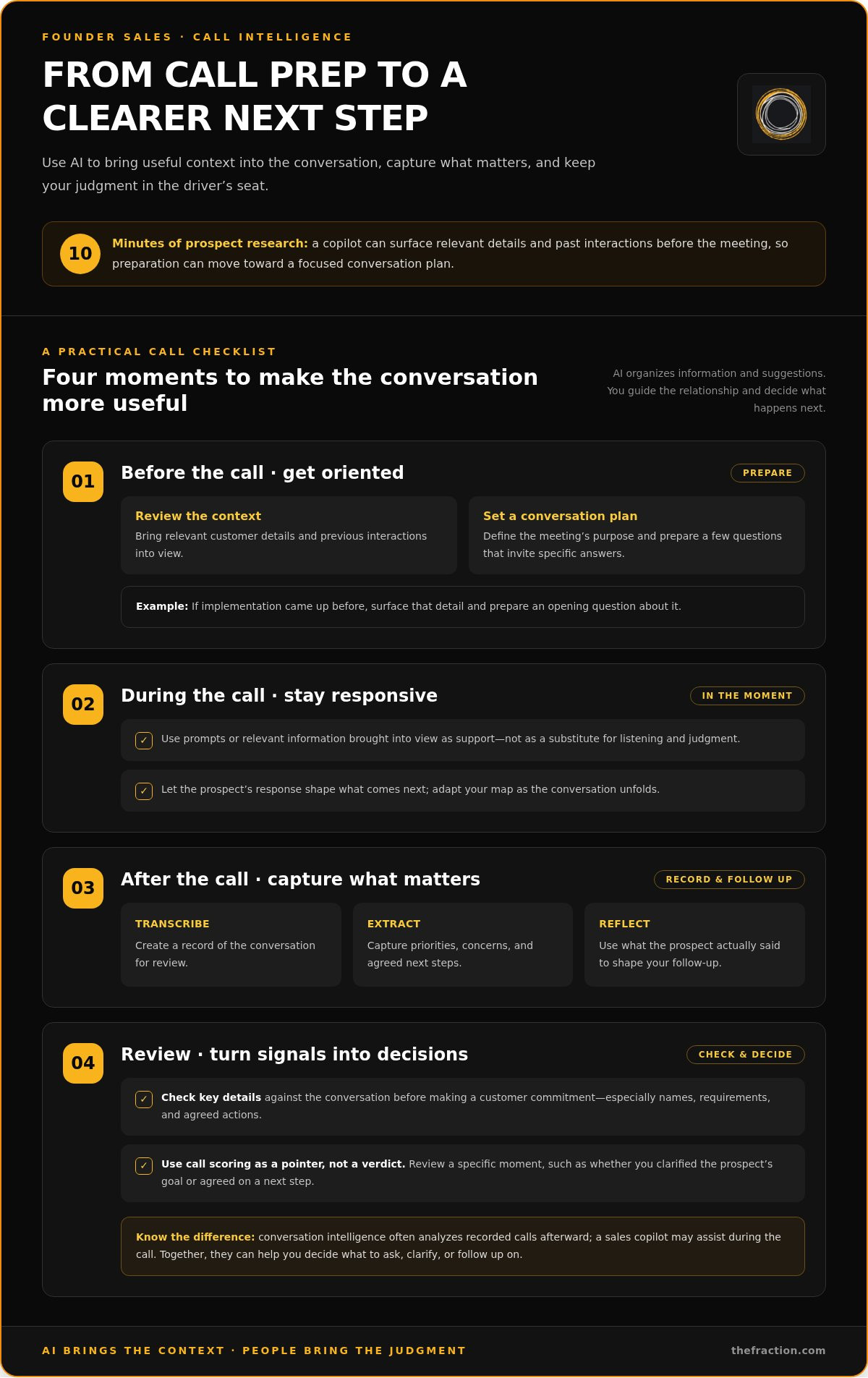
A sales copilot can prepare you for a prospect call and offer assistance as the conversation unfolds, so you can bring sharper context into the room. Instead of spending 10 minutes researching each prospect, you can review relevant details, past interactions, and a focused agenda before the meeting, like laying out the right tools before starting a demanding piece of work.
Preparation is more useful when it leads to a specific conversation plan. If a prospect previously asked about implementation, for example, the assistant can surface that detail and help you prepare an opening question. Shape the discussion around the prospect’s interest, then let their response guide what comes next.
During a live call, a copilot can offer prompts or bring relevant information into view. Afterward, it can transcribe the conversation and extract details for review. The record can help you capture the prospect’s priorities, concerns, and agreed next steps, so your follow-up reflects what they actually said.
Call scoring is most useful when it points to a specific moment and behavior. You might review whether you clarified the prospect’s goal or agreed on a next step, then use that insight to plan your next agenda. The score is a pointer to a moment worth examining, not a verdict on the conversation.
Conversation intelligence often analyzes recorded calls afterward, while a sales copilot may assist in the moment. That distinction matters if you want both an in-call prompt and a record for later reflection. Together, these capabilities can turn conversations into decisions about what to ask, clarify, or follow up on.
How accurate are AI-generated sales insights and call summaries? Accuracy depends on the quality of the call record and the context available to the system. Before making a customer commitment based on a summary, check key details against the conversation, especially names, requirements, and agreed actions.
To prepare a call script, start with the prospect’s known context, define the meeting’s purpose, and prepare a few questions that invite specific answers. Leave room for the conversation to shape the discussion: a script works best as a map you can adapt as you go. The assistant can organize prompts while you respond to the person in front of you.
That balance can also shape a sales process that feels natural, where clear preparation supports confident conversations and personal judgment guides the next move. Founders refining that approach can explore a sales process that feels natural and bring the same intentionality to their call preparation.
Integration with phone and business systems
A copilot becomes more useful when customer context flows between the tools you already use. For example, after a prospect call, you might open the CRM to add details to the opportunity record. When the systems connect, call activity can become part of that record, creating a clear path from the first conversation to the next decision.
Your phone platform and CRM serve different purposes: the phone platform handles the conversation, while the CRM organizes contacts, opportunities, and sales activity. Connecting them can help call details inform record updates and follow-up plans. The exact workflow depends on the integration and the fields your business uses.
For example, a connected workflow could associate a prospect call with the right contact, capture key details, and create a follow-up task. Review the record before sending a message, so even a meeting with several actions or a changed timeline has a clear next step.
CRM integration works best when every piece of information has a clear home. Decide which system holds the primary contact record, which fields show deal status, and where call outcomes belong. For example, you might store the prospect’s stated need in the CRM and call activity in the phone system, giving each update a defined place in the wider process.
A founder or manager can map that workflow through a few stages:
- Capture: Connect each call or meeting record to the relevant prospect.
- Organize: Match call details with the correct contact and opportunity.
- Act: Turn an agreed next step into a follow-up task.
- Review: Check CRM updates before using them in outreach.
Sales teams may also connect other tools involved in lead handling, such as calendars or customer databases, where supported. A scheduled meeting, for instance, can prompt you to review the prospect record, helping each platform contribute to one coherent process rather than adding another destination to manage.
Integration quality depends on accurate matching and useful context. If a call record lands under the wrong contact, later decisions inherit that confusion. If the CRM has no clear field for the next action, a recommendation has nowhere useful to go. Test one workflow with a sample opportunity, then review the records before expanding it.
The aim is a clear route from phone conversation to sales action, with the CRM providing a shared view of each opportunity. When every update has a destination, the copilot can help organize revenue work and make your tools feel like connected parts of one system.
Sales productivity and deal-cycle performance
Sales productivity improves when saved time goes toward valuable opportunities. An AI copilot can organize repetitive tasks, highlight stalled deals, and help founders focus outreach. Think of it as clearing clutter from a workbench so the next action is easier to see. The goal is a more deliberate sales rhythm, not activity for its own sake.
Follow-up timing and message choices can influence replies. Experimenting with follow-up angles, timing, and tone can move reply rates by 5 to 10 percentage points. A founder might compare a concise recap email with a question-led follow-up, then review which approach gets a response. The copilot can help organize those tests and surface patterns across opportunities.
Reliable follow-up also matters at scale. A hypothetical outbound team of five representatives, each handling 200 prospects per month, can face hundreds of missed follow-ups when the process is unreliable. For a founder, a simple queue showing the next action and due context can keep promising opportunities visible, even as delivery work competes for attention.
Sales performance reporting creates a feedback loop. Track practical KPIs such as response rates, meetings booked, opportunities advancing, and time between stages. A copilot can group activity by source or stage, helping you see whether outreach leads to conversations or prospects stall after a meeting. Each measure should inform a decision.
Training can draw on patterns from strong sales conversations. A manager might review calls where prospects moved forward and identify useful behaviors, such as clarifying a need or confirming a next step. An AI sales copilot can help surface recurring themes across those records. Founders can turn those patterns into call prompts without copying a top performer’s exact style.
Deal-cycle performance needs context. Sales teams using AI copilots report deal-cycle reductions of 25% or more, while organizations reinvesting AI time savings into high-impact activities are 2.2X more likely to exceed growth targets, according to Gartner. These findings point to an important distinction: automation creates capacity, and deliberate choices determine how that capacity supports revenue.
- For outreach: Review reply rates across email angles and timing.
- For meetings: Track whether conversations lead to agreed next steps.
- For opportunities: Identify stages where progress slows.
- For coaching: Convert useful call patterns into repeatable prompts.
Used this way, a sales copilot can shorten the learning loop between action and adjustment. The founder tests a focused change, reviews the relevant KPI, and decides what to refine. Reporting stays practical, training stays grounded in real conversations, and saved time goes toward opportunities that may progress.
AI-generated sales insights and next-best actions
Sales insights are valuable when they inform a decision, not just describe activity. An AI system can analyze lead details, company size, industry, and past interactions to estimate which prospects may convert. For a founder, that signal can help prioritize limited outreach time while keeping the decision grounded in the prospect’s actual context.
Consider two opportunities: one prospect has discussed a clear business need, while another has only opened an introductory email. A copilot can flag the first as a higher-priority conversation and suggest a relevant follow-up. The founder still weighs fit, timing, and the relationship before choosing what to do.
Deal-risk insights add another layer. A system can flag an opportunity with little recent engagement, an unresolved concern, or no agreed next step. These signals can help a sales team focus where a deal might stall. Ask, “What changed, and what action would address it?” rather than simply, “Which deal looks largest?”
Next-best actions work like signposts: they suggest a direction while leaving the driver in control. Depending on the available data, a copilot might recommend:
- Prioritize: Contact a prospect whose needs align with the offer.
- Clarify: Ask about an unresolved requirement before proposing a solution.
- Re-engage: Send a relevant note when an opportunity has gone quiet.
- Advance: Confirm a specific next step after a productive discussion.
Each recommendation should connect its reasoning to an observable signal. For example, “follow up” is more useful when the system explains that a prospect requested implementation details during an earlier interaction. The U.S. Government Publishing Office describes good AI explanations as clear, actionable, context-aware, and helpful for understanding predictions or recommendations.
Make insights practical by pairing each suggested action with a review habit: inspect the signal, compare it with the prospect record, then decide whether to act. If a predicted conversion rests on incomplete company details, gather context first. If several prospects share the same concern, adjust your conversation strategy or clarify your offer.
The strongest use of AI-generated insights is a learning loop. The system identifies a pattern, the founder tests a response, and later engagement helps refine the next recommendation. That cycle can sharpen strategies over time, provided the underlying records reflect real conversations and the founder applies judgment to each opportunity.
The Fraction: Automated & AI lead generation systems
The Fraction helps founders build a clearer path from lead generation to client conversations with automated and AI-driven lead generation systems. If useful sales insights still leave you responsible for finding prospects, shaping your offer, and creating a natural sales process, a connected approach can help bring those pieces together.
The Fraction can also help you develop a compelling offer and service designed to win clients quickly, supported by a sales process that doesn’t feel like selling. The goal is to align the offer, the conversation, and the next step so each part of your sales system points in the same direction.
To strengthen that foundation, explore The Fraction’s approach to building an automated sales and lead generation system.
Build a Sales System That Gives You Room to Lead
The next step is deciding which parts of selling need your personal judgment and which can run through a dependable system. An AI co-pilot for founder sales can support that design, but a strong foundation starts with clarity about the clients you want to serve and the value you want them to recognize.
Think of your sales process as the operating structure behind each client conversation. When the offer, outreach, and follow-through work together, you can give more attention to meaningful decisions and less to keeping disconnected activities moving. It’s a deliberate business choice, shaped around how you want to grow.
Ready to define your next step? Explore how The Fraction can help you build an offer and sales process aligned with your business.
Build your system with intention, and give your expertise more room to lead.
Frequently Asked Questions
What is an AI co-pilot for founder-led sales?
An AI co-pilot for founder sales is software that supports a founder’s sales work with information, analysis, and suggested actions. It can organize prospect details, identify patterns in customer interactions, and prepare follow-up tasks. Think of it as an instrument panel: it brings useful signals into view while the founder steers the relationship and decides how to respond to each prospect.
How can founders use AI to find and qualify sales prospects?
Founders can use AI to analyze available lead information and identify prospects whose characteristics align with their offer. For example, a founder serving a particular industry can use company details and past interactions to prioritize relevant contacts. Qualification still depends on fit: consider the prospect’s stated need, whether your service can help, and their readiness for a conversation before treating an AI-generated priority as a qualified opportunity.
How can AI help founders write personalized outreach and follow-ups?
AI can turn prospect context into a draft that reflects a person’s industry, earlier questions, or engagement with previous outreach. For example, a founder might use a prospect’s stated challenge to draft a concise email that addresses it directly. Review the message for accuracy, tone, and a clear next step before sending, so the personalization feels relevant rather than like a template with swapped-in details.
How do AI sales copilots integrate with CRM, email, and calendars?
AI sales copilots can connect with CRM, email, or calendar tools through supported integrations, allowing relevant activity to inform sales workflows. For example, a calendar meeting can be associated with a prospect record, while an email response can prompt a follow-up task. Integration quality depends on accurate contact matching and clearly assigned fields, so review sample records for duplicate contacts or misplaced activity.
How should founders measure the ROI of an AI sales copilot?
Measure ROI by comparing a clear baseline before adoption with results after the copilot enters a specific workflow. Track time spent on administration, prospect response rates, meetings booked, opportunities advancing, and follow-ups completed. Then assess whether changes correspond with the tool’s use, accounting for other shifts such as changes to your offer or seasonal demand. This gives founders a practical view of value beyond activity volume alone.


