

Yes, automating sales for solopreneurs can help qualify leads, follow up consistently, and grow client acquisition without hiring. The key is connecting routine steps into a clear process, while keeping your expertise and judgment at the center of conversations that need them.
Managing inquiries, tracking promising prospects, and remembering follow-ups can make every new lead feel like another task. A well-designed system gives each step a clear path: you can spot strong-fit prospects, keep communication moving, and focus more attention on building client relationships. This guide explains how to qualify leads, automate follow-ups, connect your tools, and choose a practical starting point, so you can strengthen your sales process without adding another person to manage.
Key Takeaways
- Define what makes a lead a strong fit, then use consistent CRM criteria to prioritize meaningful conversations.
- Start with one repetitive sales task and build an automation workflow around the way you already work.
- Use thoughtful follow-up sequences to keep communication moving while preserving a personal, relevant tone.
- Nurture leads with useful, timely information that helps them decide whether your offer fits their needs.
- Connect your sales tools so lead details and follow-up steps move through one coherent process.
1. Lead qualification and CRM management
A CRM is your sales control panel, keeping prospect details organized instead of scattered across notes and inboxes. Start with useful fields: name, business, contact details, need, budget range, decision timing, and next action. For example, a consultant can tag a prospect “strategy project” and record a follow-up date. Choose a CRM that makes these details easy to update and review, rather than adding manual work.
The best CRM for a solopreneur is one that fits your sales process and makes lead details, reminders, and pipeline stages easy to manage. Prioritize contact records, customizable stages, task reminders, email history, and integrations with payment and accounting tools. A short list of relevant features is more useful than a dashboard full of options you won’t use.
Qualification works like a filter, helping you spend attention where your expertise fits. For each lead, record the problem they want solved, whether your service addresses it, their readiness to act, and who makes the decision. Then assign a clear status, such as “new,” “qualified,” “proposal,” or “closed.” In the framework, Level 7 describes an agent that researches accounts, scores leads, and prepares outreach. Review the context before any message goes out.
A pipeline shows each prospect’s progress from first contact to signed proposal. Move a record forward after a meaningful action, such as a discovery call or proposal sent, and note the next step. If a proposal remains open, set a reminder; if the prospect declines, record why. This simple habit reveals where conversations stall and helps keep promising leads from getting lost in your inbox.
Contact management matters after someone becomes a client, too. Keep their preferred contact method, project details, proposal, and payment status together so you can see the relationship at a glance. For example, a designer can check whether a client approved the project, received an invoice, and still needs a receipt. Give active clients a status separate from new leads to keep your pipeline easy to read.
Manage expenses and receipts as part of the same operating rhythm, even if accounting software stores the records. Capture each receipt, assign its category, and match it to the related transaction. Let the CRM track proposal and payment milestones, while accounting tools manage expenses and receipts. Treat them as connected workspaces with distinct jobs, rather than expecting one tool to do everything.
To automate proposals, invoicing, and payments, connect approved proposal details to your invoicing and accounting workflow. After acceptance, prepare an invoice using those details and update the payment status when it’s recorded. Review the client, scope, amount, and payment terms before sending. This final check helps prevent a convenient shortcut from becoming a costly mistake.
2. What's the smartest way to start automating without overwhelming my current workflow?
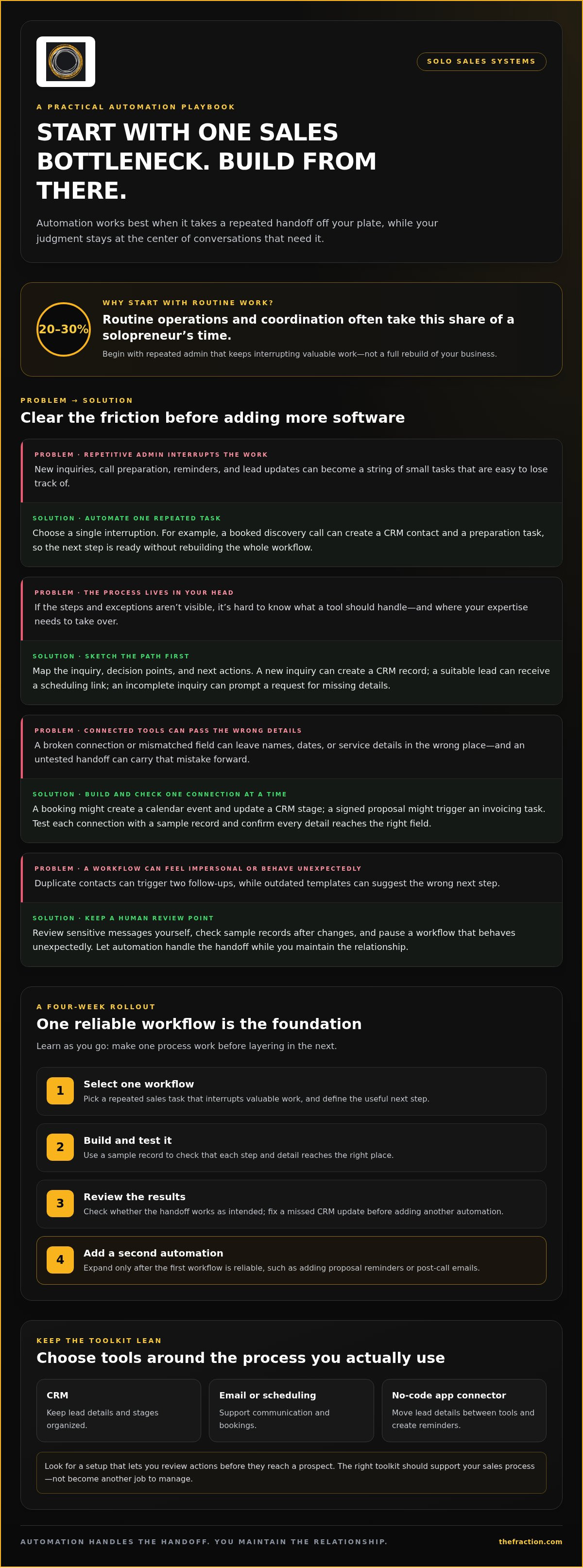
Automating sales for solopreneurs works best when you start with one repetitive task that keeps interrupting valuable work. Think of it like adding one well-placed rail to a staircase, so the next step feels easier without rebuilding the whole house. For example, a booked discovery call can create a CRM contact and a preparation task. Routine operations and coordination often represent 20–30% of a solopreneur’s time, so begin with repeated admin.
In 2026, the best sales automation tools for a solopreneur are the smallest set that supports the actual process: a CRM, an email or scheduling tool, and a no-code app connector. Look for features that move lead details between tools, create reminders, and let you review actions before they reach a prospect. The right setup should feel like a useful toolkit, not another job to manage.
Before choosing software, sketch your workflow on paper. Automating sales for solopreneurs is easier when you can see the steps and exceptions. For example, a new inquiry creates a CRM record, a suitable lead receives a scheduling link, and an incomplete inquiry prompts a request for missing details. Mapping this process shows where your judgment matters and where a template can take over.
Build one connection at a time. A booking might create a calendar event and update the lead’s CRM stage, while a signed proposal might trigger an invoicing task. Test each connection with a sample record and confirm that names, dates, and service details reach the right fields. Check each handoff before relying on the workflow.
Marketing workflows can start simply, too. Schedule a relevant follow-up email after someone downloads a guide, and create a clear path for replies or unusual requests to reach you. The sequence can offer useful next steps, while a real conversation leaves the automated track and gets your personal attention.
A four-week rollout gives you time to learn as you go: select one workflow, build and test it, review the results, then add a second automation during the fourth week. If a lead’s status doesn’t update after a meeting, fix that connection before adding proposal reminders or post-call emails. One reliable workflow is a better foundation than several tangled ones.
The main risks are poor data, broken app connections, and impersonal messages. A duplicate contact can trigger two follow-ups, while an outdated template can suggest the wrong next step. Review sensitive messages yourself, check sample records after changes, and pause any workflow that behaves unexpectedly. Let automation handle the handoff while you maintain the relationship.
If connecting lead capture, qualification, and follow-up feels like the larger challenge, explore how automated lead-generation systems can support a more coherent sales process.
3. Automated email follow-ups and client communication
A follow-up sequence gives each prospect a useful next step instead of another generic nudge. Start with a helpful reply to an inquiry, then share a relevant resource and invite a conversation. Andrew Hutton recommends a three-to-four-message sequence for automated outbound campaigns. Give each email one purpose, and make room for a personal response when someone raises a complex question.
For U.S. sales emails, use accurate sender details, honest subject lines, and a clear opt-out method, then honor opt-out requests promptly. Keep contact information relevant to the sales purpose, limit access to it, and distinguish promotional messages from essential service updates. These practices give your email workflow a responsible foundation, especially when contact details move between software tools.
Connect website forms, email software, and social media through a CRM or automation platform so information follows the conversation. For example, a website inquiry can create a contact record, note its source, and start a relevant email sequence; a reply can pause that sequence and create a follow-up task. Connect your calendar to booked meetings, too, so reminders reflect the prospect’s actual next step.
Cold-email deliverability starts with deliberate sending practices. Warm a secondary domain for two weeks before using it for outbound email, and avoid sending 200 cold emails per day from your primary domain. Keep the audience focused, write relevant messages, and pay attention to delivery and replies. A targeted sequence gives you clearer feedback than a high-volume campaign.
AI can help draft personalized emails, but you should make the judgment calls and approve the final wording. Use approved business context to tailor an opening or explain why your offer may fit, then review each message for accuracy and tone. Avoid invented familiarity and sensitive details. A specific observation about a prospect’s published service feels more credible than a copy-and-paste compliment.
Choose triggers that match the client relationship. A re-engagement campaign can start after 60 days without a response; a review request can arrive 7 days after project completion. You might request a referral after 30 days, then schedule a separate re-engagement message 72 days after project completion. Those are distinct moments, so tailor each message to its purpose rather than dropping every contact into one sequence.
Cross-channel communication should feel like one conversation, not three disconnected campaigns. If a prospect replies by email, pause the sequence before a social message or scheduled reminder goes out. Solopreneurs spend 28% of the workday managing email, so automating routine coordination can ease inbox handling, while thoughtful follow-up keeps the conversation personal and focused on the prospect’s needs.
4. Lead qualification and nurturing
Lead generation works best when every prospect has a clear path in, such as a referral, LinkedIn post, or website form. Choose channels that reach people with problems your service solves, then give each one a specific next step. For example, a prospecting strategy might invite readers to book a conversation after reviewing a focused service page.
Keep your lead-capture form short enough to complete, but specific enough to guide a relevant reply. Ask for the person’s name, business, main challenge, and preferred next step. A consultant’s form might ask whether someone needs strategic planning, operational support, or another service. These answers help route inquiries before inbox triage takes over the entire sales conversation.
Qualification is a conversation, not just a score. Compare each lead’s stated challenge with your expertise, then learn what outcome they want and what decision needs to happen next. If a prospect needs a service outside your scope, note that and focus follow-up on suitable opportunities. This keeps your pipeline aligned with work you can deliver well.
Nurture leads who show interest but need more context. Share a useful resource that addresses their concern, then invite a reply or conversation. For example, a consultant could send a brief explanation of how their process handles a common project challenge. A three-minute Loom video can explain a solution in a direct, personal format.
Content can support nurturing without requiring a fresh idea for every prospect. A weekly 20-minute video can be transcribed with AI, then adapted into related content in under an hour. Use a practical insight from the video in a follow-up email, and link it to a relevant service page or invitation. Review the transcript for accuracy before anything reaches a lead.
Prioritize prospecting with the 80/20 principle: 20% of efforts typically drive 80% of results. Review which channels produce qualified conversations, then give more attention to those sources. For instance, if referrals lead to stronger-fit inquiries than broad social posts, make referral conversations a deliberate part of your routine.
Match your message to the lead’s stage. Someone who has just downloaded a guide may need useful education, while a prospect who requested a proposal needs clarity on scope and next steps. Customers acquired through LinkedIn ads stay five times longer in one use case. Track lead source alongside fit and engagement before deciding which channel deserves more attention.
Keep the process human at key decision points. Let automation handle capture, tagging, and timely reminders, then step in when a prospect asks a nuanced question or describes a complex need. This balance gives your follow-up structure while preserving room for judgment, trust, and the individual conversation that turns a promising lead into a client.
5. Connecting sales tools with automation platforms
A connected sales system works like a relay: each platform passes the right information forward. The framework’s Level 10 connects workflows into one marketing and sales function. Start by mapping where a lead enters, which tool stores the record, and what action should follow. This reveals which connections matter before you add another app.
To automate appointment booking and sales calls, connect a scheduling page to your calendar and CRM. When a prospect books, create a calendar event, update their contact record, and send a confirmation with meeting details. Add a reminder and preparation task so the call has context. Afterward, move the lead to the right pipeline stage and record the agreed next step.
Choose one system as the source of truth for each type of information. Your CRM can own lead status, your calendar appointment times, and accounting software payment records. If two platforms control the same field, decide which one takes priority. This prevents a changed email address or rescheduled meeting from creating conflicting records.
Connect tools around specific triggers rather than syncing everything by default. A website inquiry might create a CRM contact and notify you; a booked call could pause an introductory email sequence. A signed proposal might create an invoicing task. Each connection should move one useful detail or action, keeping the workflow understandable when something changes.
Use a test record before activating a new connection. Submit a sample form, book a practice meeting, and check that the name, email, source, and appointment time arrive correctly. Then test an exception, such as a missing phone number or cancelled booking. A connection that handles both the normal path and common exceptions makes for a more dependable operating system.
Be deliberate about permissions and data flow as tools exchange contact information. Give each platform access only to the fields its workflow needs, and review which apps can read or change client records. For example, a scheduling platform may need a name and email, while an accounting platform needs transaction details. Purposeful integrations avoid creating an oversized web of access.
Review the connected tools as one sales process, not a collection of app features. Trace a prospect from website form to CRM, booked call, proposal, and payment record. At each handoff, confirm who or what handles the next action. If you have to enter the same detail twice, revise the connection or simplify the workflow.
Use the Level 10 model as a design principle: connect marketing and sales actions so each lead has a clear route. A dedicated automation platform can coordinate triggers across your CRM, website, calendar, and email tools, while you retain oversight of important conversations. The clearest takeaway is simple: connect only the tools that move a prospect forward, then test every handoff.
The Fraction: Automated & AI lead generation systems
The Fraction helps professionals build automated, AI-driven lead-generation systems for a more consistent path from prospect interest to client conversation. If lead capture, qualification, and follow-up feel disconnected, a coordinated system can bring those steps into a clearer sales process.
The Fraction also helps shape a compelling offer and service designed to win clients quickly, alongside a sales process that doesn’t feel like selling. This can be a useful next step when you understand the tools but need a stronger connection between your offer, the right prospects, and the conversations that move business forward.
If you’re ready to refine your lead generation and sales process, contact The Fraction to discuss your next step.
Make your next sales move deliberate
A deliberate approach to automating sales for solopreneurs creates a stronger foundation for growth. Your systems should reflect how you want to build client relationships, not simply how much software you can connect. Treat your sales process as an evolving blueprint: keep what helps prospects take a clear next step, and refine what creates friction.
If you want help shaping that foundation, The Fraction builds automated and AI-driven lead-generation systems, a sales process that doesn’t feel like selling, and a compelling offer and service designed to win clients quickly. This is a natural next step when you’re ready to align your lead-generation approach and offer.
You can build a business that leaves room for thoughtful client conversations and meaningful growth. Start with the next clear step, and let the system grow from there.
Frequently Asked Questions
Can automation tools actually help you scale without hiring?
Yes, automation can increase capacity by handling repeatable sales steps while you focus on decisions and client conversations. For example, a service professional can route new inquiries, send meeting confirmations, and flag unanswered proposals automatically. This creates room to serve more prospects through the same process, while your offer, lead flow, and personal follow-through still shape growth.
How can small business automation help me save time every week?
Start by tracking where sales work interrupts delivery, then automate one recurring handoff. A consultant might have each completed intake form create a preparation task and add the prospect’s details to the right record. Review the workflow regularly, because changes to fields, templates, or responsibilities can turn a time-saving process into extra corrections.
How much should solopreneurs spend on automation tools?
Set a budget by comparing each tool’s cost with the task it removes and the value of the time saved. Start with software that addresses an active bottleneck, such as organizing inquiries or scheduling calls, rather than buying a broad package of unused features. Include setup and maintenance in your decision, since a lower subscription can still require substantial manual work.
What tasks can I automate as a solopreneur to reduce stress and errors?
Automate predictable handoffs, such as inquiry acknowledgments, appointment reminders, proposal status updates, invoice prompts, and receipt organization. For example, after a client accepts a proposal, a workflow can create an invoicing task and remind you to review the details. Keep human approval for messages involving a changed scope, a sensitive concern, or a decision that requires personal judgment.
What's the smartest way to start automating without overwhelming my current workflow?
Choose a recurring task with a clear trigger and outcome, then document its current steps before making changes. Mark the points where exceptions need your judgment, such as a request outside your usual service. Test the new workflow with a sample record and compare its result with your manual process. Expand only after the automation behaves as intended in everyday use.
What sales tasks can solopreneurs automate?
Solopreneurs can automate lead capture, contact tagging, appointment confirmations, routine reminders, proposal status tracking, and follow-up task creation. A booking can prompt a call-preparation checklist, while a completed meeting can create a reminder to send the agreed material. Keep discovery conversations, offer decisions, and responses to individual objections personal, so automation supports the relationship instead of flattening it.
How much do sales automation tools cost for small businesses?
The total depends on the functions you need, the number of tools, and their subscription tiers. Before adding software, list the specific workflow each tool will support and check whether an existing platform already handles that task. This keeps your software stack aligned with your actual sales operations.
How can solopreneurs automate lead generation and capture?
Give each lead source a clear entry point, such as a website form, referral introduction, or professional social post. Ask for the information you need to understand the prospect’s challenge, then route the response into a system that records its source and prompts the next action. Review lead quality by channel so you can focus on the sources that produce relevant conversations.


