

What if the best cleverly alternative for linkedin outreach automation has less to do with sending more messages and more to do with starting conversations that sound like you? If you’re weighing cleverly alternatives for linkedin outreach automation, look, it makes sense to think beyond convenience, because your LinkedIn presence carries your professional reputation, and generic outreach can land like an awkward introduction in a room full of peers. The real question is how to make automation support the way you want to be known.
There are a few paths to consider, from software you operate yourself to managed outreach and a system built around your expertise, audience, and offer, but each puts different pieces in your hands. As you compare them, look at who defines the audience, who reviews the messages, and how replies move toward a useful next step. That’ll help you choose an approach that fits the consulting practice you’re building and the way you want to show up professionally.
Key Takeaways
- Assess outreach by whether it connects your expertise and offer with the right audience, rather than by message volume alone.
- Build a practical workflow from defining your ideal client to reviewing messages and following up, using Sales Navigator to sharpen targeting.
- Compare cleverly alternatives for linkedin outreach automation by how much they handle, how involved you remain, and what you want to build.
- Use a focused, reviewable outreach process and understand how account control and workflow ownership are handled before you commit.
- See how a done-with-you approach can bring targeting and automation into a broader consulting-practice build-out.
What Should a Cleverly Alternative Deliver for LinkedIn Outreach?
A useful alternative should help you start the right professional conversations, with people who have a reason to care about your expertise. Message volume can look impressive on a dashboard, but for a consultant, outreach works more like an introduction at an executive roundtable: the audience, timing, and opening all shape whether the conversation feels credible.
Effective LinkedIn outreach automation for consultants uses precise targeting and carefully reviewed follow-up to open relevant conversations, with the consultant’s expertise, offer, and professional reputation guiding the strategic choices. That distinction matters because automation can carry part of the workload, while you decide what you want to be known for and why a specific buyer would engage.
How LinkedIn outreach supports a consulting pipeline
Start with your ideal-client profile: the organizations and decision-makers you can genuinely help, the problems they’re working through, and the expertise you bring to those challenges. From there, tools such as LinkedIn Sales Navigator can help focus research on a defined professional audience. For each prospect, ask whether their role and organization match the problem your service addresses, then make the reason for reaching out clear in your message.
A prospect may recognize your point of view before a project is active, so the first exchange can simply be an introduction that gives the relationship room to develop. Thoughtful follow-up can add a useful insight or question that fits the person’s role. That’s social selling in practice: relationship-building and professional insight support the commercial conversation. Social Selling on Wikipedia offers a foundational overview of the concept.
That sequence works best as one part of a broader AI-driven lead generation strategy, where targeting, messaging, follow-up, and a clear next step connect like gears in one system.
What makes an alternative relevant to senior consultants?
Senior consultants bring a track record and a distinct perspective, so their outreach should sound like an extension of how they work. Accurate targeting helps a message reach people whose responsibilities match the problem you solve; credible language reflects your real expertise; and useful follow-up gives a prospect a reason to continue the exchange.
Your offer and positioning are the blueprint underneath that activity. When your service is broad or difficult to explain, even polished automation can leave a prospect unsure why they should respond. Clarify who benefits, what challenge you address, and what a sensible first conversation could explore, then use automation to carry that message consistently.
There are three distinct alternatives to compare: software provides tools you operate, managed outreach assigns execution to an outside team, and hands-on implementation helps you build and refine the workflow with your own involvement. Each puts responsibility in different places. As you consider cleverly alternatives for linkedin outreach automation, compare how each approach handles targeting, message review, follow-up, and account control, then consider what capability and infrastructure you’ll retain. Your professional reputation travels with every message, so make trust the standard the whole system meets.
How LinkedIn Outreach Automation Works When Strategy Leads
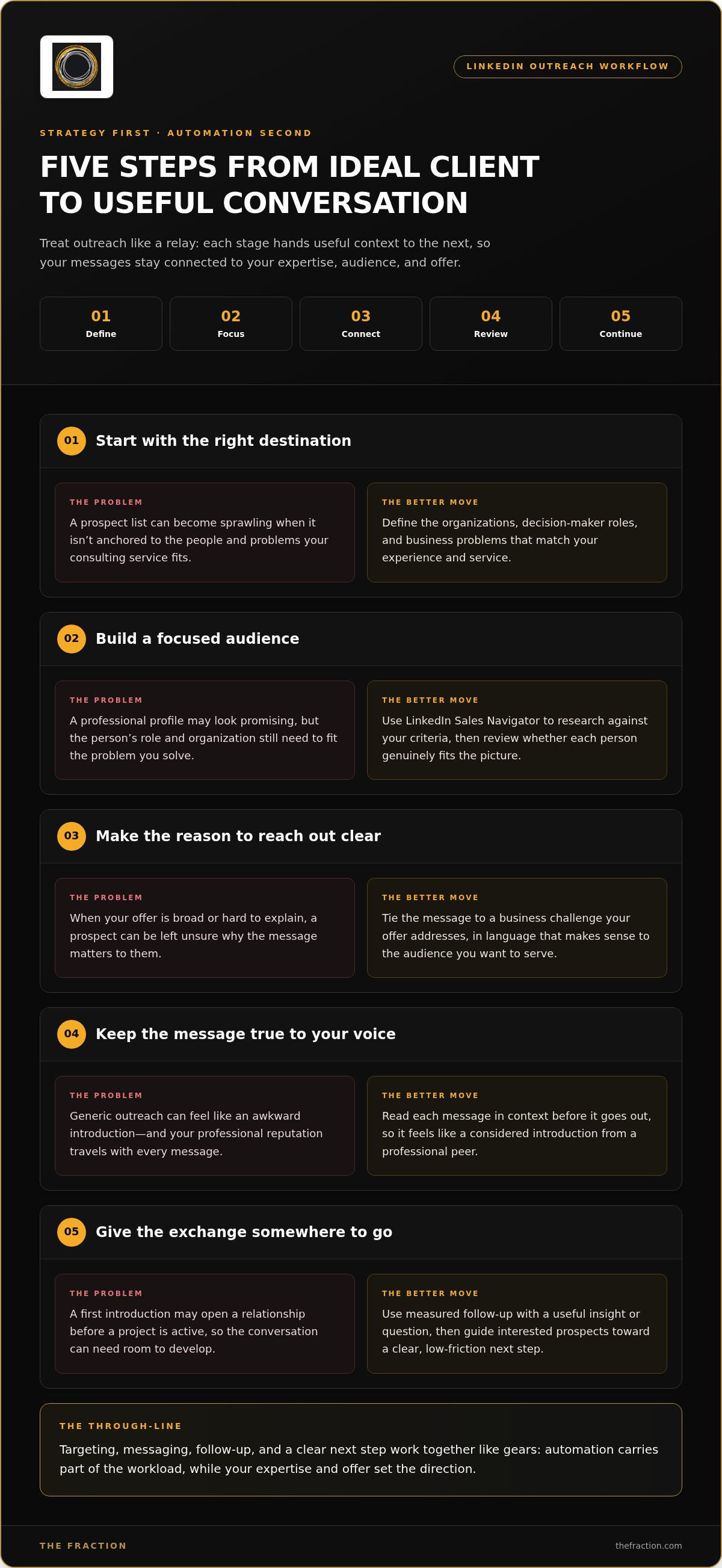
Think of outreach as a relay, where each stage hands useful context to the next, from deciding who you serve to having a conversation that can lead somewhere. Automation can help carry the work, but the direction comes from your experience, the people you want to reach, and an offer that gives them a real reason to engage. So before you switch on a sequence, make sure the whole route makes sense.
Here’s a practical order to work through:
- Define the ideal client. Get clear on the organizations, decision-maker roles, and business problems that fit your experience and service, so you’re starting with a meaningful destination.
- Build a focused audience. Use LinkedIn Sales Navigator to research professionals against those criteria, then review whether the people you find genuinely fit the picture.
- Shape the reason to reach out. Tie your message to a business challenge your offer addresses, using language that makes sense to the audience you want to serve.
- Review and personalize. Read each message in context before it goes out, so it feels like a considered introduction from a professional peer.
- Follow up and respond. Continue the exchange with measured follow-up, then guide interested prospects toward a clear, low-friction next step.
From ideal client profile to a focused prospect list
Start with the blueprint, not a sprawling list. Which organizations face the problems you can solve? Which roles are close to those challenges? And what in a professional profile suggests a useful connection? Once you’ve worked through those questions, Sales Navigator can help structure your research around the audience you’ve defined, keeping the criteria tied to your experience and offer.
That focus gives your list a thread of relevance, so each prospect has a reason to belong there. If your work addresses a particular leadership or operational challenge, for example, the organizations and roles you select should reflect that challenge. The offer gives the targeting its direction, and the targeting gives your message somewhere useful to land.
From first message to a useful sales conversation
A strong first message is concise, specific, and easy to answer. It can point to relevant business context and explain why your expertise may be useful, while keeping the ask small enough for a busy decision-maker to consider. Before automating a sequence, read it as the recipient would: does the context feel relevant, and is the reason for engaging clear?
Follow-up can add a fresh detail or invite a simple response, so the exchange feels like a conversation rather than a repeated pitch. When someone replies, listen for the issue behind their words and suggest a natural next step, such as exploring whether the challenge fits your work. Clear targeting helps you reach the right audience, while a well-defined offer gives the outreach a relevant reason to begin.
That’s the strategic difference to look for among cleverly alternatives for linkedin outreach automation: an approach that links targeting and messaging to a real sales conversation. If you’re building the broader practice alongside that workflow, The Fraction’s consulting-practice approach connects offer development, LinkedIn targeting, and configured automation in one build-out.
Cleverly Alternatives Compared: Software, Agency, or Done-With-You System?
Think of these options as different ways to staff and build the same engine. Software gives you tools to operate, an agency takes on more of the execution, and a done-with-you approach helps you assemble the parts of a client-acquisition system alongside your outreach. The best fit depends on what’s already in place, how much involvement you want, and whether you’re looking for campaign activity or a broader business foundation.
| Category | What it handles | Client involvement | Best-fit situation |
|---|---|---|---|
| Software-led automation | Workflow configuration and outreach execution, depending on the tool | High: you set strategy, review messaging, and manage replies | Your offer, audience, and sales process are already clear |
| Managed agency | Campaign planning and outreach execution, according to the engagement | Lower day-to-day involvement, with direction and oversight still needed | You want external execution for a defined campaign |
| Done-with-you system | Offer, targeting, configured automation, and sales-process development | Active collaboration to build and refine the system | You’re assembling the infrastructure for a consulting practice |
Those are broad categories, and the details of an engagement shape what each one includes. Compare the parts that define your working relationship: who sets the audience, who reviews messages, who controls the account, whether the offer gets attention, and how replies connect to a sales process. Make account control and ownership of the workflow clear, because the system needs to remain understandable and usable beyond a single campaign.
When a LinkedIn automation tool may be the right fit
A tool can suit you when your positioning is sharp, your offer is tested, and you already know how a relevant prospect moves from first contact to a sales conversation. Then you can assess whether its configuration and integrations fit your workflow, and whether you’ll have the review and control you need. Software can support execution, while strategic choices remain yours.
That distinction helps keep a feature list in perspective. A scheduling function or message template may save effort, but it won’t determine which decision-maker has a reason to talk or how your service addresses their priorities. Factor in the operating work around the software, including refining your audience, checking message context, and responding to replies.
When a broader client-acquisition system makes more sense
If you’re still shaping the offer, audience, and path from first conversation to potential engagement, software alone can leave the most consequential decisions on your desk. A co-built system connects those decisions, so outreach has a clear role in the wider business rather than sitting like a shiny tool on the dashboard. This is the thinking behind professional service sales automation.
The Fraction’s done-with-you approach combines Sales Navigator targeting and configured automation with offer and sales-funnel development, while clients retain their accounts and infrastructure. For experienced professionals who want to build those foundations alongside outreach, a consulting-practice build-out can connect the moving parts. That system-level lens gives you a stronger basis for comparing cleverly alternatives for linkedin outreach automation than features alone.
How to Choose a LinkedIn Outreach Alternative That Protects Your Reputation
Your LinkedIn presence is part of your professional capital, so choosing an outreach approach deserves the same care you’d give to any decision that represents your expertise. Think of the workflow as a front door to your consulting practice: the right people should recognize why they’re there, and you should remain in control of how they’re welcomed.
Questions to ask when evaluating outreach automation
Use this checklist to look beyond the feature list and see how the whole process will work in practice:
- Audience fit: Can you define the organizations, roles, and business needs you want to reach, and see how those criteria shape the prospect list?
- Personalization and approval: Can messages reflect relevant professional context, and can you review or adjust them before they represent you?
- Replies and next steps: Is it clear who monitors responses and how an interested prospect moves toward a useful conversation about your offer?
- Account control: Do you retain control of your LinkedIn account, with a clear understanding of what access the workflow uses?
- Ownership: Who retains the infrastructure, content, and automations, and can you keep using what you’ve built?
- Offer and process: Does implementation connect outreach to a clear service offer and a defined next step, or does the messaging sit on its own?
These questions reveal where responsibility sits. A tool may give you more direct operating control, an agency may handle more campaign execution, and a co-building approach may involve you in developing the underlying process. The useful choice is the one whose level of involvement, oversight, and ownership matches your priorities and your readiness to build a consulting pipeline.
A measured rollout for a consultant’s professional presence
Start with the foundation: make sure your profile reflects the expertise and service your outreach introduces, then share concise, experience-based content that gives prospects a clearer sense of your perspective. From there, choose a focused audience and a small, reviewable workflow, so you can see how the targeting and language land before expanding the activity.
If you’re building a practice alongside an existing role, design the schedule around your professional commitments and the boundaries you need to maintain. Outreach can be scheduled for evenings, giving you a way to organize activity around the shape of your week. Consider your employer context and existing professional relationships as you decide which audience and messages feel appropriate for your circumstances.
Then review the quality of the conversations, not just the number of actions in the workflow. Are replies coming from people whose needs fit your service? Do they understand what you help with? Use those signals to refine your audience, offer, and messaging, keeping each adjustment deliberate. For consultants comparing cleverly alternatives for linkedin outreach automation, this measured rollout keeps reputation, account control, and learning in the same frame.
How The Fraction Builds LinkedIn Outreach Into a Client-Acquisition System
The Fraction takes a done-with-you approach, co-building a consulting practice from the offer through to delivery, so LinkedIn outreach sits inside a larger structure for finding and serving clients. Think of it as building the whole bridge, not just installing one useful piece of equipment: the offer, audience, outreach workflow, and sales process need to connect so each part can support the next.
What the done-with-you approach brings together
The work connects offer development with ideal-client segmentation, LinkedIn Sales Navigator targeting, configured automation, and a systematized sales funnel. That means outreach can reflect the service you’re building and the audience you intend to serve, while the sales process gives interested prospects a clear next step. This broader view also connects with lead generation for fractional leaders, where the system matters as much as the individual tool.
Implementation includes support from a strategist and a dedicated client-success manager, alongside playbooks, scripts, and standard operating procedures. These working materials help turn decisions into repeatable steps, while you stay involved in shaping the practice and carrying conversations forward. The infrastructure is built with client ownership in mind: you retain your account, automations, content, and systems, so the assets developed remain yours to use.
Before payment, a custom proof-of-concept call includes market research and interviews with 10 industry leaders. That step brings outside market input into the early thinking, helping connect your experience and proposed offer with the audience you want to reach. It gives the build-out a more considered starting point than selecting automation settings before the business direction is clear.
Who is best positioned to explore this approach?
This approach is designed for experienced executives and consultants who are ready to shape a defined, high-value consulting practice, including professionals who may build alongside an existing role. It’s a collaborative process, so you’ll participate in implementation, outreach, and market conversations; the system gives your expertise a structure, while your judgment and relationships remain central to how it develops.
That distinction matters if you’re comparing cleverly alternatives for linkedin outreach automation: a done-with-you build-out suits someone ready to develop the business foundations around outreach, rather than hand off activity and wait for conversations to appear. If you’re looking for a more passive arrangement, the collaboration itself may feel like more involvement than you want; if you’re prepared to shape the offer and learn from market response, it can bring the moving parts into one coherent operating system.
Explore the executive program to assess whether this approach fits the consulting practice you want to build.
Build the Practice You Want to Be Known For
The decision ahead is really about what you want your outreach to make possible. A dependable consulting practice grows from choices that reinforce each other, from the clients you serve to the value you bring and the conversations that help people understand it. So as you weigh cleverly alternatives for linkedin outreach automation, think beyond the next campaign and picture the professional platform you want to keep building over time.
The Fraction’s co-building approach is designed for experienced professionals ready to shape that platform with intention. The work begins with a market-informed view of the opportunity, then brings the elements of the practice together so your outreach has a meaningful place in the bigger picture. You stay involved in building a system that reflects your expertise and supports the direction you choose.
If you’re ready to explore whether that kind of partnership fits your next chapter, take a closer look at the executive program.
Explore The Fraction’s executive program to start a conversation about building your consulting practice.
Your experience already has value. With a clear direction and a system built around it, you can give that value a stronger path to the people who need it.
Frequently Asked Questions
What is Cleverly used for?
Cleverly is associated with LinkedIn outreach services, and the right comparison depends on which parts of your acquisition workflow you want support with. For example, you might need help identifying prospects, preparing outreach, organizing follow-up, or connecting replies to a sales conversation. List those tasks first, then compare whether software, managed execution, or a broader implementation approach covers the work you actually need.
Is LinkedIn outreach automation a good fit for fractional consultants?
It can be a useful fit when your expertise and consulting offer give the right audience a clear reason to engage. For example, a fractional leader with a defined service can use outreach to start relevant conversations with decision-makers facing related challenges, while keeping judgment over the relationship. If you’re building alongside another role, consider how much time you can devote to reviewing replies and continuing promising conversations.
Can LinkedIn outreach automation damage my professional reputation?
Yes, poorly matched prospects or impersonal messages can make your outreach feel careless, especially when your profile represents years of professional experience. Before a workflow runs, review a sample of prospects and messages as if you were the recipient: does the context make sense, and is the reason for reaching out clear? Keep visibility into replies, too, so timely, thoughtful responses remain part of the process.
How much do Cleverly alternatives cost?
Costs vary by provider and by the work included, so a headline price alone won’t show what you’re comparing. One option may cover software access, while another includes campaign execution or help implementing a wider sales workflow. Compare the scope against your needs, including targeting, message oversight, account control, and what infrastructure you retain, then assess the overall commitment in light of the business process you want to support.
Can I automate LinkedIn outreach while I am still employed?
Yes, outreach can be organized around existing work commitments, including evening scheduling through The Fraction’s approach. Before setting up activity, decide which audience and consulting offer fit your professional circumstances, and establish clear boundaries around when you review messages and respond. For instance, a consistent evening review block can help you stay attentive to replies while keeping practice-building activity distinct from your regular workday.
What should I compare when choosing a Cleverly alternative?
Compare targeting, message review, follow-up, account control, and how the workflow connects to your consulting offer. Then consider the kind of support you need: software for a process you already operate, managed execution, or hands-on implementation of the broader acquisition system. The phrase cleverly alternatives for linkedin outreach automation covers different models, so match the choice to your desired involvement and the stage of your practice.
Does The Fraction take over my LinkedIn account?
No, clients retain control of their LinkedIn accounts. The Fraction configures automation software and supports clients in using it, with LinkedIn targeting connected to the wider work of developing a consulting offer and sales process. In practice, that means you remain the account owner and keep your business infrastructure, while participating in the decisions and conversations that shape how the system represents your expertise.


