

The strongest answer to the sales navigator vs clay for lead list enrichment question may be both tools, working like a compass and a workbench: one helps you find the right people, while the other helps make their records more useful. If your prospect list is patchy or inconsistent, it’s easy to assume you need a better database, but the real issue may be that prospect discovery and record enrichment are being treated as the same job.
That distinction matters, because even a capable tool can’t make an unclear ideal-client profile useful. Sales Navigator helps you identify target accounts and people on LinkedIn, while Clay can enrich lead records and organize repeatable data workflows. So the right setup depends on who you’re targeting, which details help you assess fit, and how research leads to follow-up. Here’s how each tool fits into a practical prospecting process, where they can work together, and how to choose a setup that supports qualified conversations instead of adding complexity for its own sake.
Key Takeaways
- Choose your setup by starting with your ideal-client profile, list volume, and capacity to review enriched records.
- Use the sales navigator vs clay for lead list enrichment comparison to decide which workflow stages need support and where the tools may work together.
- Build a repeatable sequence from account targeting through contact review and prioritization, keeping only details that help assess fit or guide relevant follow-up.
- Understand how information moves between tools before building a process around an export or integration.
- Connect tool choices to offer clarity, outreach, and follow-up so your lead workflow can grow with your consulting practice.
Sales Navigator vs. Clay for lead list enrichment: what each tool does
The practical distinction is straightforward: Sales Navigator helps you discover relevant people and understand their professional context on LinkedIn, while Clay helps enrich records and coordinate the workflows built around them. Think of Sales Navigator as a research desk for finding the right accounts and contacts, and Clay as the workbench where useful details can be organized and put to work.
Lead-list enrichment means adding useful context to a prospect record, such as details that help you assess fit or prepare for a relevant conversation. The fields available depend on the record and its data sources, so more information doesn’t automatically mean a better list. Enrichment sits within the broader process of What is lead generation?, where finding potential clients is one step toward building a qualified pipeline.
Product capabilities change, so check current documentation before designing a process around a particular feature, integration, or usage limit. Keep a clear line between what a platform does natively and what depends on connected tools. That distinction helps you build a workflow you can operate without making assumptions about how data moves.
What Sales Navigator contributes to prospect research
Sales Navigator’s primary role is finding and researching target accounts and professionals through LinkedIn. Its account and people searches, filters, saved research, buying-signal monitoring, and relationship context can help narrow a broad market into a focused set of prospects. For example, a fractional consultant could define a company type and relevant senior roles, search for matching accounts and people, then review their professional context to decide who merits closer attention.
The quality of that search rests on the quality of your criteria. A clear ideal-client profile gives you practical parameters for company fit, role, and the buying context that makes your expertise relevant. Sales Navigator can surface people who match those parameters, but your judgment determines whether they belong on the list and whether your offer gives them a reason to talk.
What Clay contributes to enrichment workflows
Clay’s primary role is enriching records and orchestrating repeatable data workflows. It can draw on connected data providers to investigate prospect details, apply steps to records, and organize information for later review or use in another system. Depending on the workflow and available sources, that may help fill useful context or bring relevant details together for prioritization and more considered outreach.
Clay provides the workflow layer, while the underlying information depends on external sources that can vary in coverage, freshness, and availability. So a filled field still deserves review, especially when it could shape a business decision or personalized message. In the sales navigator vs clay for lead list enrichment comparison, the central distinction is the work each platform supports: discovery and professional context on one side, record enrichment and workflow coordination on the other, with your ideal-client profile guiding both.
How Sales Navigator and Clay differ across the lead-enrichment workflow
The difference becomes clearer when you follow one prospect from discovery to a useful next step. Imagine you’re looking for a senior leader at a company that fits your consulting offer: Sales Navigator helps you find and assess the account and relevant people, while Clay can add selected context to a record and help coordinate what happens next. The better starting point depends on the gap between finding prospects and turning them into usable, reviewed records.
- Discovery: Sales Navigator leads by helping you search for accounts and people on LinkedIn. Clay can work with prospect records you provide or connect to a workflow, but it serves a different stage.
- Fit signals: Sales Navigator provides professional and account context for research. Clay can gather additional data, while you decide whether the combined evidence fits your ideal-client profile.
- Record completeness: Clay supports enrichment using available data sources. Sales Navigator contributes LinkedIn context, and a human reviewer should assess the details before they inform decisions.
- Prioritization: Use information from either platform to inform review, but tie your criteria to genuine fit, relevance, and a clear reason to start a conversation.
- Next-step workflow: Clay can help coordinate data steps and connect with business systems. Sales Navigator supports LinkedIn-based prospect research; the handoff between tools depends on current export or integration options.
Where prospect discovery ends and enrichment begins
Say your criteria point you toward a particular type of company and a senior operations role. In Sales Navigator, you research matching accounts and people, then assess whether their professional context appears relevant. That’s discovery: identifying candidates and forming an initial view of fit. Enrichment begins when you add selected details to a prospect record to make review or a later conversation more informed.
Think of the stages as separate checkpoints on a route. A search result is a candidate for review, and added data is extra context, but neither makes the final decision for you. Someone still needs to assess whether the prospect fits and whether the information supports a thoughtful next step.
How to compare data quality and workflow ownership
Evaluate each field by asking whether it helps assess fit, where it came from, how current it appears, and whether someone will review it before outreach. A record with more populated fields can look like progress, but irrelevant or unchecked details create clutter rather than confidence. Give each stage a clear owner to prevent duplicate records and disconnected work: decide who selects prospects, who reviews enriched data, and where the approved record lives. A CRM can serve as part of that operating system; Understanding Customer Relationship Management (CRM) helps explain its role in organizing customer and prospect relationships.
Sales Navigator’s lead-list handoff requires a separate method, so understand current export options before building a process around transferring records to Clay. Clay’s available data sources and CRM connections can also change, so consult its current documentation before relying on a specific connection. If you’re building a repeatable prospecting process for a consulting practice, done-with-you lead-generation systems can connect targeting, automation, and follow-up into one owned workflow.
Which tool fits your consulting lead-generation needs?
The right starting point depends on where your prospecting process has a gap. If you’re still working out which companies and decision-makers fit your consulting offer, start with research and targeting. If you already have a relevant prospect list but need more context to assess and prioritize it, enrichment may deserve more attention. And if both stages are defined, a connected workflow may bring them together, provided the current features and handoff options support how you work.
For a solo consultant, a carefully qualified list can be more useful than a large one that takes hours to review. Think of your tools as the workshop around your client-acquisition strategy: they can make good targeting easier to repeat, but the blueprint still comes from your ideal-client profile, offer, and capacity to follow up.
When Sales Navigator may be the stronger starting point
Sales Navigator is a practical starting point when your search begins on LinkedIn and depends on understanding roles, companies, and professional context. If you can describe the executive or buyer most likely to value your expertise, use those criteria to guide account and people research, then qualify promising prospects yourself. That hands-on review is useful when relevance matters more than producing a high-volume list.
When Clay may add more value to the workflow
Clay may add more value when you already have prospect records and need a repeatable way to investigate useful details or coordinate enrichment steps. That context can support prioritization and more tailored outreach, but the information available depends on the sources used and the fields you’re seeking. Build time into the workflow to review records, because a populated field still needs to make sense for your decision and your message.
Before choosing, look at four practical constraints:
- ICP clarity: If your best-fit companies and buyer roles are still shifting, tighten the profile before adding more workflow complexity.
- List volume: Match the process to the number of prospects you can realistically qualify and follow up with, rather than optimizing for records alone.
- Review capacity: Enrichment adds context, and that context is useful when you have a clear way to assess it.
- Current process: Identify where prospects enter, where records are maintained, and who owns review and follow-up before connecting tools.
For the sales navigator vs clay for lead list enrichment decision, there’s no universal winner: your best fit depends on whether you need stronger discovery, richer record context, or a workflow that connects the two. If your process depends on a particular filter, integration, or data source, verify that capability in current product documentation before building around it.
A simple test helps: can you name the missing step slowing your prospecting down, and can you review the information a tool adds? Start there, keep the process lean, and let real use show you where additional automation earns its place.
Build a practical lead-list enrichment workflow with both tools
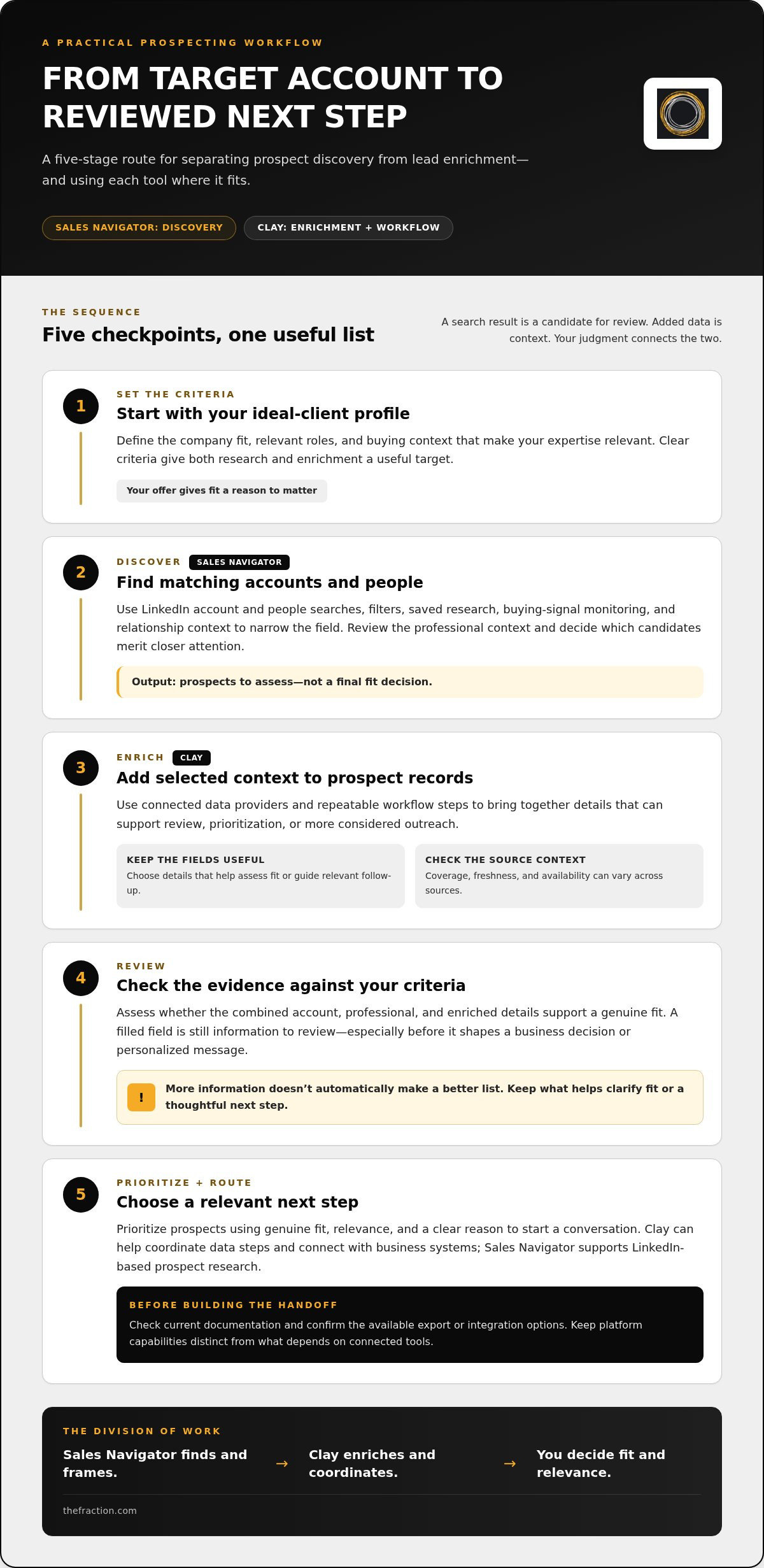
Think of prospecting as a relay: each step should pass a useful, reviewed record to the next, rather than sending a growing pile of names downstream. For an independent consultant, that starts with a clear definition of the right client and ends with a thoughtful next conversation. The tools support the process, while you decide what belongs in the workflow and who’s responsible for each handoff.
Define the ideal-client profile before building a list
Start with the expertise you want to bring to market, then translate it into a practical profile: which industries or company situations fit, which decision-makers are relevant, and what observable signals suggest they may need your work. Separate essentials, such as role and company fit, from optional research details that might add context but won’t change your decision.
A sharper profile works like a good map: it helps you spend research time in the right territory and keeps outreach connected to your offer, instead of sending scattered messages to people who only loosely resemble a prospect.
Once those criteria are clear, move through the workflow in order:
- Define the ICP. Record the company, role, and fit criteria you’ll use to make a consistent decision.
- Identify accounts. Use Sales Navigator to research companies that match the profile and select relevant contacts.
- Enrich useful fields. Use Clay for additional context that helps assess fit, understand relevance, or prepare for a conversation.
- Review the records. Assign a person to check important fields, correct errors, and flag information that needs follow-up.
- Prioritize next steps. Decide which prospects merit outreach and what context can support a relevant opening.
Connect research, enrichment, and thoughtful outreach
Keep the handoff simple: Sales Navigator research identifies a potential fit, Clay adds selected information to the record, and a human reviewer decides what’s useful before outreach. For example, a relevant company initiative or a clear connection between a leader’s role and your offer might help shape a specific opening. It can guide a more considered message, while the message itself still needs your judgment and voice.
Set ownership as deliberately as you set fields. Decide who reviews records, where approved information is maintained, and who corrects or updates it when something changes. That way, the sales navigator vs clay for lead list enrichment decision becomes one part of a wider AI-driven lead-generation strategy, with targeting, automation, and follow-up working from the same design. The Fraction’s lead-generation systems for consultants bring those practical pieces together while keeping the workflow grounded in your offer and client-acquisition process.
Turn tool choice into a durable client-acquisition system
Software is one part of the architecture. Your offer defines the value you bring, your ideal-client profile points prospecting in the right direction, and outreach and follow-up give a qualified person a reason to continue the conversation. Reviewing the process helps you see where it needs refinement, whether that’s the profile, the message, or the handoff between research and follow-up.
That’s why the sales navigator vs clay for lead list enrichment decision belongs inside a larger system. As your consulting pipeline develops, an owned, documented workflow gives you a foundation you can adapt: refine the target market, adjust the fields you review, and change how prospects move toward a conversation without rebuilding the whole process from scratch.
What a sustainable prospecting system needs beyond software
Start with a clear offer and a practical ICP, then establish a repeatable prospecting cadence that fits your capacity. A list becomes an operating process when someone reviews it, decides which prospects merit attention, and follows up with a relevant next step. Track what you learn from that work, too, so targeting and messaging can improve through deliberate review instead of guesswork.
For a fractional leader, support should reflect the realities of building a consulting practice around established expertise, including how targeting connects to positioning and consistent business development. The Fraction’s lead-generation guidance for fractional consultants connects those elements as parts of one client-acquisition system, rather than separate tasks competing for attention.
How implementation support can make the workflow usable
Putting the process into practice takes more than selecting tools; targeting, configured automation, review steps, and follow-up need to work together in a way you can understand and manage. The Fraction’s done-with-you implementation includes Sales Navigator targeting, configured automation, and training so you can use the systems built around your prospecting process. You retain your accounts and business infrastructure, giving you practical ownership as your pipeline evolves.
The aim is a workflow that supports your judgment, rather than a complicated stack that becomes another job to manage. Start with a clear target, keep only the steps that serve your client-acquisition process, and make sure you can operate and adapt the infrastructure you build.
Make your next prospecting step deliberate
Your next move can be simple: choose one part of your client-acquisition process to improve, then build around that decision. Perhaps your offer needs sharper positioning, your target profile needs more definition, or your follow-up needs a clearer rhythm. When you know what you’re improving, the sales navigator vs clay for lead list enrichment choice becomes easier to place within the larger system, and each tool earns its place by supporting a practical business priority.
For experienced professionals building a consulting practice, a thoughtful process can turn hard-won expertise into a steadier way to start relevant conversations. Shape that process step by step, learn from real prospecting, and refine it as your practice grows.
Your expertise already gives you a strong foundation. Give it a clear system to work through, and your next stage of growth can become more focused, more intentional, and more yours.
Frequently Asked Questions
Is Sales Navigator or Clay better for lead list enrichment?
Choose the tool that addresses your current bottleneck, then let your ideal-client profile and workflow set the direction. If you’re building a list around a specific LinkedIn buyer group, Sales Navigator may be a useful starting point; if prospects already sit in a spreadsheet or CRM and need additional research context, Clay may fit better. For sales navigator vs clay for lead list enrichment, compare the missing step, your review capacity, and how prospects enter your process.
Can you use Sales Navigator and Clay together?
Yes, they can work in one process when the handoff supports your needs. For example, a consultant could select relevant contacts for a focused research project, transfer approved records into Clay, and send reviewed information to the system used for follow-up. Before building around that approach, review current export and integration options, along with Clay’s available data sources. A small test can reveal field-mapping issues before you rely on the workflow.
What does Clay do in a lead-generation workflow?
Clay can coordinate data-research steps across available sources and organize useful context for review, prioritization, or a later CRM handoff. A consultant comparing potential partner firms, for instance, might collect relevant company details before deciding which relationships to pursue. The information available depends on the sources and fields involved, so treat Clay’s output as research input. You still make the final judgment about fit and the appropriate next action.
Does Sales Navigator provide lead enrichment?
Sales Navigator contributes LinkedIn profile and account context that can support prospect research. For direct contact details such as email addresses or phone numbers, pair that research with an external data source or enrichment workflow, then review the returned information before using it. Product capabilities can change, so consult current LinkedIn documentation for available search and relationship features before building procedures around a particular function.
How do you build a qualified lead list for consulting?
Define what makes a potential engagement commercially and practically relevant, then use consistent labels to record your reasoning. For example, an operations consultant might distinguish essential company fit from additional signals that suggest a timely need. Keep those categories separate so a promising clue doesn’t become an assumed qualification. Recording why a prospect made the list also gives you a useful reference when refining your targeting criteria later.
Do consultants need both Sales Navigator and Clay?
Consultants can begin with the tool that serves their current process, then add another when a clear workflow need emerges. A manually maintained pipeline may call for a lighter setup, while recurring research tasks could justify more connected data steps. Consider the time required to manage each tool, the systems you already use, and who will own updates. A lean process you can maintain may serve you better than a larger stack.
How can you keep lead enrichment useful and accurate?
Set a clear review rule for each important field, such as marking it confirmed, needs review, or unavailable, and assign someone to resolve records that could affect outreach. You can also inspect a small sample after changing a workflow to spot recurring mismatches before they spread through the list. This gives you a practical quality-control habit while keeping the record focused on details that support a real decision.


