

An AI lead generation workflow for consultants works best when AI handles the repeatable pieces, like research, lead scoring, and routine follow-up, while you bring judgment to qualification and real client conversations. AI agents can manage up to 80% of routine sales development tasks, so think of automation as the engine room and your personal attention as the hand on the wheel.
That balance matters: prospects want communication that reflects their needs and context. Automation helps you stay consistent while making each interaction feel considered. Give every prospect a relevant next step without turning your outreach into a script that could belong to anyone.
In this guide, you’ll map the workflow from first contact through follow-up, decide where AI can help and where your personal touch matters most, and qualify prospects thoughtfully. You’ll also consider costs and implementation timelines to build a system that supports your consulting practice instead of adding busywork.
Key Takeaways
- Map each stage from first contact to booked conversation, then assign AI the repeatable tasks and keep relationship-sensitive decisions personal.
- Track engagement, lead quality, conversion, and follow-up performance together so you can see where prospects move forward or lose momentum.
- Make outreach more relevant by tailoring messages and follow-up to each prospect’s needs, behavior, and readiness to talk.
- Design chatbot questions around your qualification criteria, so suitable prospects can move toward a meeting while your workflow captures useful context.
- Assess workflow costs and implementation timelines by starting with the process you need to improve, its complexity, and how it must connect with your existing systems.
What’s the Right Balance Between Automation and Human Touch?
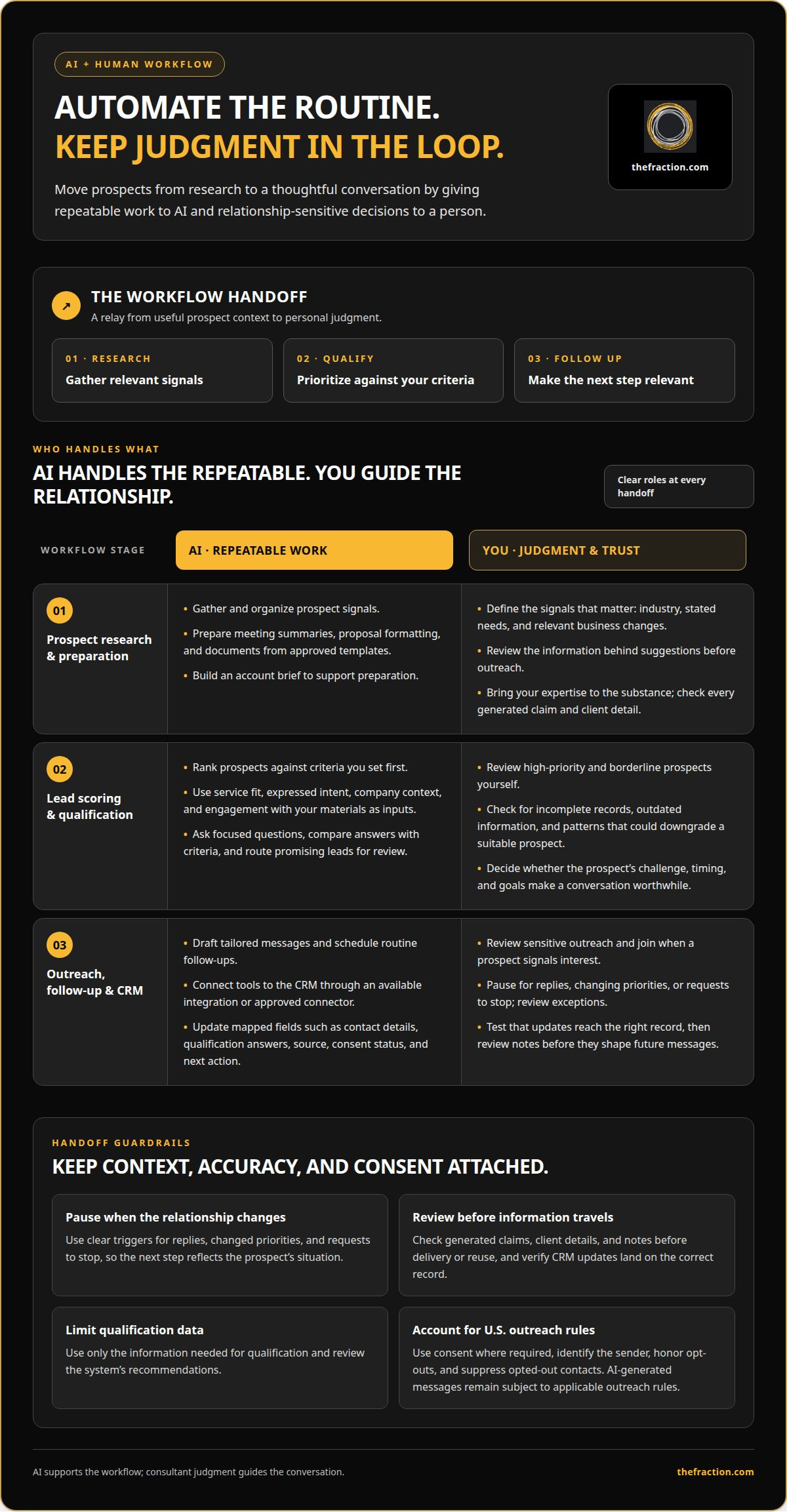
Let automation handle repeatable tasks, but keep your judgment involved in decisions that shape trust, fit, and worthwhile sales conversations. Think of the workflow as a relay: every automated handoff should give you useful context for a relevant, personal next interaction.
-
Research Prospects and Automate Tasks
Start by defining the prospect signals that matter, such as industry, stated needs, and relevant business changes. Then use AI to gather and organize those signals. Review the information behind each suggestion before reaching out. An account brief is a useful map; your experience determines whether the route makes sense for your consulting work.
Automate repeatable preparation, such as meeting summaries, proposal formatting, and document production from approved templates. Keep your expertise in the substance, and check every generated claim, recommendation, and client detail before delivery. This leaves more room for strategic work while ensuring the final document reflects the considered judgment clients expect from an experienced consultant.
-
Score and Qualify Leads
Set your qualification criteria first, then use predictive lead scoring to rank prospects against them. Useful inputs include service fit, expressed intent, company context, and engagement with your materials. Treat each score as a prioritization signal, and review high-priority or borderline prospects yourself. The context behind a score can matter as much as the score itself.
Automated qualification can ask focused questions, compare answers with your criteria, and route promising leads for personal review. Watch for incomplete records, outdated information, or patterns that could downgrade a suitable prospect. AI can flag a likely fit, but you decide whether the prospect’s challenge, timing, and goals make a conversation worthwhile.
Reduce risk by limiting the system to information needed for qualification and reviewing its recommendations. For outreach in the United States, account for applicable privacy and anti-spam requirements: use consent where required, identify the sender, honor opt-outs, and suppress opted-out contacts. AI-generated messages remain subject to the rules that apply to outreach.
-
Automate Outreach and CRM Updates
Set clear triggers for an initial response, relevant follow-up, and personal handoff. AI can draft tailored messages and schedule routine follow-ups, while you review sensitive outreach and join conversations when a prospect signals interest. Build in pauses for replies, changing priorities, or requests to stop, so each next step reflects the relationship.
Connect AI tools to your CRM and marketing automation platform through an available integration or approved connector. Map contact details, qualification answers, source, consent status, and next action to the right fields. Then test that updates reach the correct record. CRM rules can pause campaigns after a reply or opt-out, while a person reviews exceptions and keeps the pipeline accurate.
Record outreach, responses, qualification decisions, and agreed next steps. Review generated notes before they shape future messages. This human check catches mistaken context early, helping automation support consistent relationships and preventing errors from spreading across connected systems.
What Is a Lead Generation Workflow and Why Does It Matter?
Treat the workflow as a connected path from a prospect’s first interaction to a considered sales conversation. Track each handoff to see where engagement builds, where interest cools, and what helps a suitable prospect move forward.
-
Personalize Content and Engagement
Match each message to the prospect’s needs, stage, and previous engagement, then use those details to make the next interaction useful. Someone who reads a case study about market entry could receive a related insight, while a new subscriber might benefit from a clear introduction to your expertise. AI can help draft the message, but review the context before sending.
Keep the experience connected across email, your website, and sales conversations. If a prospect asks about a specific challenge, carry that concern into the next resource or meeting agenda instead of restarting the conversation. Continuity can turn scattered touchpoints into a considered relationship in which your expertise makes you a valuable partner.
Use AI to draft engagement proposals from approved service details, then review the scope, assumptions, and client-specific outcomes yourself. A draft can organize a prospect’s stated goals into a proposal structure; your judgment shapes the approach and commitments. Templates can speed up preparation, but recommendations should reflect the prospect’s actual situation.
Bring a person into the conversation when a prospect raises a complex concern, objects, or signals readiness to discuss an engagement. Let automation handle routine delivery, then make the handoff thoughtful and use the prospect’s own words to guide the discussion. This balance keeps each interaction responsive and human.
-
Measure Workflow Outcomes
Choose measurable indicators for engagement, qualification, conversion, and consultant time saved. Track replies and meaningful clicks alongside qualified conversations, proposals delivered, and signed engagements. Email opens alone can give an incomplete picture, so connect activity to the next stage and the quality of the opportunities entering your pipeline.
Compare movement between stages to find friction. If prospects engage with a resource but rarely book a conversation, examine the follow-up and invitation. If calls happen but proposals stall, revisit qualification and proposal relevance. Each comparison points to a specific adjustment rather than a vague push to generate more leads.
Review which sources bring prospects whose needs fit your expertise, and note which interactions help them decide. For instance, a detailed project inquiry might lead to stronger conversations than a general newsletter signup. Use these insights to refine content, routing, and follow-up around behavior that signals genuine interest.
Measure productivity alongside commercial progress by recording time spent on research, follow-up, and proposal preparation. Compare those tasks with qualified conversations and client work supported by the workflow. If automation saves effort but does not improve the prospect experience, reconsider where it enters the process and what useful next step it should enable.
Cold outreach and sales process improvement
Build outreach as a coordinated system: align the message, follow-up, and person responsible for each next step. Then train your team to use AI consistently across its platforms.
-
Align Marketing and Sales
Agree on your ideal prospect, the problem your consulting work solves, and what qualifies someone for a sales conversation. For example, marketing can share which guide a prospect engaged with, while sales uses that context to shape a relevant first message. Record shared definitions and feedback in one place so both functions can improve the same pipeline.
Review lead quality together regularly, using actual replies and sales conversations as evidence. If a campaign attracts interest from poor-fit prospects, refine its audience or promise before increasing outreach. Marketing and sales work best as partners when response patterns inform the next campaign.
- Train the team to adopt the workflow. Start with one outreach process, then walk through each stage with the people who will use it. Show how AI agents prepare prospect context, draft messages, and record activity, while the consultant checks accuracy and relevance before sending. Use real examples from your pipeline to make the process practical.
Document human handoffs, escalation rules, and approved message patterns alongside the automation steps. After launch, review a sample of generated messages and CRM records together. This helps catch confusing instructions early and gives the team a clear way to report errors, improve prompts, and build trust in the system.
-
Improve Cold Outreach
Start with a specific reason for contacting each prospect, then let AI help tailor the opening and follow-up. Personalized emails have 29% higher open rates and 41% higher click-through rates on average. Treat those figures as context, not a promise; relevance depends on the prospect, the message, and the offer.
Choose channels that suit your audience and message rather than copying every available tactic. B2B campaigns using three or more channels see a 287% higher response rate than single-channel campaigns. For a consultant, a sequence might pair a thoughtful email with a relevant social interaction, then pause for a human reply.
- Improve the process through feedback. Give every outreach sequence a clear purpose, a useful next step, and a rule for stopping when someone replies or opts out. AI-driven email campaigns can adapt to user behavior, but check that each change remains relevant and respectful. An open or click should inform context, not trigger endless contact.
Track response quality, qualified conversations, and time spent on manual sales tasks. AI-powered sales tools can reduce time spent on non-selling activities by up to 40%, leaving more room for client conversations when the workflow is well designed. If the process needs a more natural commercial structure, explore a sales process that feels natural.
Website chatbots that qualify prospects and book meetings
Design the chatbot as a guided first conversation, with clear qualification questions and a useful next step. Use AI tools to personalize responses and pass relevant context into your sales process.
- Define the qualification path. Decide which information indicates a potential fit, such as the prospect’s business challenge, desired outcome, and interest in your consulting services. Write chatbot questions that gather this context in a natural order. For example, ask what prompted the visit before asking whether the visitor wants to discuss a project.
Set a clear route for each response. A strong-fit visitor might see an invitation to book a conversation, while someone still researching could receive a relevant guide. Keep questions focused: a long intake form can turn a promising first interaction into unnecessary work for both sides.
-
Personalize Prospect Messaging
Use the visitor’s stated concern to shape the chatbot’s next message. If someone asks about improving a consulting offer, provide a relevant explanation and a meeting option tied to that challenge. Keep the language consistent with your voice, and check that AI-generated answers reflect your actual services and expertise.
Give the chatbot useful context, such as approved service descriptions and answers to common questions. Direct complex or sensitive inquiries to a person rather than letting the chatbot improvise beyond that information. This keeps personalization grounded in facts and gives prospects a clear path to human engagement.
-
Connect CRM and Prospecting Tools
Connect the chatbot to your sales CRM so each inquiry can create or update the right contact record. Map the visitor’s answers, source, and requested next step to specific fields. Then test a sample conversation from submission through booking. Check how duplicates are handled and confirm meeting details appear on the correct record.
Use prospecting tools to add relevant business context, and distinguish it from details the visitor provided directly. For example, a CRM record might show the inquiry topic and a separate note about the prospect’s industry. Review the combined record before outreach so automated intelligence supports, rather than replaces, your judgment.
- Test the booking and handoff. Walk through the website as a prospective client: ask a common question, answer qualification prompts, and try to book a meeting. Confirm the calendar step works, the CRM captures the conversation, and the follow-up reflects the visitor’s stated need.
Review chatbot conversations for unanswered questions, confusing prompts, and missed handoffs. If several visitors ask about the same issue, improve the approved response or add a useful resource. Assign someone to review exceptions, update the chatbot’s knowledge, and ensure each qualified prospect receives an appropriate next step.
AI workflow costs and implementation timelines
Estimate the full workflow before choosing tools, then build it in stages. AI works efficiently when its scope, integrations, and human oversight are clear.
- Define the workflow you need. List the steps from prospect discovery through qualification, follow-up, and CRM updates. Mark which tasks need automation and which require consultant judgment. For example, an initial version might draft prospect research and log replies, while a person reviews messages and qualifies inquiries. A narrow scope makes the first build easier to assess.
- Map the cost drivers. Account for software access, usage, integrations, data preparation, maintenance, and staff time to manage the workflow. A system connecting prospecting tools, email, a CRM, and a calendar has different requirements from a single automated task. Compare options by total operating effort and the outcomes they support, not software features alone.
- Build a simple pilot first. A simple AI workflow can be built and tested in a few days, while more complex AI workflows may take 2-4 weeks to build. Use the pilot to test one defined process, such as routing an inquiry into the correct CRM stage. Capture errors, manual work, and useful insights before adding more automation.
- Plan validation around risk and fit. BCG reports that an 8-to-12-week validation sprint tests AI concepts against a 14-dimension framework. Use a structured review to assess data quality, workflow fit, governance, and user adoption. This broader validation stage can follow an initial build; it helps determine whether the process is ready to expand across more prospect interactions.
- Set a timeline with clear milestones. Break implementation into discovery, configuration, testing, launch, and refinement. Workflows that once took months can be automated or accelerated to hours or days, depending on the process and its complexity. Define what “ready” means at each milestone, such as accurate CRM records or a successful test inquiry, so the team can measure progress.
- Assess value after launch. Compare ongoing costs with the work the workflow changes: research time, response handling, follow-up consistency, and qualified conversations. Track these measures before and after implementation, then adjust the system when results reveal friction. A useful workflow improves efficiency and insight rather than adding tools without improving the sales process.
The Fraction: Automated & AI lead generation systems
The Fraction helps consultants build automated, AI-powered lead generation systems when prospecting, qualification, and follow-up need more structure. Automation works best as part of a considered sales process, giving consultants more time to focus on prospects who are a strong fit.
The Fraction can also help shape a compelling offer and service, giving prospects a clearer reason to start a conversation. The goal is a sales process that doesn’t feel like selling, with useful outreach and personal judgment working together. If you’ve mapped the workflow and want help turning it into a practical client-acquisition system, contact The Fraction to discuss your next step.
Make Your Next Workflow Decision Deliberate
Choose one point where the prospect experience could be clearer, then shape the workflow around that moment. An AI lead generation workflow for consultants is useful when it reflects how you build trust, assess fit, and guide a potential client toward a decision. Ground the design in your expertise and let automation handle repeatable steps.
If you want help turning that approach into a stronger client-acquisition system, The Fraction can support your workflow, sales process, and offer. A clear next step can turn a promising idea into a practical operating model for your consulting business.
Build with intention, learn from real conversations, and keep refining the system as your practice grows. You can create a more focused path to the right client, one thoughtful improvement at a time.
Frequently Asked Questions
How Do You Maintain Personalization at Scale Using AI?
Give AI clear audience segments, approved message examples, and boundaries for personalization. For example, a consultant serving finance leaders could tailor an opening around a prospect’s stated reporting challenge, then review the draft before sending. Keep a person involved when a reply raises a nuanced concern or asks for a recommendation. Compare generated messages with real conversations regularly, and update examples when the language feels generic.
What Metrics Should You Track to Measure Workflow Success?
Track whether the workflow produces suitable conversations, not just activity. Compare qualified opportunities by lead source, note how often prospects progress between pipeline stages, and record where conversations pause. Monitor time spent preparing outreach or proposals, then assess whether saved effort supports client work. Reviewing these measures together helps distinguish a busy workflow from one that meaningfully supports business development.
What is an AI lead generation workflow for consultants?
An AI lead generation workflow for consultants is a connected process that uses artificial intelligence to support prospect discovery, prioritization, outreach, and follow-up. It can bring information into a CRM, prepare drafts, and prompt a next action based on a prospect’s response. The consultant sets the criteria, checks important details, and leads conversations that require expertise. The goal is to make client acquisition more organized and relevant.
Which AI tools are best for lead generation for consultants, and what do they cost?
The right tools depend on the work you need to support: prospect research, message drafting, CRM management, scheduling, or workflow connections. Start with tools that fit your existing process and can pass useful information between systems. Costs depend on factors such as user access, usage, integrations, and ongoing maintenance. Compare the full operating effort, including setup and review time, rather than choosing by feature count alone.
How can consultants define an ideal client profile and identify target accounts using AI?
Build your ideal client profile from engagements where your expertise addressed a clear, valuable problem. Describe the organization, decision-maker, trigger event, and conditions that make your work relevant. Then ask AI to organize target accounts against those criteria, using information you can inspect and validate. For example, a consultant focused on operational efficiency could prioritize firms signaling process change, then manually assess whether the challenge fits their experience.
How can AI find and verify contact information for prospective consulting clients?
Use AI to organize candidate contacts based on information gathered through your prospecting process, then verify each person’s role and business details before outreach. Compare the record with a current company or professional profile, and flag mismatches for review. Keep the source and verification date in your CRM. If information is uncertain, pause that contact rather than letting an automated sequence spread an error.
How can consultants use AI to personalize cold emails and LinkedIn outreach?
Give AI specific account context, the prospect’s likely business concern, and a concise explanation of your relevant expertise. Ask for a draft that opens with a genuine reason to connect and offers one useful next step. For LinkedIn, adapt the message to the platform and relationship stage instead of copying an email verbatim. Review every claim and remove details that feel intrusive or unrelated to the prospect’s work.
What are the steps to automate lead qualification, scoring, and CRM updates with AI?
First, define fit criteria and the information needed to assess them. Next, use AI to interpret inquiry answers and assign a priority for review. Set CRM rules to create or update the contact record, preserve answers and lead source, and assign the next action. Test edge cases, such as incomplete responses or duplicate contacts, then review recommendations regularly so human judgment can correct weak classifications.


