

The best answer to hubspot sales hub vs automated cold email platforms may be a connected system, because these tools do different jobs. Think of your sales process as a relay: one tool can open the conversation, while another keeps the relationship, follow-up, and pipeline moving once a prospect responds. But if the handoff’s unclear, your prospect records, outreach, and next steps can end up scattered across the track.
If you’re weighing the options, your hesitation makes sense. HubSpot Sales Hub can bring customer interactions and pipeline management into one place, while dedicated cold-email platforms focus on starting conversations through automated outbound outreach. But software can only support a process you’ve designed, so if you invest before clarifying your offer, ideal client, and follow-up workflow, you can end up with a polished system that still feels disjointed.
Here, you’ll see what each platform is built to handle, when one may be enough, and when connecting the two can create a clearer path from first touch to qualified conversation. We’ll also look at how to choose based on your sales motion, so your tools support a manageable client-acquisition system rather than becoming the system.
Key Takeaways
- Compare each platform by the role it needs to play in your sales motion, from first outreach to opportunity follow-up.
- Use the hubspot sales hub vs automated cold email platforms comparison to assess which system should own contact records, pipeline visibility, and outbound execution.
- Choose a CRM-first, cold-email-first, or connected setup based on your outreach volume, relationship complexity, and capacity to maintain the workflow.
- Map the journey from ideal-client definition to qualified conversation before selecting software, so each tool has a clear job.
- Build around a defined offer, audience, and follow-up process, then test a small workflow before expanding your setup.
HubSpot Sales Hub vs. cold email platforms: what job does each system do?
HubSpot Sales Hub centers on organizing sales relationships and pipeline activity. Automated cold-email platforms focus on executing outbound email sequences and follow-up. One is built around managing a prospect’s progress, while the other helps initiate and sustain outreach.
That distinction gives you a useful starting point, though a tool’s specific capabilities depend on its product, plan, and configuration. Treat category descriptions as a guide, then check the current product details as you compare options. The real question behind hubspot sales hub vs automated cold email platforms is which work your system needs to support, from selecting prospects through sending outreach, handling replies, and tracking opportunities.
What does HubSpot Sales Hub do in a sales workflow?
Sales Hub’s CRM-centered role is to give you an organized place for contacts, companies, deals, and follow-up activity. That structure can help you see who you’ve spoken with, what the opportunity involves, and what action should happen next. Think of it as the relationship map for your sales process, with the pipeline showing where potential client work stands.
For example, a consultant might record a qualified prospect after an initial conversation, associate that person with their company, and track the opportunity as it moves toward a proposal and decision. The value comes from keeping context and next steps visible, so a promising conversation doesn’t disappear into an inbox. Features such as automated sequences or more advanced workflow options depend on the plan and setup, so separate the core job of relationship and pipeline management from the additional capabilities you need.
What does an automated cold-email platform do?
A cold-email platform is designed to organize outbound prospects and send planned email sequences, including follow-ups, through a repeatable workflow. Cold email describes an initial message to someone the sender hasn’t previously contacted, with the aim of starting a business conversation. The software can support that first touch and follow-up rhythm, while relevant targeting and thoughtful messaging still determine whether the outreach feels worth answering.
And here’s the key distinction: sending activity is an input, not a verdict on lead quality. A sequence can help you reach people consistently, but qualification depends on whether a prospect fits your ideal client, has a relevant need, and responds to an offer that makes sense for them. Your pipeline then needs a clear home, along with a defined handoff for replies and follow-up.
The two categories can overlap, and they can connect, but their primary roles stay distinct: one organizes the relationship and opportunity, while the other supports outbound execution. Once you see the work as a series of handoffs, choosing software becomes less like comparing feature lists and more like designing a sales workflow that holds together.
Compare HubSpot Sales Hub and cold-email platforms across the full sales motion
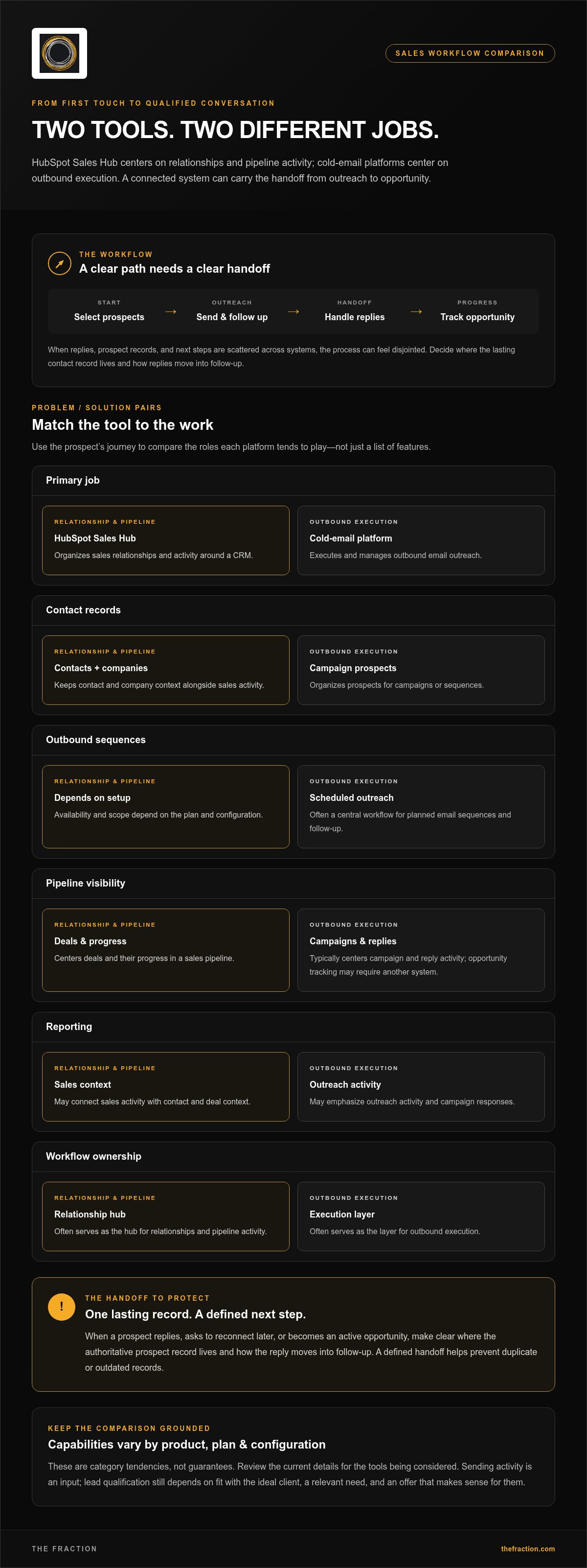
A useful comparison follows the prospect’s journey instead of treating a feature list as the whole sales system. The categories have different centers of gravity, and the capabilities below are tendencies, not guarantees: specific features and integrations vary by product, plan, and configuration, so review the details for the tools you’re considering.
| Sales workflow area | HubSpot Sales Hub tendency | Cold-email platform tendency |
|---|---|---|
| Primary job | Organize sales relationships and activity around a CRM. | Execute and manage outbound email outreach. |
| Contact records | Maintain contact and company context alongside sales activity. | Organize prospects for campaigns or sequences. |
| Outbound sequences | Availability and scope depend on plan and setup. | Often a central workflow for scheduled outreach and follow-up. |
| Pipeline visibility | Center deals and their progress in a sales pipeline. | Typically center campaign and reply activity; opportunity tracking may require another system. |
| Reporting | May connect sales activity with contact and deal context. | May emphasize outreach activity and campaign responses. |
| Workflow ownership | Often serves as a relationship and pipeline hub. | Often serves as an outbound execution layer. |
Think of the CRM as the master ledger and the campaign tool as the dispatch desk: both hold useful information, but you need to decide where the authoritative prospect record lives. For consultants, this matters when a recipient replies, asks to reconnect later, or becomes an active opportunity. If the reply stays in one system while the deal progresses in another, a clear handoff and a process for preventing duplicate or outdated records keep the work on track.
Which tool gives you the clearer view of prospects and opportunities?
A CRM record is designed to hold relationship context, while an outbound campaign or sequence record tends to show what happened during outreach. That difference shapes the path from targeted prospect to booked conversation and qualified opportunity. Decide which system owns the lasting contact record, what information needs to move across tools, and who updates the opportunity after a response. Since synchronization behavior varies, test the integration and duplicate-handling process before you rely on it.
How do automation, personalization, and reporting differ?
Sequences make outreach repeatable, while broader sales tracking can connect follow-up activity to a contact or opportunity. The principle of sales automation is useful here: automate repeatable work while keeping the process accountable to its purpose. Personalization still starts with thoughtful targeting and a relevant message, with software supporting that discipline rather than supplying it.
Read outreach metrics as indicators, not the final score. Sends, replies, and booked conversations can show where a campaign needs attention, while qualified conversations and viable opportunities tell you whether the sales motion is serving the business. If you’re shaping that process alongside your offer and audience definition, client-acquisition system design can help connect the workflow to the work you want it to support.
When should a consultant choose one platform or connect both?
Choose the setup that matches the work you can reliably run today, then let real conversations show you where the process needs more support. In the hubspot sales hub vs automated cold email platforms decision, outreach volume, relationship complexity, and your capacity to maintain the workflow matter more than owning the broadest stack. Automation can make relevant outreach more consistent, but your targeting and message still need a human point of view.
| Setup | Best fit | Advantages | Trade-offs |
|---|---|---|---|
| CRM-first | A consultant managing inbound interest, referrals, and a growing set of active relationships. | One central place for contact context, follow-up, and opportunity tracking. | May offer more outreach capability than a simple process needs, depending on plan and configuration. |
| Cold-email-first | A focused outbound motion where initiating conversations is the immediate priority. | Dedicated tools can make planned email outreach and follow-up easier to run consistently. | Relationship history and opportunity progress may need a separate home as conversations develop. |
| Connected stack | An established outbound process alongside ongoing relationship management. | Can assign outreach and pipeline work to tools suited to each task. | Requires clear ownership, tested data flow, and capacity to maintain the handoff. |
When can one platform be enough?
For a solo professional with a clear audience and a manageable outreach process, one well-configured platform can be the cleanest starting point. Think of it like a small, capable workshop: keep the tools you use close, and bring in more elaborate machinery when the job calls for it. Prioritize capabilities you’ll actually use, along with a reliable contact record, a visible next step, and follow-up you can sustain.
Run the workflow with real prospects and note where friction appears. Are you losing context after a reply, struggling to track active opportunities, or looking for a more repeatable way to manage outreach? Those specific gaps show you what capability to add, instead of leaving you to guess from a long feature list.
When does a connected CRM and outreach workflow make sense?
A connected setup becomes useful when outbound execution and long-term relationship management have different demands, and you have the capacity to keep the handoff orderly. Map it like a relay: select a prospect, send relevant outreach, handle the reply, qualify the fit, then create or update the CRM opportunity when the conversation merits active follow-up. Decide which system owns each record and what information needs to travel with it.
Before building around an integration, review the connection options, synchronization behavior, and plan requirements for the specific products you’re considering. A thoughtful AI-driven lead-generation strategy starts with audience and offer fit, then gives automation a clear job in the process.
Use this five-step framework to select your sales technology
Software decisions get easier when you treat them like a blueprint for the work, rather than a shopping list of features. Before comparing the hubspot sales hub vs automated cold email platforms, write down how a prospect moves from your ideal-client definition to a first conversation and opportunity follow-up. Then use that journey to decide what the system needs to support, who’ll maintain it, and what deserves a place in the workflow.
Map the sales process before comparing software
Start with the work itself. For each step, define the audience, offer, outreach trigger, follow-up rhythm, qualification signal, and next action. For example, a relevant reply might prompt a personal conversation, while a clear fit and stated need could signal that it’s time to create an opportunity record. Keep the sequence specific to your process, so automation has a useful role from the outset.
- Define the sales outcome. Name the result you need the technology to support, such as starting relevant conversations, keeping follow-up visible, or tracking qualified opportunities. A clear outcome helps you separate useful capability from attractive extras.
- Map the workflow. Trace the journey from prospect selection through outreach, response handling, qualification, and opportunity follow-up. Note who owns each action, even if you’re currently the only person responsible.
- Identify the system of record. Decide where authoritative prospect and opportunity details live, when a record is created, and which system owns updates as the relationship develops. This is the backbone that keeps context from drifting.
- Check integration needs. If more than one tool is involved, define what information must move between them and how you’ll handle duplicate or incomplete records. Review current integration behavior and plan requirements before designing the workflow around them.
- Test a small process. Run a focused workflow using representative prospects and realistic message scenarios. Check record accuracy, reply handling, task ownership, and whether the next step is easy to see before expanding automation.
Run a focused test and assess the handoff
During the test, keep a simple record of where the process feels smooth and where it needs attention. Can you find the prospect’s context after a reply? Is it clear who follows up when someone asks to reconnect later? Does a qualified conversation become visible as an opportunity in the place your process depends on? These checks reveal practical gaps that a feature comparison alone can miss.
Separate essentials from preferences, too. Accurate records, clear ownership, and dependable follow-up are foundational; a more elaborate workflow can wait until experience shows you what’s missing. Data hygiene and ongoing maintenance belong in the decision from the start, because even a capable setup needs someone to keep its records and handoffs useful.
That’s the disciplined way to choose: define the outcome, map the work, assign record ownership, verify the connections, and test before scaling. For a system built around your offer and lead-generation workflow, explore AI-driven lead-generation systems.
Build a connected lead-generation system around the software you choose
Software is infrastructure, the frame and wiring that support your sales process, while your offer, audience fit, and follow-up design determine how that infrastructure works. So the choice between hubspot sales hub vs automated cold email platforms becomes more useful when you look beyond the tool and connect the whole journey: who you target, what you say, how you handle a response, where you track the opportunity, and what you learn from the market.
What should the system connect beyond the software?
Begin with a clear picture of your ideal client and the outcome your offer helps them pursue. That definition gives targeting its compass and gives outreach a reason to feel relevant, because a message grounded in a real business concern can open a thoughtful conversation rather than add another touchpoint to someone’s inbox.
Then build the path forward around a low-friction sales process. A prospect responds, you understand their situation, assess whether the work fits, and agree on a sensible next step. Your software can support the handoffs, while a playbook or documented workflow helps you respond consistently and keep the conversation human. That combination matters for independent professionals, who need a system that supports their expertise and makes each interaction feel natural rather than turning it into a hard sell.
As the practice develops, retained systems, automations, and documented workflows can provide continuity. They preserve the logic behind your targeting, follow-up, and opportunity tracking, so you can refine the process with market feedback instead of rebuilding from memory. The system becomes a learning loop: outreach prompts conversations, conversations reveal what resonates, and those insights inform the offer and the next iteration of your approach.
How can The Fraction support implementation?
The Fraction’s done-with-you model co-builds a consulting practice from offer development through delivery, including lead-generation infrastructure, automation setup, playbooks, and a systematized sales funnel. The focus is the architecture of the acquisition process, with software chosen to serve that workflow.
The work can also include a custom proof-of-concept call, with interviews with 10 industry leaders using a provided framework. That research helps ground the business build-out in market conversations, while the broader process connects the offer, acquisition system, and sales process into a working structure. Clients retain their systems, automations, content, and infrastructure, giving them an asset they can continue to use and develop.
So here’s the practical conclusion: choose tools that fit the sales motion, then make the offer, targeting, outreach, and follow-up work together like parts of one well-designed operating system. If you’re ready to shape that foundation, explore sales automation for professional services.
Build the sales system your next chapter needs
Your sales system should give your expertise room to travel further, with each useful conversation helping you sharpen how you explain the work you do and who it serves. So treat hubspot sales hub vs automated cold email platforms as one decision inside a larger professional design: the aim is a client-acquisition process you can understand, own, and keep improving as your practice grows.
That kind of foundation takes more than switching on software. It asks you to bring your experience, market perspective, and business-development choices into one practical structure, so outreach feels purposeful and follow-up feels natural. With the right support, you can shape the system around your expertise and build confidence in how you create new client relationships.
Build from what you know, stay curious about what the market teaches you, and give your expertise a clear path to the right conversations.
Frequently Asked Questions
Is HubSpot Sales Hub a cold-email platform?
HubSpot Sales Hub is primarily a CRM-centered sales platform, with outreach capabilities that depend on the product plan and setup. Some plans include sequences, while dedicated high-volume cold outreach is a distinct use case. Think of Sales Hub as the relationship desk, with selected outreach functions alongside it. Before building a campaign around those features, review their current availability and whether they suit your sending workflow.
Can HubSpot Sales Hub and a cold-email platform work together?
Yes, they can work together when the specific products, plans, and integration support the workflow you need. For example, an outbound tool could manage a prospect’s campaign activity, while HubSpot holds the contact and deal context after a reply signals a real conversation. Before launch, test how fields, replies, and status changes sync, and decide which platform owns the definitive record so updates stay clear.
Which is better for a consultant: HubSpot Sales Hub or cold-email software?
The better fit depends on where your client-acquisition process needs support. If referrals and ongoing relationships create most opportunities, a CRM-centered setup may give you the clearest view of follow-up. If initiating outbound conversations is the central need, dedicated email software may fit that task. The hubspot sales hub vs automated cold email platforms choice becomes easier when you define your outreach motion and the work you can consistently maintain.
Do cold-email platforms replace a CRM?
Usually, a cold-email platform serves a narrower role than a CRM, focusing on prospect lists, campaigns, and outreach activity. Some tools also offer CRM functions, so assess each product’s capabilities against your relationship-management needs. Consider what happens after a prospect replies: can you track conversations, decisions, and future follow-up in a way that remains useful as the relationship develops? Evaluate those needs against the specific product.
How do I keep prospect records consistent across sales platforms?
Choose one system as the authoritative home for contact and opportunity details, then define which fields must match elsewhere. For example, agree on how you’ll record a prospect’s email, company, outreach status, reply date, and next action. Test what happens when either system changes, and decide how your process handles duplicates or conflicting updates. A short, regular record review can catch inconsistencies before they disrupt follow-up.
What should I define before automating cold outreach?
Define who you’re contacting, why your offer may fit their situation, and what makes a response worth pursuing. Then decide what event starts outreach, what follow-up makes sense, how you’ll recognize a qualified conversation, and who owns the next action. A useful test is whether you can explain the relevance of a message in plain language. That clarity gives automation a deliberate job and helps you learn from replies.


