

The tool with the longer feature list can still be the wrong first move, because prospecting works more like a pipeline than a bucket for collecting names. If you’re weighing phantom buster vs clay for linkedin prospect scraping, start with the job you need done: PhantomBuster is associated with sourcing prospects from LinkedIn activity, while Clay is used to enrich and organize records you already have. More data can feel like progress, but a pile of incomplete or poorly matched records leaves you sorting through names instead of deciding who’s worth approaching.
So the choice comes down to your workflow, the information you need, and the time you can give to setup and review. This comparison looks at where each tool may fit, what to consider when assessing prospect records, and when using both could make sense. More importantly, it connects tool choice to the wider process, from defining your target and reviewing records to building a thoughtful path toward a stronger client-acquisition system.
Key Takeaways
- Define your target market and the prospect information you need before building a workflow, so the records you collect are useful for making decisions.
- Separate the jobs of gathering prospect data, enriching records, and planning follow-up before choosing tools.
- Use the phantom buster vs clay for linkedin prospect scraping comparison to match each platform to your sourcing, enrichment, and workflow needs.
- Build in review points to assess prospect fit and record quality before information moves into follow-up.
- Connect your tool setup to a clear offer and considered sales process, so prospecting supports a repeatable client-acquisition system.
PhantomBuster vs Clay for LinkedIn prospect scraping: what decision are you really making?
Look, the real decision is which workflow helps you move from a defined target market to prospects you’ve actually reviewed, because a long list can look like momentum while leaving the hardest question unanswered: who fits? That’s the practical question behind phantom buster vs clay for linkedin prospect scraping: do you need help finding people, adding context to records, or coordinating those steps in a process you can manage?
Prospect scraping generally means gathering information from profiles or search results. Finding people who appear to match your target is one step, capturing relevant fields is another, and enrichment adds context to a record. Outreach comes after you’ve assessed whether someone belongs in the conversation. LinkedIn gives this work a professional setting, and its overview describes it as a business and employment-oriented social networking service.
What does LinkedIn prospect scraping include?
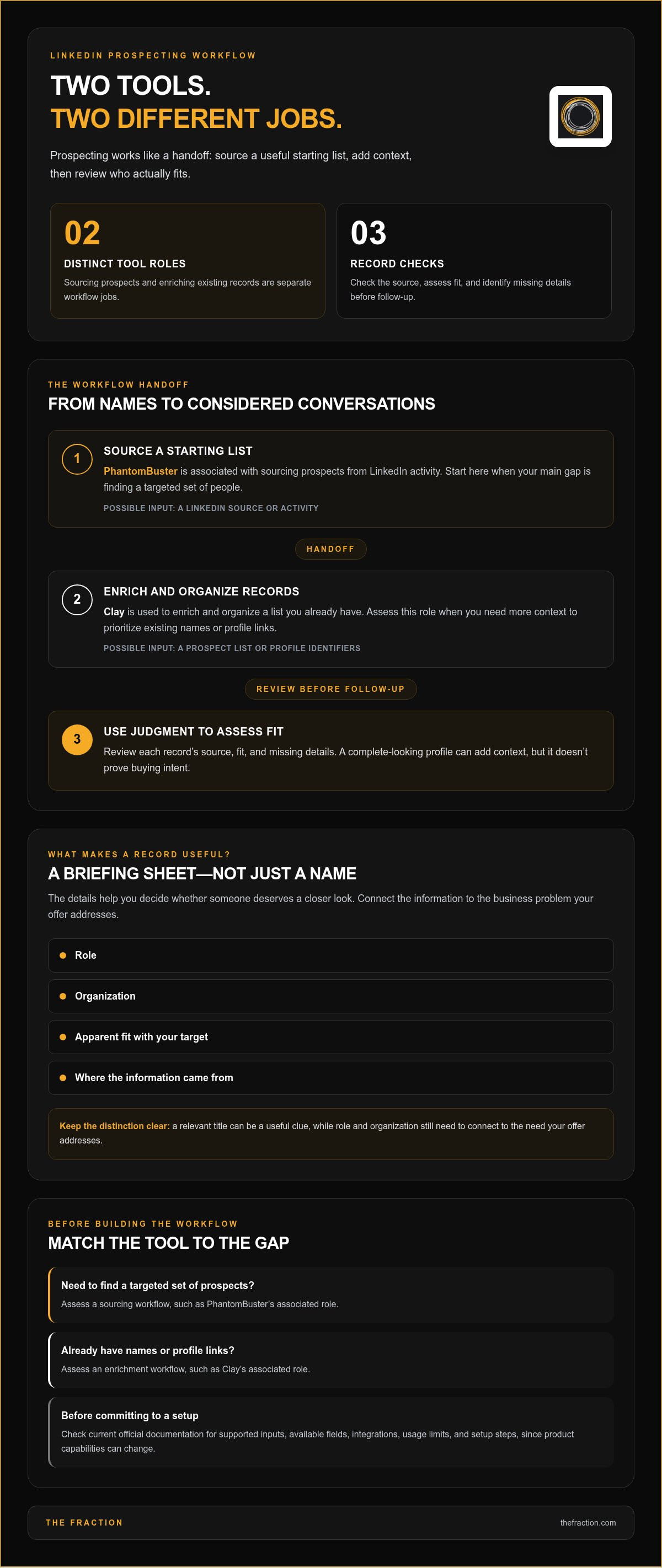
Think of each record as a small briefing sheet, with the details you need to decide whether a person deserves a closer look: role, organization, apparent fit with your target, and where the information came from. Those fields give you something concrete to review, but they don’t prove buying intent. A profile might show a relevant title, for example, while you still need to connect that person’s role and organization to the business problem your offer addresses.
Where do PhantomBuster and Clay sit in the workflow?
At a high level, PhantomBuster is associated with sourcing prospect lists from LinkedIn activity, while Clay is used to enrich and organize lists you already have. They sit at different points in a process, so compare them by looking at what you’re starting with and what you need at the end. Product capabilities, integrations, limits, and setup steps can change, so review current official documentation before you build an operating process around a specific function.
If your immediate gap is finding a targeted set of prospects, assess a sourcing workflow first. If you’ve already gathered names or profile links and need more context to prioritize them, assess an enrichment workflow. Either way, decide which fields will support a sound sales decision before choosing how to gather them. It’s like preparing a briefing for an important conversation: the raw details matter, but context is what helps you use them well.
Collecting records gives you a starting list; adding relevant context helps you decide which prospects deserve a sales conversation. Your judgment remains part of the process, because role, organization, and potential need all have to connect to your offer. Compare the tools by their inputs, outputs, workflow control, and the review work you’ll own, so the process helps you make a decision rather than simply generating more activity.
How PhantomBuster and Clay handle LinkedIn prospecting workflows
Think of the workflow as a handoff between two kinds of work: first, assemble a useful starting set; then, add enough context to decide what deserves attention. PhantomBuster is associated with sourcing LinkedIn prospects, while Clay is associated with enriching and organizing an existing list, so the sequence depends on where your process needs the most support. Product functions, integrations, and usage limits can change, so review current documentation before setting up a workflow.
Inputs: PhantomBuster workflows may begin with a LinkedIn source or activity; Clay workflows may begin with a prospect list or identifiers such as profile URLs. Check the current requirements for each.
Outputs: PhantomBuster can support prospect sourcing, while Clay can add context to existing records through data-provider workflows. Check which fields are currently available.
Setup and review: Configure the selected workflow, then assign someone to check each record’s source, fit, and missing details.
Intended role: Assess PhantomBuster for sourcing and Clay for enrichment, then match each role to the stage your process needs.
PhantomBuster's role in a LinkedIn data workflow
PhantomBuster is associated with sourcing prospects from LinkedIn activity, and available automations and supported inputs can change. Illustrative workflow, verify current product documentation: choose a relevant audience or activity source, configure an appropriate sourcing automation, and review the resulting records for role, organization, and fit. Before relying on a specific automation, integration, or limit, check the current documentation and confirm that its output supports your review process.
Clay's role in prospect research and record workflows
Clay’s workflow starts with a prospect list and can use data-provider workflows to enrich records. Illustrative workflow, verify current product documentation: bring in a list with profile identifiers, add context using currently supported options, and review the fields before assigning a fit or follow-up priority. Enrichment can make a record more informative, but your judgment connects that information to your offer and decides what action makes sense.
Here’s where human judgment matters: a profile may show the right title and organization, but the context behind that match may still need a closer look. Review the source, fill gaps where appropriate, and mark uncertain fits for further review. A complete-looking record earns its place in the process through context, rather than moving forward simply because its fields are populated.
There’s a platform-policy step to build into your workflow, too. LinkedIn's User Agreement outlines restrictions on scraping and automated data collection. Read the current terms and consider your intended use before applying automation to LinkedIn data, so your operating plan accounts for the platform’s stated requirements as well as the work a tool can perform.
So, for the phantom buster vs clay for linkedin prospect scraping decision, start with the input you have, the output you need, and the review your process requires. If you’re shaping those steps into a client-owned lead-generation and sales process, explore how automated lead-generation systems fit into a broader business-development workflow.
PhantomBuster vs Clay: compare fit, data quality, and operating effort
Start with the work you need done, because a tool can run a repeatable process while your team still owns the decisions that make a prospect relevant. For phantom buster vs clay for linkedin prospect scraping, assess the target source, fields needed for qualification, repeatability, review effort, and how records move into the next sales step. Treat the product-specific descriptions below as starting points, then check current capabilities in each tool’s documentation.
| Decision criterion | PhantomBuster | Clay |
|---|---|---|
| Target source | LinkedIn activity or prospect sources may support sourcing; check current documentation. | An existing list or prospect identifiers may support enrichment; check current documentation. |
| Field needs | Assess whether its current workflow captures the fields you need; verify. | Assess whether its current enrichment workflow can supply relevant context; verify. |
| Repeatability | Review current automation options and setup requirements; verify. | Review current workflow options and setup requirements; verify. |
| Review effort | Plan to check source, fit, missing details, and duplicates. | Plan to check enriched fields, fit, missing details, and duplicates. |
| Handoff | Confirm current export or integration options before designing the handoff; verify. | Confirm current export or integration options before designing the handoff; verify. |
Which tool fits a defined prospecting use case?
Start with the shape of the work. A focused profile list calls for a clear source and dependable capture of the fields you’ll review. A research-heavy process calls for more context on records you already have. A repeatable data process calls for a workflow you can maintain and an owner who can check its output. Match each requirement to current documented capabilities, and verify the specific setup before committing.
Target clarity changes what automation can do for you. If your buyer role, organization profile, and offer relevance are still fuzzy, automation can repeat a fuzzy search at scale. Once those criteria are defined, a repeatable workflow can support consistent collection or enrichment, while your review decides whether a record belongs in the next stage. The tool carries the materials; your strategy draws the map.
How should teams assess data quality and upkeep?
Choose fields that support a real qualification decision, such as role, organization, source, and context connecting a prospect to your offer. Then set a review routine for duplicates, missing information, and records that no longer match your target. A fuller profile can still leave the main question unanswered: does this person’s situation make your offer relevant?
Build maintenance and handoff into the workflow, too. Decide who owns the process, who reviews its output, and what happens when a record is incomplete. Data handling deserves deliberate attention; LinkedIn’s Data Privacy Framework participant listing provides information about its certification status. Review applicable policies and requirements for your intended use before designing the process.
Decision rule: choose the workflow whose verified inputs and outputs match your target and field requirements, then account for the human review and upkeep needed before handoff. Software can organize prospecting, but offer-market fit still calls for strategy: a clean record can’t make an unclear offer compelling. Keep the tool in its proper place in the system, and the choice becomes less about a universal winner and more about the workflow you can operate with care.
Build a LinkedIn prospect-scraping workflow that leads to qualified conversations
A useful workflow starts before you open a search tool, because automation takes its direction from the target and offer behind it. Begin with the business problem you solve, the buyer role connected to that problem, the kind of organization where it matters, and the relevance of your service. With those pieces in place, each profile has a reason to enter your process, and each review has a clear standard.
Set targeting criteria before automating
Define a focused segment around relevant roles, organization characteristics, and business needs, then translate those criteria into an appropriate LinkedIn Sales Navigator search. Search controls can change, so check current Sales Navigator features before naming filters or building steps around them. Keep your offer at the center: you’re looking for people whose context makes your service relevant, so every criterion should connect to the value you provide.
- Define the problem and offer. Describe the business issue you address and the outcome your service is designed to support. This gives your targeting process a clear anchor.
- Describe the buyer and organization. Specify the role, organization profile, and business need that make a prospect worth reviewing. Clear criteria support consistent decisions.
- Translate the criteria into a search. Use current Sales Navigator capabilities to locate a focused segment, and verify the available controls before documenting the process.
- Gather and organize records. Choose a sourcing or enrichment workflow based on the information you need, and retain the source alongside relevant role and organization fields.
- Review before follow-up. Have a person assess fit, context, and information gaps. A matching title is a useful signal, while the reviewer connects the person’s role and organization to the problem your offer addresses.
- Plan the next step and learn from it. Assign ownership, record the review status, and use what you learn from conversations and responses to refine your targeting criteria.
Review, organize, and route prospect records
Give each record a consistent structure, such as segment, role, organization, source, owner, and review status. A simple naming convention helps everyone find information in the same place, while a quality-control pass can surface duplicates, missing context, and prospects whose details have changed. Keep records that need more context in a separate review status until someone can make a considered fit decision.
Then connect approved records to a follow-up process with clear ownership and a relevant next step, so outreach feels like a thoughtful continuation of the conversation you want to have. Prospecting tools sit within a broader automated lead-generation strategy, where targeting, offer clarity, and sales follow-through work together. Use responses and conversations as feedback, then refine your audience or message with care.
Turn the PhantomBuster-versus-Clay decision into a complete client-acquisition system
A tool comparison can reveal a bigger design question: how do targeting, your offer, prospect review, and follow-up fit together? If your target keeps changing, records arrive in different formats, or outreach feels disconnected from the service you sell, the missing piece may be the system around the software. Think of the tools as parts of an engine…they can help move work along, but direction comes from a clearly defined ideal client profile and a compelling offer.
When a tool comparison reveals a system-design problem
Start with the business problem you solve, the buyer role that experiences it, and the organization where your service makes sense. Then shape that into a focused, productized service with a clear outcome, so your targeting criteria and follow-up have something specific to connect to. That foundation makes the phantom buster vs clay for linkedin prospect scraping decision more practical, because you can assess each workflow against a real acquisition process instead of a feature checklist.
For fractional leaders, prospecting is one part of building a sustainable pipeline, alongside positioning, offer development, and thoughtful conversations. A related guide to lead generation for fractional leaders can help frame the wider strategy; here, keep the focus on how your targeting and offer work together, then choose technology that supports that process.
What a done-with-you build-out contributes
A done-with-you build-out brings the moving pieces into one working structure, from offer development through lead-generation setup, sales process, and delivery. The work includes mapping a target market, configuring relevant automation, and helping you understand how the workflow operates, so you can manage the infrastructure as part of your own business. LinkedIn Sales Navigator targeting and automation configuration are part of the setup, with you retaining control of your account.
That ownership matters. Your systems, automations, content, and infrastructure remain yours, while the work is configured and taught collaboratively rather than built around someone else taking over your LinkedIn account. The objective is a process you can understand and operate, with a considered sales approach that feels like a natural extension of your offer, not a disconnected sequence of automated steps.
So if the comparison has shown you that the real challenge spans targeting, offer clarity, and follow-through, take a look at the broader lead-generation and sales system support. The Fraction works alongside experienced professionals to build business-development infrastructure, connecting technology to a clear market, a relevant service, and a sales process that feels human. The tool decision becomes one deliberate choice inside a system you own and can keep refining.
Build a prospecting system you can grow into
The next step is to choose a workflow you can operate consistently, then improve it as you learn which prospects connect with your offer. That’s the real value of the phantom buster vs clay for linkedin prospect scraping decision: it gives you a starting point for building a client-acquisition system around your expertise, rather than leaving prospecting as a stack of disconnected tools and tasks.
If you’re shaping your experience into a consulting business, The Fraction provides done-with-you support to build the business and its client-acquisition system. LinkedIn Sales Navigator targeting and automation setup can be part of that work, connecting the technology to your offer and the way you want to work with prospective clients.
You’ve already got valuable expertise; with a deliberate process behind it, you can take the next step toward a business-development system that feels clear, considered, and truly your own.
Frequently Asked Questions
Is PhantomBuster or Clay better for LinkedIn prospect scraping?
Neither is universally better; the stronger fit depends on the job you need the workflow to do. For phantom buster vs clay for linkedin prospect scraping, compare both against one defined audience and a sample of the fields your sales process needs. Then assess setup effort, record usefulness, review time, and handoff. A small, clearly scoped test can show whether a workflow supports your process before you build around it.
Can Clay scrape LinkedIn profiles?
Clay’s current LinkedIn-related capabilities depend on its documented features and integrations, so check its official product documentation before treating a workflow as profile scraping. Separate finding a person, collecting profile information, and enriching an existing record, since these steps can rely on different inputs and sources. For a practical check, trace one sample record from its starting identifier through each step, then review where each field came from and what still needs human verification.
Can PhantomBuster work with LinkedIn Sales Navigator?
Check current PhantomBuster documentation for the specific Sales Navigator workflow you have in mind, since supported inputs and processes can change. Before building around it, write down the search or list you expect to use, the output fields you need, and the review step that follows. That gives you a concrete way to assess operational fit and avoids planning your process around an assumed integration or capability.
Do I need both PhantomBuster and Clay for LinkedIn prospecting?
You may need both if your process has separate sourcing and enrichment needs, but a single-tool workflow can be enough when it covers the required steps. Map the process first, from where prospects come from to what information you need for a useful decision. Add another platform when its verified capability fills a specific gap and the extra setup and maintenance suit your workflow.
Is LinkedIn prospect scraping the same as LinkedIn outreach automation?
No. Prospect scraping generally refers to collecting data, while outreach automation concerns communication tasks, and each stage calls for its own review. For example, a profile record might be gathered and checked by a person before anyone decides whether and how to follow up. Define the exact tasks in your process, verify the tools’ current functions, and make sure the eventual message has a clear connection to the recipient and your offer.
How do I improve the quality of LinkedIn prospects from either tool?
Define what a strong-fit record should show before you collect or enrich data. For instance, decide which buyer roles and organization characteristics connect to your service, then create a review status for records that need more context. After follow-up, look for patterns in which segments lead to relevant conversations and refine your criteria accordingly. That feedback loop keeps automation in service of judgment and a clearer offer.


