

The better warmup feature can still be the wrong fit for the outreach system you’re building, because mailbox readiness is only one part of getting a campaign off the ground. If plan pages and feature lists leave you wondering which differences will shape your day-to-day work, the question of mailshake vs smartlead for cold email warmup deserves a closer look.
Both platforms offer warmup, but their current plan setups differ: as of October 2026, Mailshake includes unlimited warmup on paid plans, while Smartlead includes it on higher-tier plans and offers it as a paid add-on on Base and Pro. That’s a useful starting point, but mailbox volume, campaign workflow, and the need for a broader sales-engagement system matter just as much. This comparison will help you weigh those practical trade-offs, plan for new or underused mailboxes, and see where each tool fits in a client-acquisition process built around a clear offer and deliberate outreach.
Key Takeaways
- Separate mailbox warmup from campaign sequencing and contact discovery so you can judge what each tool actually supports.
- Use mailshake vs smartlead for cold email warmup as a practical comparison of mailbox needs, campaign workflow, and team operations, not just feature lists.
- Match the platform to your sending setup and daily workflow, then test how its controls fit the way your team works.
- Review current plan terms and product documentation before committing, since feature access and platform details can change.
- Build around more than software: align your target audience, compelling offer, automation, and sales process into one acquisition system.
What cold email warmup does, and what it can’t settle for Mailshake vs. Smartlead
Choosing a warmup feature is one part of the decision, because mailbox readiness also depends on the wider sending setup. Think of warmup as preparation for takeoff, while domain and mailbox configuration, campaign design, and message relevance help shape the flight. In the mailshake vs smartlead for cold email warmup comparison, the useful question is what role warmup plays and how the rest of your process supports a responsible launch.
What does cold email warmup mean in practice?
Cold email warmup is the gradual establishment of ordinary sending activity for a mailbox before it handles a larger volume of outreach. Its purpose is to build a sending history over time, so the mailbox moves toward campaign activity in a measured way. Warmup prepares a mailbox; campaign sequencing organizes messages and follow-up timing, while contact discovery identifies potential prospects.
Each activity has a separate job: warmup supports mailbox preparation, sequencing organizes outreach, and contact discovery helps identify who may be a fit. Picture a runway supporting an aircraft as it prepares for launch; the runway helps the aircraft get moving, but the destination and passenger list come from other decisions. Likewise, warmup supports preparation, while relevant messaging and appropriate prospect selection guide the campaign.
If you’re refining the outreach itself, What is cold email? offers foundational context on the purpose of cold email. The practical point is simple: a prepared mailbox works best when there’s a clear reason to contact a specific person.
Why warmup isn’t a deliverability guarantee
Delivery outcomes reflect a wider environment than one platform feature. Mailbox and domain configuration, sending patterns, recipient relevance, message content, and recipient responses all contribute to how outreach performs. Warmup supports mailbox preparation, while campaign quality and sending practices influence delivery, inbox placement, and replies. A strong offer and a well-matched prospect list give the message a clear purpose.
Assess warmup claims alongside the sending process you plan to run. Consider whether your setup fits its intended use, whether your volume is deliberate, and whether your audience and message make sense together. Then assess platform controls in that context, treating warmup as one part of a considered readiness plan.
- Mailbox preparation: Builds activity gradually.
- Campaign readiness: Reflects setup, volume, audience, and message.
- Campaign results: Require evaluation of the full process.
Carry this lens into the Mailshake and Smartlead comparison: warmup is one component of the outreach system, and the right fit depends on the work the whole system needs to support.
How Mailshake and Smartlead approach cold email warmup
Now that warmup has its proper place in the wider sending setup, the comparison gets more practical: what access does each platform report, how does that fit with mailbox connections, and does the surrounding workflow match the way your team runs outreach? Think of it like choosing a cockpit, not just a single instrument. Warmup matters, but so do the other controls you’ll use every day.
Mailshake warmup: assess the current workflow
Mailshake’s reported approach places warmup inside a broader sales-engagement platform, where email outreach sits alongside other sales channels. That can suit a team looking to coordinate prospecting within one workflow. Product materials have reported warmup access across paid plans, while the number of sending accounts varies by plan. Review current documentation for the precise access and controls available to your account.
Smartlead warmup: assess access and operating needs
Smartlead presents warmup as part of a cold-email-focused sending workflow, with AI-powered warmup reported and access dependent on plan or add-on. Its mailbox connection model has also been reported as broader than a fixed per-plan sending-account limit. Treat both points as details to verify in current plan terms, then consider whether the operating model fits your team’s volume and workflow.
Reported distinction: Mailshake bundles warmup within its paid sales-engagement plans, while Smartlead’s warmup access is reported as plan-dependent, so compare the current plan terms before deciding. That captures the reported access difference; deliverability and platform fit also depend on your sending setup and team workflow.
| Comparison point | Mailshake | Smartlead |
|---|---|---|
| Access model | Warmup is reported as included on paid plans; review current terms. | Warmup is reported as plan-dependent; review whether it’s included or an add-on. |
| Controls | Review the current warmup settings and account-level controls. | Review the current warmup settings and any adaptive controls offered. |
| Workflow fit | May suit teams bringing email into a broader sales-engagement workflow. | May suit teams centered on dedicated cold-email sending operations. |
| Details to review | Plan access, sending-account limits, and how warmup fits campaign management. | Warmup access, mailbox connections, and how warmup fits campaign management. |
Use the table as a decision map. Warmup availability, mailbox counts, campaign management, and team workflow are separate dimensions, each addressing a different operating need. A team coordinating email with other sales activity may value the surrounding workflow, while an operation built around multiple mailboxes may prioritize how account connections and warmup access scale together.
Keep the technical foundation in view as well: warmup operates alongside authentication and sender-reputation practices, as outlined in Email authentication and sender reputation. If software is one part of a larger acquisition engine, building a lead-generation system around automation can help connect the platform to targeting, offer clarity, and sales workflow.
Mailshake vs. Smartlead: compare warmup against your outreach requirements
For this decision, picture your outreach as a working operation, with mailbox needs, campaign coordination, and team workflow all shaping the setup. In the mailshake vs smartlead for cold email warmup comparison, those operating requirements are the map; warmup access is one marker on it.
The table separates reported product details from interpretation about fit. Plan information can change, so treat the access details as a snapshot of current published plans as of October 2026, then review the terms that apply to your setup before you commit.
| Decision area | Mailshake | Smartlead |
|---|---|---|
| Mailbox needs | Published detail: Sending-account limits vary by plan. Fit: Consider whether those limits match the number of mailboxes your workflow requires. | Published detail: Plans report unlimited connected email accounts and sender rotation. Fit: This may suit operations organized around multiple mailboxes. |
| Warmup access | Published detail: Unlimited warmup is reported on paid plans. Fit: Review the controls available for your account and how they fit your preparation process. | Published detail: Warmup is included on Unlimited Smart and Unlimited Prime, and reported as an add-on on Base and Pro. Fit: Factor access into the plan comparison. |
| Campaign workflow | Published positioning: Sales engagement across email, phone, and LinkedIn. Fit: May align with teams coordinating several outreach channels. | Published positioning: Focused on cold-email sending. Fit: May align with teams whose operating model centers on email campaigns. |
| Team requirements | Editorial view: Consider how account limits and multichannel coordination work for your team. | Editorial view: Consider whether mailbox operations and plan-based warmup access suit your team’s scale and ownership model. |
When Mailshake may fit the work
Mailshake may fit a team that wants email outreach within a broader sales-engagement workflow, particularly when coordination across channels matters alongside mailbox preparation. Its reported warmup access is broad across paid plans, while the sending-account allowance varies by plan, so match the plan’s account capacity to your mailbox setup and campaign needs before choosing.
When Smartlead may fit the work
Smartlead may fit a team built around cold-email operations and managing multiple connected mailboxes. Its reported mailbox model and plan-dependent warmup access can affect how you evaluate scale and total platform requirements, so compare the current plan terms and controls with the way your team will run campaigns.
Decision rule: Weigh warmup access alongside mailbox scale and workflow complexity: a multichannel sales motion may point toward Mailshake, while a mailbox-centered cold-email operation may point toward Smartlead, depending on current plan fit. The strongest choice supports the full set of tasks your team needs the platform to handle.
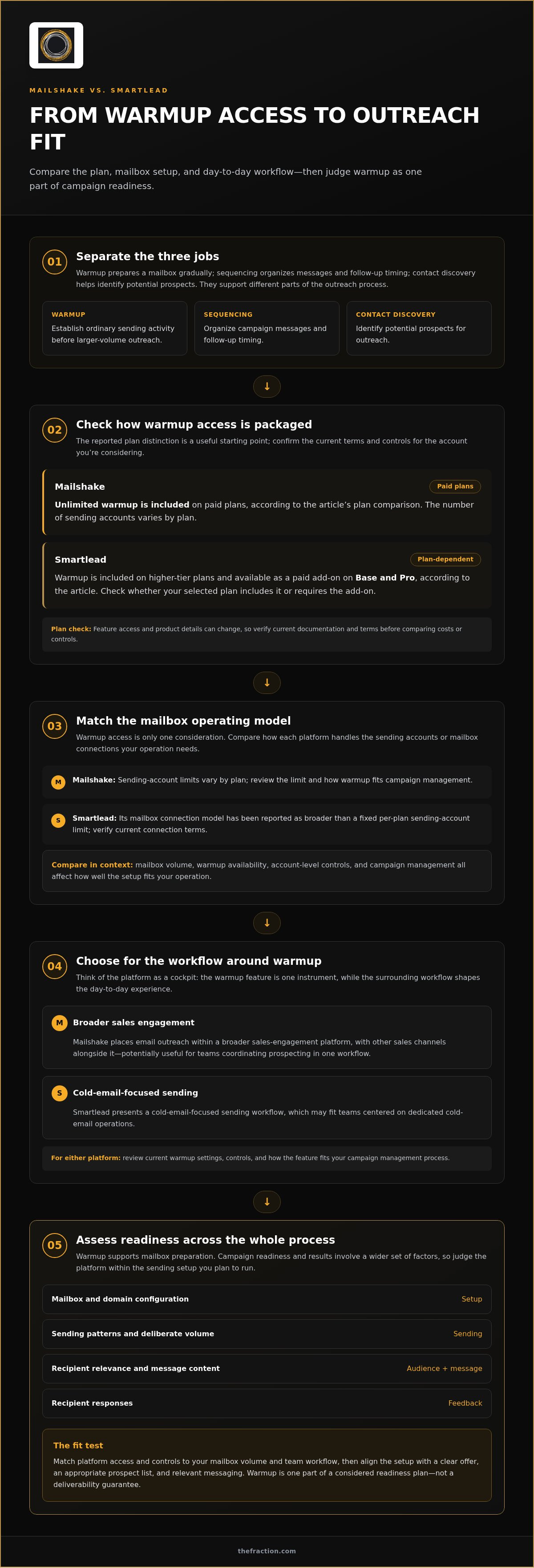
A practical checklist for choosing and operating a warmup setup
Here’s a grounded way to make the decision: treat warmup as one input to mailbox readiness, then work through the sending setup and campaign it’s meant to support. That keeps the mailshake vs smartlead for cold email warmup choice tied to your actual acquisition process, rather than a feature label that looks impressive on a plan page.
- Define your sending needs. List the mailboxes you plan to use, who will manage them, the campaigns they’ll support, and whether email sits alongside other sales activity. A solo operator running a focused campaign has a different operating map from a team coordinating several inboxes and shared workflows, so write down the real requirements before comparing platforms.
- Inspect current features and terms. Compare warmup access, controls, mailbox connections, and campaign tools against your list. Review the current plan page and platform documentation before committing, since access and plan placement can change. Base your decision on what the product materials currently describe, rather than an old comparison or a broad feature claim.
- Test the workflow. Walk through the tasks your team will repeat: connecting the intended mailboxes, setting up warmup, organizing campaigns, and understanding who owns each action. Look for friction between those steps. A feature can be capable on paper but awkward in your daily process, so test the route your team will actually take before building the whole operation around it.
- Review outcomes over time. Track relevant campaign signals across a consistent period, such as bounce patterns, replies, and changes in engagement, and interpret each signal in context. A reply tells you something about response; it doesn’t independently prove inbox placement. Use the pattern to guide investigation and adjustment, rather than treating one metric as a complete diagnosis.
Match warmup access to the mailbox setup
Start with the mailbox inventory, then compare it with documented platform limits and warmup controls. If your plan requires several mailboxes, review how connections and warmup access work together under the current terms; if you’ll manage campaigns as a team, include handoffs and ownership in the test. This inventory keeps the setup grounded in product details and real operating needs.
Review campaign readiness beyond warmup
Before launch, make sure the audience, offer, and message have a clear purpose: who should care, what problem are you addressing, and why is this outreach relevant to them? A structured AI lead-generation strategy can help connect those choices to the wider acquisition goal. Warmup supports preparation, while campaign design gives that preparation direction.
So here’s the practical takeaway: use warmup as one part of a considered sending setup, and let the audience, offer, and operating workflow shape the rest. That’s how you build an acquisition system with clear purpose, instead of asking one feature to carry the whole process.
Build the client-acquisition system around your cold email platform
Once you’ve compared Mailshake and Smartlead, zoom out and look at the whole acquisition path: who you want to reach, what valuable offer gives them a reason to respond, how automation supports consistent outreach, and what happens when someone shows interest. Those pieces work like parts of one engine, and the platform helps run the process you’ve designed. Clear strategy shapes who receives your message and why.
Connect the tool to your offer and audience
For consultants and professional-service teams, mailbox setup makes more sense after you’ve defined the people you serve and the value you bring. Start with a specific ideal client, a problem your service addresses, and a message that makes the relevance easy to understand. Then choose sending infrastructure that supports how you’ll reach that audience, instead of letting available features dictate the campaign.
That same clarity should guide what happens after a positive reply. A thoughtful response process gives a potential client room to understand the offer and decide whether there’s a fit, rather than turning every conversation into a hard sell. This consultant sales process framework explores how to handle qualified replies as part of a considered client-acquisition process.
Choose infrastructure that supports a repeatable process
Automation works best as infrastructure beneath a clear operating system: targeting informs the audience, the offer gives outreach a reason to exist, and a structured sales process creates a deliberate next step. Mailshake or Smartlead can support campaign execution, but the choice between them belongs inside that wider design. That’s the useful lens for mailshake vs smartlead for cold email warmup: which platform supports your actual process, and what strategic decisions still need to be made outside it?
The Fraction builds done-with-you lead-generation systems that bring offer development, ideal-client targeting, automation setup, and a systematized sales funnel together. Clients retain ownership of their accounts and systems, while The Fraction configures and trains them on the automation. So the setup becomes part of an operating process you understand and own, rather than a black box that only works while someone else is running it.
Here’s the distinction to make before choosing your next step: if your audience, offer, and sales process are already defined, you may simply need software that fits your workflow. If those pieces still feel disconnected, the bigger opportunity is building the acquisition system around the software, so each part has a clear job.
Set your next outreach decision in motion
Your next move is to decide what kind of foundation your client acquisition needs: a platform that slots into an established process, or a more deliberate build that connects the offer, audience, outreach, and conversations into one operating model. That’s the practical value behind the mailshake vs smartlead for cold email warmup decision, because the tool works best when it has a clear job inside your plan.
If you’re shaping that broader system, The Fraction’s done-with-you work brings offer development, targeting, acquisition, and the sales process into the same blueprint, with automation configured and taught in a way that leaves clients owning their systems. Before payment, the program also includes a custom proof-of-concept call with interviews involving 10 industry leaders, so the proposed direction can be explored against the market.
Choose the next step that fits where you are now, and give your outreach a foundation you can build on with confidence.
A clear system gives every tool a purpose, and you can create that clarity one deliberate decision at a time.
Frequently Asked Questions
Is cold email warmup necessary for every mailbox?
No, the need depends on the mailbox’s history and planned use. A mailbox that already handles regular business correspondence has a different starting point from a new mailbox created for outreach or one that’s been inactive. Before adding a warmup process, consider how the account is currently used and what sending pattern you intend to introduce. That context helps you decide whether warmup belongs in your setup and how cautiously to begin.
Can an email warmup tool fix a poor sender reputation?
No, warmup alone can’t repair an established reputation problem. First look for possible causes, such as a sudden change in sending activity, invalid addresses, weak audience relevance, or authentication problems. Then address the underlying issue and monitor what changes. In the mailshake vs smartlead for cold email warmup decision, treat warmup as one operational tool, not a reputation reset button; adding activity before understanding the problem can make diagnosis harder.
How long should you warm up a new cold email mailbox?
A commonly cited best-practice range for a new domain is two to four weeks of gradual preparation before significant outreach, though the right pace depends on the domain’s history and your sending plan. Think of the timeframe as a planning guide rather than a finish line: increase activity in a measured way, and keep campaign volume deliberate as the mailbox begins outreach.
Can you use Mailshake or Smartlead with Google Workspace or Microsoft 365?
They may work with mailboxes hosted by Google Workspace or Microsoft 365, depending on the connection methods and requirements each platform currently supports. Before connecting an account, review the platform’s integration instructions and your organization’s account settings. For a team-managed mailbox, make sure the person configuring the connection has the required access, and confirm which account will send campaign messages.
Should you run warmup and a cold email campaign at the same time?
For a new mailbox, give preparation priority before introducing significant campaign activity; running both at once can make it harder to understand how the mailbox responds to the added volume. If the account already has an established sending history, any overlap should be deliberate and consistent with the platform’s current guidance. Keep campaign activity measured, and change one part of the setup at a time so you can interpret the results.
Can you warm up the same mailbox in Mailshake and Smartlead at once?
It’s generally better to assign one warmup process to a mailbox at a time. Two platforms acting on the same account could create overlapping activity, making the total pattern harder to manage or interpret. Choose the tool that fits your sending workflow, review its current instructions, and avoid running duplicate warmup settings unless both platforms’ documentation clearly explains how that arrangement works.
Does email warmup guarantee that cold emails land in the inbox?
No, warmup can’t guarantee inbox placement. Providers evaluate messages and sending activity in a wider context, so delivery can vary with factors such as account configuration, audience, content, and recipient response. Use warmup as one part of mailbox preparation, then monitor campaign signals and investigate changes rather than assuming a warmup status confirms where every message landed.


