

The best CRM for fractional executive sales pipelines depends on how you manage client conversations, deal progress, and follow-up. The Pipedrive vs Close decision comes down to which platform puts the controls you actually use within reach.
When you’re balancing several client engagements, opportunities need a clear home, but conversations and next steps can easily get scattered. Choosing between Pipedrive and Close means finding the system that keeps your sales work organized without adding unnecessary admin.
Compare pipeline tracking, sales workflows, communication tools, forecasting, and AI features to see which CRM better supports the way you build relationships and move opportunities forward. Then decide how each might fit the business you’re building.
Key Takeaways
- Choose the CRM around how you manage conversations, follow-up, and active opportunities across fractional engagements.
- Define pipeline stages by what’s happened with the prospect, what information advances the deal, and the next action.
- Compare email, calendar, and proposal workflows to see how smoothly each CRM can support your client conversations.
- Assess reporting and forecasting by whether they give you a useful view of deal progress and potential revenue.
- Weigh AI features and lead-to-deal workflows against the way you want to generate and develop new business.
Visual sales pipeline stages and deal tracking
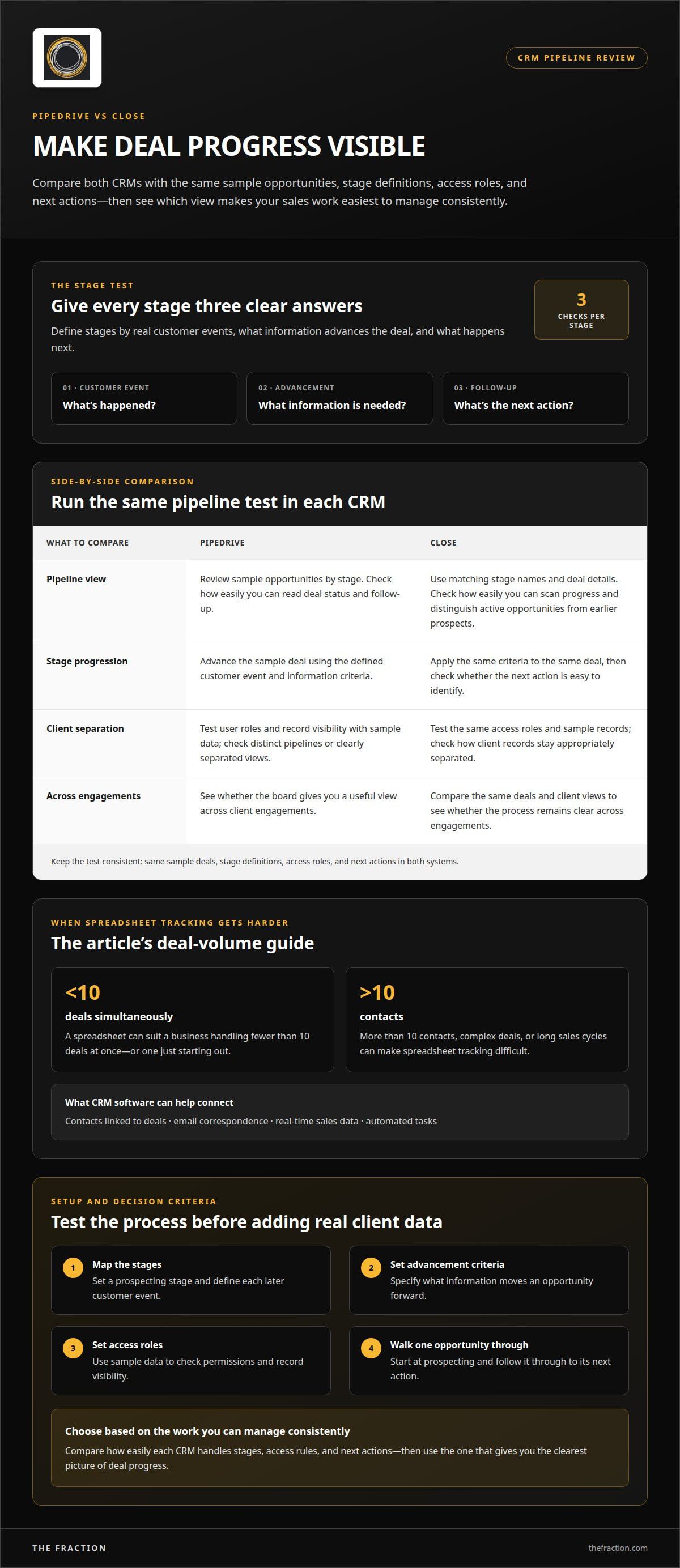
A visual pipeline makes deal progress easier to read when its stages reflect real customer events, so if you’re comparing Pipedrive and Close for fractional executive sales pipelines, put the same sample deals, stage definitions, and next actions into each and see which view gives you the clearest picture of your work.
Pipedrive Visual Pipeline Management
Use a sample opportunity to get a feel for Pipedrive’s visual pipeline and deal tracking…define the customer event for each stage, the information needed to move forward, and the next action. Then see how easily you can read the deal’s status and follow-up, and whether the board gives you a useful view across client engagements.
Customizable Visual Sales Pipelines
Run the same test in Close, using matching stage names and deal details, then compare how easily you can scan progress and distinguish active opportunities from earlier prospects. The comparison should mirror your real process…a clean-looking screen earns its keep when it helps you see what happens next.
Start with a prospecting stage that shows whether an opportunity has earned a place in the pipeline, and for every later stage, define the customer event, the information needed to move forward, and the next action. A spreadsheet can suit a business handling fewer than 10 deals simultaneously or just starting out, but complex or long sales cycles, or more than 10 contacts, can make spreadsheet tracking difficult. CRM software can link contacts to deals, integrate email correspondence, show sales data in real time, and automate tasks.
Security and permissions: Treat client data as separate records with carefully managed access, and test each CRM’s user permissions and record visibility with sample data before entering real client information.
Support and cancellation: Review each provider’s support options and contract terms, including renewal, cancellation, and notice conditions, so you can see how they fit your needs.
Pricing: Pipedrive and Close costs vary by plan and billing terms, so compare current per-user pricing and included features in each system’s plan information.
Separate client pipelines: Test distinct pipelines or clearly separated views, then check each user role to see how client records stay appropriately separated.
Setup: Map your stages, define advancement criteria, set access roles, and test a sample opportunity from prospecting through its next action.
| CRM | Visual pipeline review | Client separation | Stage progression |
|---|---|---|---|
| Pipedrive | Review sample deals by stage | Test role access with sample data | Advance using defined criteria |
| Close | Review the same deals by stage | Test the same access roles | Advance using the same criteria |
Choose the CRM where stages, access rules, and next actions are easiest to manage consistently, so it’s a system you can keep using as client work progresses.
A prospecting stage should establish whether an opportunity is ready to enter the sales pipeline. Apply the same qualification check to each sample opportunity, sorting those that meet your criteria from those that need more work, so you create a clear entry threshold and keep prospecting focused on that decision.
Email, calendar, and proposal capabilities
Email, calendar, and proposal workflows connect a promising conversation to a concrete next step. Compare Pipedrive and Close by taking one prospect through an email, a scheduled meeting, a follow-up, and a proposal, then see which process keeps the context accessible.
Start with email synchronization, since a prospect’s reply can change the direction of a conversation. Connect a test inbox, send a sample message, and check that it appears under the right contact and deal. Reply from the prospect’s side and confirm the thread remains attached to the right record. This simple test shows whether the CRM keeps the relationship’s history organized.
Next, schedule a sample discovery meeting, record its purpose, and review how the event appears in the opportunity history. Reschedule it, then check that the updated time and next action are clear on desktop and mobile. Look for a workflow that feels as easy to follow as a well-marked path, with the same clarity on screen and in use.
Call, email, and meeting records should read like parts of the same story. Log a call outcome, send a recap email, and schedule a follow-up meeting. Then review the contact record as if someone else needed to pick up the thread: can they understand what happened and what comes next without searching separate tools?
In Close, compare the calling, SMS, email-sequence, and sales-automation workflows you expect to use. Test them with a sample contact, then review how interactions are recorded, what follow-up is prompted, and whether the sequence suits your communication style. Aim for a useful conversation flow, where each activity moves the relationship forward.
Evaluate proposals separately. Attach or reference a sample proposal, record when it was sent, and note the next step, such as a review meeting. Then compare how easily Pipedrive and Close keep the proposal beside the deal and its communication history.
Integrations matter when email, calendar, proposal, and marketing platforms all contribute to the client journey. List the platforms in your workflow and test a representative handoff from each. Look for duplicate contacts, missing context, or unclear ownership, the small gaps that can make a process clumsy.
Choose the CRM that makes communication captured, meetings scheduled, proposals connected, and follow-up visible in one steady flow. If you’re also shaping how qualified conversations enter that flow, explore a client-acquisition process that fits the way you want to build relationships.
Sales reporting and revenue forecasting
So, to compare Pipedrive and Close for reporting, forecasting, and dashboards, load the same deal records into the plans you’re considering, then look at how each one shows pipeline movement, forecast assumptions, and client-level performance…you want the picture that’s easiest to read and act on.
Pipeline Reporting and Bottlenecks
Pipeline reports show where opportunities are piling up and where the sales process is slowing down. So use the same sample deals and stage definitions in both Pipedrive and Close, then see whether the records make stalled next steps or missing information jump out. Several deals waiting on proposal review may point to a shared bottleneck, while one overdue opportunity may call for individual follow-up.
Sales Dashboards and Reporting
Dashboards turn individual deal fields into the big-picture view. Compare Pipedrive and Close with the same fields, such as client, stage, expected value, and next action, and see which one makes a quick review feel easiest. When your work spans client engagements, you’ll want to see overall activity and each client’s results clearly, side by side.
A forecast is only as useful as the assumptions underneath it. So, to make a fair comparison, choose a reporting period, use the same active opportunities in each CRM, and write down how deal value and stage shape your estimate. Keep forecast revenue in its own lane from closed business, so a promising conversation has its place in the forecast while secured income stays clear.
Build a test dataset with deals at different points in the sales process: a newly qualified opportunity, a proposal under review, and a deal awaiting a decision. Enter equivalent details in both systems, then compare the dashboards…can you filter by client and stage, and do changes to a deal record create an update that makes sense?
Use a short review routine to spot reporting gaps:
- Compare active deal counts with the records behind each dashboard view.
- Review fields for missing values that could distort expected revenue.
- Trace a stalled deal back to its last recorded customer event and next action.
- Separate client-specific performance from the combined pipeline view.
For fractional work, useful reporting makes client-level progress clear while keeping the overall picture in view. Choose Pipedrive or Close based on which tested dashboards help you explain forecast assumptions, spot bottlenecks, and decide what to do next.
Lead-to-deal workflow
A lead-to-deal workflow is the path a new contact takes from first hello to a qualified opportunity and active sales, and comparing Pipedrive and Close is a bit like following the same map twice…trace an example from first inquiry to a clear decision, tying each handoff to the information needed and an action.
Begin with the entry point. A referral inquiry, for example, should capture its source, the person’s organization, and the business problem they raised. Record those details in each CRM, then determine whether the lead meets your qualification criteria before creating or advancing a deal.
This distinction keeps early interest separate from an opportunity with a genuine next step. A fractional executive might qualify a lead after confirming the buyer’s need, decision process, and willingness to discuss a defined engagement. Use the same criteria in Pipedrive and Close to compare workflow clarity fairly.
Map the workflow as a sequence:
- Capture the lead source and contact details.
- Record the business need and qualification outcome.
- Create or advance a deal when the criteria are met.
- Assign a member responsible for the next action.
- Document the outcome after each conversation.
Next, test automation for repeatable actions. In both systems, check whether a qualified lead can trigger a task for the assigned team member, such as preparing a discovery agenda. Review the trigger, task owner, and due-date logic to see whether automation supports the sales process or creates extra cleanup.
Keep the human decision visible. An assistant or executive may collect information, while the person leading the engagement decides whether the lead fits the offer. Configure the workflow so the qualification result and decision owner are easy to identify, especially when an enterprise prospect has several stakeholders.
Test exceptions as well: a lead needing later follow-up and one who declines or falls outside your offer. Record each outcome in Pipedrive and Close, then check that the next action is appropriate. A useful workflow moves qualified opportunities forward while giving every other outcome a clear next step.
Finally, compare the transition to active deal management. Attach or reference the relevant document, note the agreed next step, and confirm that the contact and deal records remain connected. Repeat the same sequence in each CRM, then assess which makes ownership, qualification, and handoffs easiest to follow.
Choose the workflow that reflects your actual sales method, with automation handling repeatable tasks and the executive retaining control of qualification and client-fit decisions.
Choose the setup that makes transitions easiest to verify. Define each pipeline stage by the customer event that occurred, the information required to advance, and the next action. Apply the definition consistently in Pipedrive and Close so each stage represents a meaningful change, like a mile marker on the road to a decision. When reviewing a deal, check that its recorded event supports its current stage, the required information is present, and a clear next action is assigned. If something is missing, keep the deal at its current stage until the record is complete. This gives you a practical basis for comparing workflows and keeping handoffs clear.
AI sales features
Look, AI features earn their place when they support specific sales decisions and make the work feel more like a clear path than another screen to manage. Compare Pipedrive and Close with the same account scenario in each, then see whether the output helps organize relationship context, clarify progress, or tee up a useful next step.
Start with a defined task, like reviewing discovery-call notes, and assess whether the available AI features in each CRM can help produce a concise summary, spot missing details, or draft a follow-up. Treat the result as a draft for executive review…tone, accuracy, and client context still call for human judgment.
Then try an account-planning example. Give both systems the same contact history, stated business need, and latest interaction, and compare whether AI-assisted views help you find relevant context quickly while keeping what the prospect said distinct from what your team inferred. That separation helps keep assumptions in their proper lane, instead of letting them pass for facts.
Use a repeatable evaluation, with a feature checklist as one useful piece of the picture:
- Choose one account and use the same source notes in Pipedrive and Close.
- Assess whether the output organizes relevant details and preserves their meaning.
- Check whether a suggested action fits the account’s actual stage and conversation.
- Review whether another team member can understand and correct the result.
You can also put AI alongside your reporting needs. Compare whether either system can summarize deal progress across client accounts, and whether you can trace each summary back to the underlying records. A clear path from summary to source detail gives you what you need when you’re explaining a decision or updating a client.
For fractional work, consider boundaries alongside convenience. Use a test account with sample information, then assess who can access the output and how it appears in the customer record. Keep client details separate, and review generated text before you share it externally…that’s how AI becomes part of a controlled sales process.
Finally, weigh practical value against workflow fit. A polished summary needs a meaningful place in the workflow, so look at how much review it calls for and which step it saves. If AI helps organize account context and supports a relevant follow-up, it can complement your process. Score each test for accuracy, usefulness, and ease of review.
Choose Pipedrive or Close based on the AI-supported tasks your team will use, the quality of the output, and the control you retain over client communication.
The Fraction: A sales process built around real conversations
The Fraction helps fractional executives build a client-acquisition process around clear value and genuine conversations…so if comparing Pipedrive and Close has clarified your tracking needs, but your offer, lead flow, or follow-up still feels disconnected, it may be time to strengthen the foundation beneath it.
That foundation can bring together automated and AI-driven lead generation, a compelling offer and service designed to win clients, and a sales process built around real conversations…like giving prospects a clear path to follow, with the CRM as the map and your offer and lead-generation approach shaping the route toward a decision.
If you’re ready to strengthen the system behind your pipeline, contact The Fraction.
Build the sales system around your next stage
Choosing between Pipedrive and Close for fractional executive sales pipelines is one part of a broader business decision: how opportunities enter your business, how you guide conversations, and what client work you want to pursue. So think of your CRM as the engine under the hood…let it power the direction you’ve chosen, while your sales approach stays in the driver’s seat.
As you put your choice into practice, notice where your process still relies on improvisation. A clearer offer, a steadier way to generate leads, or a more natural path through sales conversations can give your CRM a stronger system to support.
You’ve already done the strategic work of comparing your options, so now you can shape a pipeline that reflects the expertise you bring and the business you’re building.


