

The best Reply.io alternative may be the platform that changes the least about how your team needs to sell. If you’re comparing reply io alternatives for automated sales outreach, look beyond the feature checklist. The right choice should fit your channels, prospect data, CRM, and day-to-day workflow without disrupting active outreach.
It makes sense to want more automation, clearer costs, or a better way to coordinate email, LinkedIn, and calls. But software is only one part of the sales system. Compare options such as Apollo, Instantly, Smartlead, Woodpecker, Salesloft, and Outreach based on the work you need done, then check how account ownership and switching requirements affect your decision.
This comparison also looks at what a platform can handle and what still depends on strong targeting, a compelling offer, and a deliberate client-acquisition process. Knowing the difference will help you build a more useful shortlist.
Key Takeaways
- Choose reply io alternatives for automated sales outreach by matching the platform to your channels, data sources, CRM workflow, and team needs.
- Before switching, identify whether the friction comes from the software or from targeting, offer clarity, messaging, and follow-up.
- Compare each option’s workflow breadth, setup effort, CRM dependence, and account ownership, then test it against your actual outreach process.
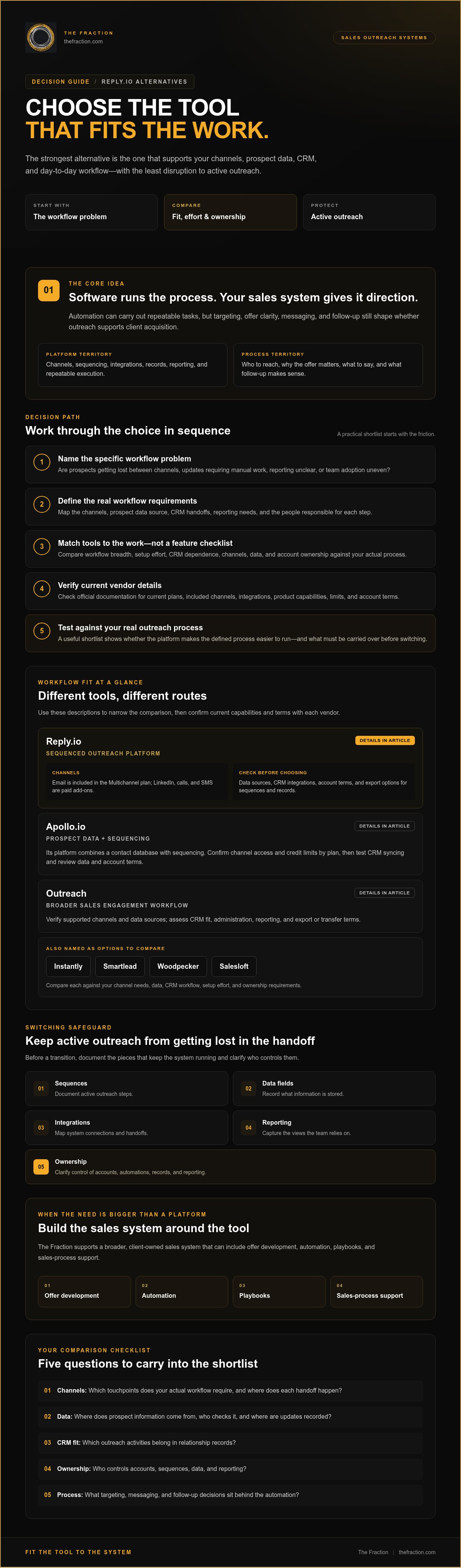
- Protect active outreach by documenting sequences, data fields, integrations, reporting, and ownership before making a transition.
- When you need more than a platform, The Fraction supports a broader, client-owned sales system with offer development, automation, playbooks, and sales-process support.
Why Consider Reply.io Alternatives for Automated Sales Outreach?
Before switching, name the specific workflow problem you want a new tool to solve. Are prospects getting lost between channels? Does reporting leave you unable to see what happened after a message went out? Is your team spending too much time on manual updates? Each issue calls for different requirements. A platform can improve execution, but targeting, offer clarity, messaging, and follow-up still shape whether outreach supports client acquisition.
If you’re building repeatable outreach as a consultant, assess the whole path from finding a prospect to managing the relationship. Consider channel coverage, the source and upkeep of prospect data, CRM connections, and who owns the accounts, automations, and records. Customer relationship management (CRM) provides the broader context: outreach software sits within a system for organizing and managing customer relationships.
What usually prompts teams to look beyond Reply.io?
Teams often compare tools when the current setup makes routine work awkward. A channel may require extra steps, an integration may create manual updates, reporting may not answer useful questions, or adoption may vary across the team. These are workflow considerations, not universal defects in a particular platform. Before shortlisting, compare each vendor’s current plans, included channels, integrations, and product details in its official documentation.
Is a different tool the whole answer?
Software can carry out a process, but it can’t decide who your right-fit prospect is, explain why your offer matters, or determine what a useful follow-up should say. First define the audience, offer, and next step for each prospect. Then evaluate whether the platform makes that process easier to run. For a wider view of the system behind outreach, explore an AI-driven lead generation strategy alongside your software comparison.
An outreach stack is the software, process, and ownership that move a prospect from first contact to a managed relationship. Use this checklist to define what your next tool needs to support:
- Channels: Which touchpoints does your actual workflow require, and where does each handoff happen?
- Data: Where will prospect information come from, who checks it, and where will updates be recorded?
- CRM fit: Which outreach activities need to appear in relationship records?
- Ownership: Who controls accounts, sequences, data, and reporting?
- Process: What targeting, messaging, and follow-up decisions sit behind the automation?
Once those requirements are clear, comparing reply io alternatives for automated sales outreach becomes a decision about fit and workflow, not a search for a universal winner.
Which Reply.io Alternative Fits Your Automated Outreach Workflow?
Think of the options as tools for different routes. Some combine prospecting and sequencing, some focus on email-led outreach, and others may suit sales teams coordinating work through a CRM. Start with the workflow you need to run, use this comparison to narrow the shortlist, then verify current capabilities, plan limits, integrations, and account terms in each vendor’s official documentation.
That’s the practical role of sales automation: software can handle repeatable tasks, while your process determines how those tasks support prospect relationships and client acquisition.
| Option | Potential workflow fit | Channels and data | CRM relationship and ownership |
|---|---|---|---|
| Reply.io | Teams assessing an engagement platform for sequenced outreach. | Email is included in the Multichannel plan; LinkedIn, calls, and SMS are paid add-ons. Confirm current data sources. | Check CRM integrations, account terms, and how sequences and records can be exported. |
| Apollo.io | Teams looking to bring prospect data and sequencing into one platform. | Its platform combines a contact database with sequencing; confirm channel access and credit limits by plan. | Test how prospect records sync with your CRM, and review data and account terms. |
| Outreach | Sales teams evaluating a broader engagement workflow. | Verify supported channels and whether prospect data comes from your CRM or another source. | Assess CRM fit, administration, reporting, and export or transfer terms. |
| Salesloft | Teams comparing sales-engagement options alongside CRM workflows. | Confirm current channel availability, data connections, and plan requirements. | Check integration depth, reporting access, and how account assets are handled. |
| Lemlist | Teams assessing whether its current sequencing approach fits their outreach mix. | Verify channel coverage, data options, and which capabilities sit in each plan. | Test CRM connections and clarify data, sequence, and account portability. |
| Instantly | Email-led outreach teams comparing volume-based workflows. | Plans include unlimited email accounts and warmup; its lead database and CRM are separate products. | Review how separate products connect to your CRM and what account assets you can retain. |
| Smartlead | Email-led teams assessing multi-account sending workflows. | Plans include unlimited email accounts and warmup; verify data sourcing and current plan details. | Confirm integrations, reporting, and export or account-transfer terms. |
| The Fraction | Consultants who need a broader, done-with-you business build-out alongside software selection. | Includes configured automation support. | Clients retain their systems and automation assets. Explore the client-owned sales system approach. |
Which comparison criteria matter beyond feature lists?
Compare more than channel checkboxes. Trace how prospect data enters the system, how activity reaches the CRM, what reports are available, how much administration the setup requires, and whether accounts and assets can be transferred. “The right tool is the one that supports the workflow you need to run, with clear ownership of the data and automation behind it.” Features and plan limits can change, so confirm current terms before committing. A ranking without a clear method and comparable evidence can hide the practical fit questions that matter most.
Use the table to narrow your reply io alternatives for automated sales outreach, then test the finalists against the way you actually prospect and follow up.
Reply.io Alternatives Compared: Software, CRM Workflows, and Outreach Models
A useful comparison separates tools that focus on outreach execution from platforms that combine prospecting data or broader sales workflows in the same environment. The matrix below is an editorial guide to workflow fit, not a controlled performance benchmark. Use each category as a starting point, then verify current product details directly with the vendor.
| Model | Options to assess | Workflow breadth | Configuration and CRM considerations | Ownership to check |
|---|---|---|---|---|
| Engagement and sequencing | Reply.io, Lemlist | May fit teams focused on coordinating outreach sequences; confirm the channels and functions available in the plans under consideration. | Map sequence setup, reporting, and integrations against your current CRM workflow. The more channels and processes you configure, the more important clear administration becomes. | Review who controls accounts, sequences, contact records, and exports. |
| Prospecting plus outreach | Apollo.io | May suit teams that want prospect data and sequencing within a broader platform. Validate each required workflow separately. | Check data sourcing, CRM synchronization, and how records move between systems; broader functionality can mean more settings to manage. | Clarify what happens to data and configured assets if your stack changes. |
| Email-led outreach | Instantly, Smartlead | May suit teams with a clearly defined email workflow and specific sending requirements. | Assess account setup, integrations, reporting, and any separate products needed for data or CRM functions. | Confirm account access, data exports, and portability of campaigns and settings. |
| Sales engagement within a wider sales operation | Outreach, Salesloft | May be relevant for teams coordinating sales engagement with established CRM processes. | Check configuration demands, CRM dependence, reporting, and whether your team needs the broader workflow. | Review contract, account, data, and asset terms with the vendor. |
| Done-with-you sales-system build-out | The Fraction | A broader implementation option for consultants building client-acquisition infrastructure alongside their software choices. | Includes offer development, automation setup, playbooks, and sales-process support. | Clients retain their systems and automation assets. |
When does an all-in-one platform make sense?
A broader platform may appeal when your team wants fewer connected systems and can confirm that the included data, CRM, and outreach workflows match how it works. The trade-off is that more functionality can also mean more configuration than a focused process needs. Check how synchronization works, where prospect data comes from, and which channels are available. Then ask whether consolidating tools simplifies daily work or adds another layer to manage.
When might a specialized outreach tool fit better?
A specialized tool may suit a team with a defined channel strategy and clear execution requirements, such as an email-led workflow. Compare setup effort, administration, integrations, and reporting against those needs. Verify current deliverability and automation features with each vendor, since capabilities and plan limits change. A tool can support a process, but booked calls and revenue depend on the full client-acquisition system around it.
The strongest reply io alternatives for automated sales outreach are the ones that fit the workflow you need to operate, with manageable configuration and ownership terms you understand.
How to Choose and Test a Reply.io Alternative Without Disrupting Outreach
Switching platforms is easier to manage as a staged migration than as a single changeover. Before comparing reply io alternatives for automated sales outreach, document what your current setup supports. Decide what a replacement must preserve, improve, or make easier to manage, and keep active outreach in view throughout the evaluation.
What should you audit before selecting a replacement?
Start with the client-acquisition workflow, because a tool can only support the route you give it. Record who you target, what offer and message they receive, which channels you use, who owns each follow-up, and which systems the process depends on. Separate must-haves from nice-to-haves so an attractive demo doesn’t pull the shortlist away from your actual needs.
- Audience and offer: Capture your audience definition, targeting criteria, and the offer the outreach is meant to communicate.
- Sequences and fields: Document active sequences, message versions, contact fields, and the purpose of each step.
- Connections and reporting: List integrations, CRM dependencies, key reports, and the handoffs between people or systems.
- Access and ownership: Identify who controls accounts, data, automations, and campaign assets.
- Transition terms: Ask each vendor about export options, integration behavior, user access, and data retention before committing.
How can you evaluate a candidate platform responsibly?
Move from inventory to a small, representative test. Use data approved for the evaluation and agree on success criteria in advance. For example, test how a suitable prospect moves from initial outreach through a follow-up and into the CRM. Note where the process is clear, where records fail to sync as expected, and where extra administration is needed.
- Map the workflow: Trace the steps from prospect selection to follow-up, including who acts at each handoff.
- Confirm requirements: Check current vendor documentation for the channels, integrations, permissions, and plan limits you need.
- Set evaluation criteria: Agree on what a successful test means, including usability, accurate data movement, useful reporting, and manageable upkeep.
- Run a controlled test: Use a limited workflow and review results with the people who will operate it.
- Expand deliberately: Resolve issues, document the new process, and then decide whether to move additional outreach.
A controlled workflow test reveals operational fit by showing how the platform handles real handoffs, data, and team routines. That gives you a more useful basis for a careful transition than comparing feature lists alone.
If you’re building the broader client-acquisition process alongside automation, explore a done-with-you system build.
When a Sales System Is the Better Reply.io Alternative: The Fraction's Approach
Sometimes the decision is bigger than choosing another outreach platform. The Fraction provides a done-with-you business build-out for experienced professionals who need their offer, client-acquisition infrastructure, automation, and sales process working together. It isn’t a standalone Reply.io software replacement. It addresses the wider system around the tools you use.
The work includes offer development, client-acquisition infrastructure, configured and trained automation, playbooks, and sales-process support. Documented tools include LinkedIn Sales Navigator targeting and automation setup, while clients retain their systems and automation assets. That ownership can matter if you’re building a repeatable acquisition system you intend to operate and develop over time.
Who benefits from support beyond a software license?
This path may fit experienced professionals who are shaping a defined offer and want a repeatable way to reach and convert suitable clients, with strategic and technical implementation alongside their software. If you need only a specific platform feature, choosing a tool that provides it may be more direct. A broader build-out makes sense when the offer, targeting, automation, and follow-up process need to work as connected parts.
- Offer: Clarify what you sell and why it matters to the audience you serve.
- Acquisition: Build the infrastructure and playbooks that support consistent prospecting and follow-up.
- Implementation: Configure and learn the automation and sales process you’ll use.
What should readers clarify before taking the next step?
Start with readiness. Do you have the capacity to take part in implementation, make decisions about your offer and audience, and operate the resulting system? Then identify the support you want, whether that’s automation setup or a broader build-out connecting market insight, client acquisition, and sales activity. The program includes a custom market-research strategy before payment, with interviews involving 10 industry leaders using a provided framework. This can help you assess the market and clarify fit before deciding.
This is one possible direction among reply io alternatives for automated sales outreach, and it’s most relevant when you need a client-owned system supported through implementation, rather than a software license alone. Compare the scope with your needs and choose the path that matches the work you’re prepared to do.
Choose the Outreach System You Can Build On
The right reply io alternatives for automated sales outreach depend on the work your system needs to support: your channels, prospect data, CRM workflow, and the way your team manages follow-up. Compare platforms against those requirements, then test a small, representative workflow before moving active outreach.
Keep the wider picture in view, too. Software can automate execution, while clear targeting, a compelling offer, and a considered sales process shape how outreach supports client acquisition. If you need help connecting those pieces, The Fraction offers a done-with-you consulting business build-out, with configured automation and systems retained by the client.
Build from a clear map, make the decision that fits your needs, and take the next step with confidence.
Frequently Asked Questions
What are the best Reply.io alternatives for automated sales outreach?
The best option depends on the workflow your team needs to run. Shortlisting reply io alternatives for automated sales outreach could include Apollo.io, Outreach, Salesloft, Lemlist, Instantly, or Smartlead, depending on your channels, data sources, CRM, and team process. Treat that list as a starting point because product features and plan limits can change. Check vendors’ current documentation, then test a suitable option against a small, representative workflow before deciding.
Is Apollo.io a good alternative to Reply.io?
Apollo.io may suit teams that want prospecting data and outreach capabilities in one platform, while Reply.io may fit teams assessing multichannel engagement. The practical difference depends on your required channels, how prospect data enters your workflow, and how each platform connects with your CRM. Compare the tasks your team actually needs to perform, then verify current features, plan terms, and integrations with both vendors before moving active outreach.
Can LinkedIn Sales Navigator replace Reply.io?
LinkedIn Sales Navigator may support prospect research and targeting, but whether it replaces Reply.io depends on the functions your workflow needs. Map your current use of sequencing, follow-up, reporting, and channel coordination, then check which requirements Sales Navigator covers in its current offering. Verify supported functions and permitted workflows directly with the provider. If your process also needs engagement automation or reporting beyond prospecting, you may still need a separate platform or connected system.
How do I choose the right Reply.io alternative?
Choose by mapping the work your team must complete, from defining an audience and sourcing data to messaging prospects, following up, handing records to the CRM, and reviewing reports. Mark essential capabilities separately from convenient features, then compare each vendor against the same criteria. Before expanding adoption, test a representative workflow with clear success measures. This keeps the decision grounded in your operating needs instead of a feature checklist or generic ranking.
What should I check before switching from Reply.io?
Before switching, document active sequences, contact fields, integrations, account access, reporting, and who owns follow-up. Ask both the current and prospective vendors about export options, integration behavior, migration support, access, and data-retention terms. Then test a limited workflow and agree in advance how you’ll assess usability, handoffs, and reporting clarity. A staged review helps uncover operational gaps and shows what must be transferred or rebuilt.
Can I automate sales outreach while staying employed?
It may be possible to build outreach while employed, provided your plan respects workplace policies, confidentiality obligations, and clear boundaries around employer accounts and resources. The Fraction’s documented program supports outreach scheduled for evenings and structures LinkedIn activity to avoid employer conflicts. Your circumstances may differ, so review applicable requirements and keep consulting activity distinct from your employment. Plan the time and follow-up capacity you can genuinely commit before automating the process.
Can The Fraction replace Reply.io?
The Fraction is a done-with-you consulting business build-out, not a standalone software replacement for Reply.io. The work can include offer development, client-acquisition infrastructure, configured automation, playbooks, and sales-process support, so it may fit when you need implementation beyond selecting a platform. Clients retain their systems and automation assets. If you’re considering this broader approach, clarify your readiness, available capacity, and support needs, then confirm the current program scope before deciding.
Ready to connect your offer, outreach automation, and sales process into a client-owned system? Explore The Fraction’s executive program.


