

Some prospecting tools publish their prices, while others disclose them only in a sales conversation. When comparing Lusha alternatives for independent consultant prospecting, look beyond the visible price: you also need data that fits your market and a process that matches how you find clients.
And that’s where the choice can get a little tangled, because a clear price tells you what you’ll pay, while the contact records still need to point toward the people you want to reach. You’re right to weigh both before committing, so you can choose with your eyes open rather than chasing a polished feature list.
This guide compares prospecting tools on pricing transparency, database fit, and data quality, then shows how to assess them against the accounts you want to win. It also explains when one provider can cover your workflow and when combining tools may be useful.
Key Takeaways
- Choose one data provider when it covers your target market and workflow; add another only when it fills a clear gap.
- Compare the relevance and usability of contact data, not just the size of a provider’s database.
- Assess pricing transparency alongside what each plan includes, so the apparent cost reflects the prospecting work you need done.
- For cold email, consider how well each tool supports your full process, from finding suitable prospects to reaching them.
- When choosing tools still leaves client acquisition feeling fragmented, The Fraction’s automated and AI lead generation systems can help build a more cohesive approach.
Choosing between a single B2B data source and multiple providers
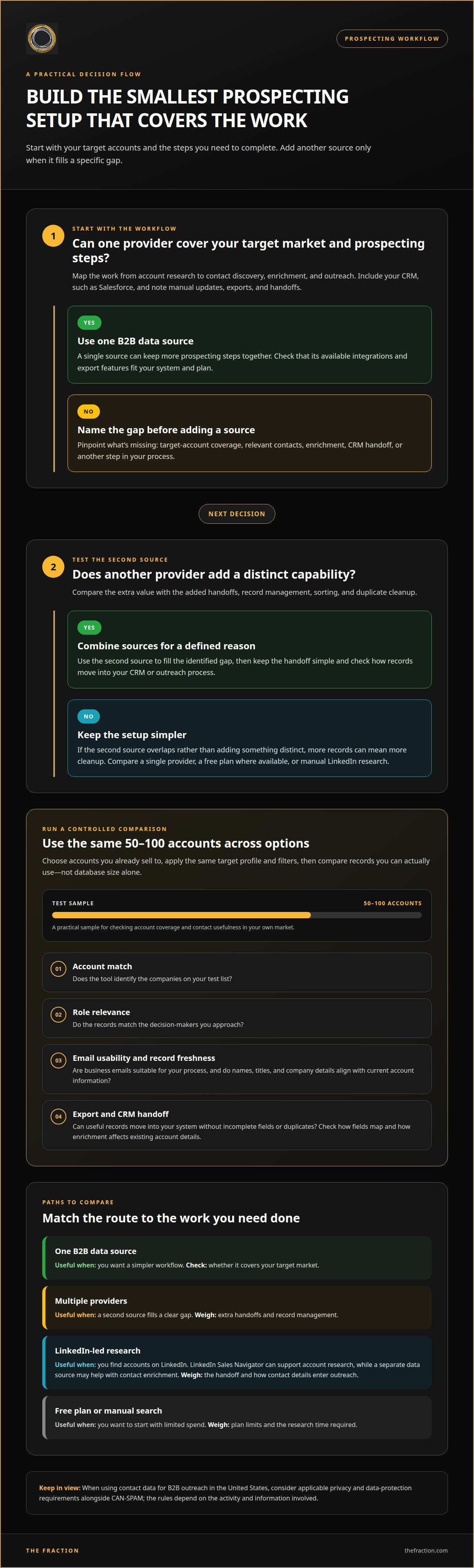
One provider may keep prospecting steps together, while another can fill a specific gap. Start with the work you need done, then build your setup around it.
For CRM integrations and exports, compare options such as Apollo, ZoomInfo, Cognism, RocketReach, and Lusha against your preferred system; available connections and export features vary by product and plan. In the United States, consider applicable privacy and data-protection requirements alongside CAN-SPAM when using contact data for B2B outreach, because the rules depend on the activity and information involved.
For a lower-cost start, explore free plans where available or research prospects manually on LinkedIn. Use the same target profile for each method, then compare the time required and the useful contact details you find.
Prospecting Workflow Fit
Map your process from account research to contact discovery, enrichment, and outreach, then identify where each provider fits. One source may cover several steps; two sources may split the work and add a handoff. If Salesforce is part of your process, include it in the map and count the manual updates each option requires.
Before adding a provider, define the gap it should fill. A second source makes sense when it adds a distinct capability; overlapping records can mean more sorting and duplicate cleanup.
LinkedIn Prospecting Alternatives
If you identify accounts on LinkedIn, compare how easily each tool moves you from a company profile to contact review and outreach. LinkedIn Sales Navigator can support account research, while a separate data source may help with contact enrichment. Combining them can add steps, so keep the handoff simple.
For a practical comparison, choose 50 to 100 accounts you already sell to and test the same profile across your options. Note which accounts and roles appear, then compare the records you can actually use.
| Option | Useful when | Trade-off to weigh |
|---|---|---|
| One B2B data source | You want a simpler workflow | Whether it covers your target market |
| Multiple providers | A second source fills a clear gap | Extra handoffs and record management |
| LinkedIn-led research | You find accounts on LinkedIn | How contact details enter outreach |
| Free plan or manual search | You want to start with limited spend | Plan limits and research time |
Choose the simplest setup that supports your target accounts and next steps. Add another provider only when it brings something distinct.
Database size and email accuracy
A large database may look comprehensive, but independent consultants need the contacts who match their target market. Compare Lusha, Cognism, Apollo, and ZoomInfo against the companies and roles you actually pursue, and evaluate the records returned, not just the database size. A broad platform can still miss a niche industry, a particular seniority level, or the right geography.
Use a controlled test before deciding. Select 50 to 100 accounts you already sell to, search each provider for relevant contacts, and compare the results using the same criteria. This gives you a practical view of account coverage and email usefulness for your own market, rather than a general promise that may reflect a different customer base.
- Account match: Does the platform identify the companies on your test list?
- Role relevance: Do the records match the decision-makers you approach?
- Email usability: Are business emails present and suitable for your outreach process?
- Record freshness: Do names, titles, and company details align with current account information?
- Export quality: Can you move useful records into your CRM without creating duplicate or incomplete entries?
Keep the comparison consistent: use the same account names, job functions, and geographic filters in each database. For example, if you serve finance leaders at US software companies, search that profile across Lusha, Cognism, Apollo, and ZoomInfo. Track missing contacts, mismatched roles, and unusable emails separately, since each affects your prospecting differently.
Then assess the workflow around the data. A native CRM connection may reduce manual entry, while a CSV export may suit a consultant who reviews every contact before outreach. Salesforce users should check how fields map, whether duplicate records appear, and how enrichment affects existing account details. A smooth handoff matters only if the records stay clear and actionable.
For independent consultants, the best source is the one that reliably serves a defined target market and supports a manageable review process. If testing reveals a coverage gap, a second provider may help. If it returns overlapping records, more database access can mean more cleanup. Assess email accuracy against your own sample and use the contact-level results to guide your decision.
Prospecting tools for independent and small-team users
A prospecting platform should fit the work you can manage alongside client delivery. Compare Lusha, RocketReach, Apollo, and Cognism by the steps they support, the records you can use, and the effort it takes to turn research into relevant conversations. A tool that fits your routine matters more than a longer feature list.
Start with a specific task, such as finding operations leaders at consulting firms in your target market. Assess each platform against that task instead of comparing every feature at once. A focused shortlist can show whether you need contact discovery, company research, data enrichment, or a simpler way to organize outreach.
- Contact research: Check whether RocketReach, Apollo, or another candidate returns useful records for your target roles.
- Verified details: Look for clear ways to assess email status and distinguish current contact information from older records.
- Browser access: If you research prospects on LinkedIn, see whether the provider offers an extension or Chrome extension that fits your workflow.
- Usage limits: Compare what a free plan includes, how credit is used, and which actions consume it.
- Follow-through: Map how each tool moves a prospect from discovery into your CRM or outreach process.
A Chrome extension can reduce tab switching during LinkedIn research, but the key test is what it returns and how you can use the details. Open a relevant company profile, identify a suitable role, and see whether the extension provides enough information for a considered next step. Compare that process with searching the same account directly in RocketReach or another database.
Signals can help prioritize accounts when they relate to your consulting offer. A hiring announcement, leadership change, or company expansion may be a reason to research an account more closely. Treat each signal as a prompt for human review, then connect the prospect’s situation to a specific business problem you can solve.
For a solo practice, a free plan can support initial research, while a paid plan may be relevant when regular prospecting requires more credits or exports. Compare the full workflow, including research time, record review, and follow-up, rather than judging a tool by its entry-level plan. A small team should also decide who handles duplicate cleanup and CRM updates.
Choose the tool that makes your next useful action clear: identify the right account, find an appropriate contact, and prepare relevant outreach. If a platform needs extensive customization before those steps connect, its apparent convenience may disappear in daily use.
Alternatives for individual consultants and small teams
A solo consultant needs a source that fits a defined market, a repeatable outreach routine, and the time available to review records. Compare Apollo.io, ZoomInfo, Cognism, RocketReach, and Lusha against those requirements, not just database counts.
Compare all five using the same target accounts, contact roles, geographic coverage, and export needs. Each tool’s practical value depends on how well it serves your market and fits your workflow, so begin with the work you need it to do.
| Provider | Solo-consultant comparison lens | What to assess |
|---|---|---|
| Apollo.io | Fit with your prospect research and outreach steps | Relevant records, usage limits, and handoffs |
| ZoomInfo | Coverage of your target companies and roles | Account matches, exports, and CRM workflow |
| Cognism | Contact relevance for your chosen market | Role accuracy and useful records |
| RocketReach | Contact discovery for named prospects | Email details and review effort |
| Lusha | Fit against the same requirements as alternatives | Coverage, record quality, and workflow |
This comparison won’t identify a universal winner, but it can show which provider merits a closer look for your target market. If outreach starts with LinkedIn research, prioritize a clear path from profile discovery to contact review. If you work from a HubSpot pipeline, assess how records enter your CRM and how duplicate entries are handled.
Use a consistent evaluation process. First, define your buyer profile, such as finance leaders at US software companies. Select accounts that represent that market and search each provider using the same filters. Then record relevant contacts, missing roles, mismatched company details, and the work needed to prepare each record for outreach.
- Coverage: Compare whether each source returns suitable accounts and contacts.
- Record usefulness: Separate current, relevant details from incomplete or mismatched entries.
- Workflow: Map exports, CRM entry, and review steps before committing.
- Practical fit: Weigh the records you can use against the time required to manage them.
For a small team, assign someone to review contacts and update HubSpot or another CRM before outreach begins. This keeps source records, CRM entries, and follow-up activity aligned instead of creating parallel lists that drift apart. The most useful alternative is the one that supports your actual process and offers coverage and record quality you can assess against your market.
Comparing prospecting tools for cold email
Cold email involves a series of decisions: find the right account, identify a relevant contact, prepare a useful message, and manage follow-up. Compare Apollo, ZoomInfo, Cognism, RocketReach, and Lusha by how each fits that process, rather than treating a contact database as a complete pipeline.
Start by defining the prospects your offer serves, such as US finance leaders at software companies or operations executives at professional services firms. Compare each tool’s records against those profiles and note whether the contact details support your intended outreach. Phone numbers may suit another channel, while email fields matter more for cold email.
Before exporting records, decide which fields your pipeline needs. A practical list might include company, contact name, role, business email, source, and a short reason for reaching out. Keep the export focused: extra fields add review work, while missing context can make a message feel generic. Check how the tool transfers records into your CRM before building a large list.
- Relevance: Does the contact’s role connect to the problem your offer addresses?
- Context: Can you explain why this specific company belongs in your outreach?
- Record review: Can you inspect email details and source information before sending?
- Handoff: Does the export preserve the fields your CRM and follow-up process use?
- Channel fit: Do phone numbers support a separate call process, or do they add clutter to email-focused work?
For example, a consultant targeting finance leaders could search the same companies in Apollo and ZoomInfo, then review relevant contacts before exporting. If the records include names but little role context, more research is needed before writing a meaningful message. If one source provides better account context and another adds useful contact details, combining them may help, provided the handoff is manageable.
Include US coverage in your evaluation. If you prospect nationally, check whether each provider returns suitable companies and contacts for your target market instead of assuming coverage is consistent across industries and company types. Compare the same profile and fields across tools, and note where each source supports your process or leaves research gaps.
Finally, separate tool performance from message performance. A clean contact record can help you reach the right person, but your email still needs a clear reason, a relevant point, and a credible next step. Review the source, tailor the message, and track replies in one pipeline to see whether the constraint is contact selection or the outreach itself.
The Fraction: Automated & AI lead generation systems
The Fraction helps independent consultants connect prospecting with a clearer path to winning clients through automated and AI-driven lead generation systems. A database can provide contact records, but a sustainable acquisition process also needs an offer that speaks to the right buyer and a natural way to start sales conversations.
Consider this approach when your tools support research and outreach, but the steps from first contact to winning a client still feel disconnected. The Fraction helps develop a compelling offer and service designed to win clients quickly, along with a sales process that doesn’t feel like selling. This gives prospecting a more deliberate structure instead of asking each tool to carry the entire process.
Turn your comparison into a focused prospecting plan
The right Lusha alternatives for independent consultant prospecting are the ones that support how you want to build client relationships. Make your next step practical: define your target buyer, choose a prospecting rhythm you can sustain, and decide what a useful conversation should lead to. Give every tool a clear role rather than letting it dictate your approach.
Then connect prospecting to the wider business: a strong client pathway begins with a clear reason for the right person to engage. If your research generates activity but your next steps feel scattered, The Fraction can help you assess where to focus and what to refine.
With a clear direction and a process built around your expertise, you can create momentum one considered conversation at a time.
Frequently Asked Questions
Do any Lusha alternatives offer transparent public pricing?
Yes. Some prospecting tools publish plan details, while others share pricing through a sales conversation. The best Lusha alternatives for independent consultant prospecting make it easier to compare included features, contact or credit limits, and whether exports or CRM connections require a different tier. A visible starting price is only part of the picture, so compare the plan’s actual limits with your research and outreach needs.
Which prospecting tools offer accurate US business emails and direct-dial phone numbers?
No provider can ensure that every email address or direct-dial number for a US contact is current. Apollo, Cognism, Lusha, RocketReach, and ZoomInfo are tools consultants can compare, but record quality varies by person, role, and company. For each prospect, check whether the record distinguishes business contact details from other numbers and whether the email status has a clear, usable label.
What data coverage and accuracy do prospecting tools offer for small businesses and niche industries?
Coverage can vary by company size, industry, and how clearly a business’s roles appear in available records. A small specialist firm, for example, may use titles that differ from standard corporate job categories, so a narrow title search could miss suitable contacts. Compare several representative account types and role variations, then note where each platform returns relevant people or incomplete company profiles.
How can an independent consultant evaluate and choose a Lusha alternative on a limited budget?
Compare Lusha alternatives for independent consultant prospecting by starting with the task that matters most, such as finding qualified finance contacts or building a focused email list. Review any free plan’s usage limits, then prioritize the feature that addresses your main bottleneck. Track credit use and the time spent preparing records, so your decision reflects practical value rather than the number of features on a plan page.


